
Golf Simulator Accessories: What's Worth Buying and What's a Waste of Money

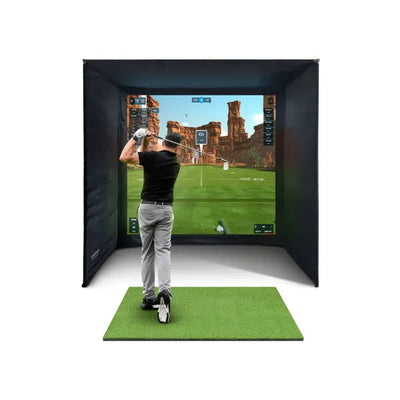

You've bought the launch monitor. You've got the enclosure and the mat. The bundle is ordered, the room is cleared, and you're feeling good about the decision. Then you start looking at accessories.
And suddenly the list grows. Projector mounts. HDMI cables. Surge protectors. Side nets. Foam balls. LED light strips. Putting simulators. Dehumidifiers. Carrying cases. "Simulator-optimised" PCs that cost twice what a normal gaming PC does. Each one seems reasonable on its own. Together, they can add £1,000+ to your total spend before you've hit a single ball.
Here's the thing: some of these accessories are genuinely essential. Your simulator literally won't work without them. Others are smart additions that improve the experience in meaningful ways. And a fair few are marketing nonsense — the same product you'd buy anywhere else, repackaged with "golf simulator" in the title and a 40% markup.
This guide sorts them into three clear categories: essential (buy these, no question), worth considering (genuine improvements, but not urgent), and skip these (save your money). Every price is in GBP, every recommendation is honest, and nothing here is padded to sell you things you don't need.
The Essential Accessories: Buy These Without Hesitation

These aren't optional extras. They're the components that sit between "I own a launch monitor and an enclosure" and "I have a functioning golf simulator." Without them, your setup doesn't work — or works so poorly you'll wish it didn't.
Projector — £300 to £1,500
The single most important accessory you'll buy. The projector transforms your setup from a data readout on a laptop screen into an immersive visual experience. It's the difference between staring at numbers and feeling like you're standing on the 18th at St Andrews.
What to look for:
- Throw ratio: Short-throw (0.5:1 to 1.0:1) is ideal for rooms where the projector sits close to the screen. Standard throw works if you have 2.5-3m of depth behind the screen
- Resolution: 1080p is the minimum. 4K is lovely but doubles the price and your simulator software may not output 4K anyway
- Brightness: 3,000+ lumens for a room with ambient light. 2,000 lumens is fine for a blacked-out room
- Input lag: Under 30ms. You want the ball flight to appear instantly after impact. Gaming projectors prioritise low input lag — look for "game mode" in the specs
- Lamp life: LED/laser projectors last 20,000+ hours. Traditional lamp projectors last 3,000-5,000 hours and need £100-£200 replacement bulbs
Budget pick (£300-£500): BenQ TH671ST or Optoma HD146X. Both 1080p, low input lag, widely used in UK simulator setups.
Mid-range pick (£600-£900): BenQ TH685P or Optoma GT1080HDR. Better brightness, lower input lag, and the Optoma is genuinely short-throw.
Premium pick (£1,000-£1,500): BenQ X3100i or Optoma UHZ35ST. 4K, laser light source, extremely low input lag. The best visual experience money buys.
The key specs are throw ratio (matched to your room depth), input lag (under 30ms), and brightness (matched to your room lighting). Everything else is secondary. For a deeper dive into projector selection and mounting, our complete projector guide covers every detail.
Gaming PC or Laptop — £600 to £1,200
Something needs to run the simulator software that connects your launch monitor to your projector. That something is a PC — and you may already own one that works perfectly.
Minimum specs for smooth performance:
- Processor: Intel i5-12400 / AMD Ryzen 5 5600 or better
- Graphics card: NVIDIA GTX 1660 Super / RTX 3060 or better
- RAM: 16GB
- Storage: 512GB SSD
Before you buy: Check what you already have. A gaming PC from the last 4-5 years almost certainly meets these specs. A work laptop with a dedicated GPU might work too. Fire up the simulator software's free demo and see how it runs before spending money on new hardware.
If you need to buy: A pre-built gaming desktop from CyberPower, AWD-IT, or a refurbished workstation with a GPU upgrade will cost £600-£900 and run every major simulator software (GSPro, E6 Connect, Awesome Golf) at high settings. You don't need a £2,000 machine — more on this in the "Skip These" section.
Projector Ceiling Mount — £20 to £50
One of the most underrated accessories, mostly because it's boring. A universal ceiling mount gets the projector out of the ball flight path, locks the image alignment permanently (no more re-adjusting every session), and minimises keystone distortion. Total cost: under £50. Total improvement: enormous.
HDMI Cable (Long Run) — £15 to £30
Your PC connects to your ceiling-mounted projector, so you need a longer cable than the 1m one in the box. Measure the actual run (wall, ceiling, across to projector), add 1m for slack. Most setups need 5-10m.
For runs under 7m, a standard HDMI 2.0 cable works. Over 7m, get a fibre-optic HDMI cable (£25-£40) to avoid signal degradation. 18Gbps speed is enough for 1080p at 60Hz, which is what most simulator setups run. Don't buy anything marketed as "premium" or "gold-plated" — HDMI is digital, and a £15 cable carries the identical signal. For cable management tips, our room design guide has practical advice.
Surge-Protected Power Strip — £20 to £40
Your simulator room has multiple devices drawing power. A surge-protected power strip provides enough sockets and protects your electronics from power surges that can fry a projector or PC in milliseconds.
Look for 2,000+ joules of surge protection with at least 6 outlets. Belkin, APC, and Masterplug all make reliable options. Don't use a cheap multi-plug adapter from a pound shop — they don't have surge protection, they're not rated for continuous loads, and plugging £1,000+ of electronics into a £3 adapter is a false economy.
Essential accessories total: £455 to £1,820
Realistically, most people land at £500-£700 for the essentials (mid-range projector, existing PC, ceiling mount, HDMI cable, surge protector). If you need a PC, add £600-£900.
These are non-negotiable costs. Budget for them from the start. A Mevo Gen 2 bundle at £2,498 plus essentials is approximately £3,000-£3,200. A GC3S bundle at £4,988 is around £5,500-£5,700 all-in. Our full UK costs breakdown covers every line item.
Worth Considering: Genuine Improvements That Aren't Urgent

These accessories won't make or break your simulator, but each one addresses a real need. Buy them when the budget allows, not because someone told you they're mandatory.
ExPutt Putting Simulator — £329
Here's a truth most simulator marketing glosses over: standard golf simulators are terrible for putting practice. Putting accounts for 40% of your strokes, yet a typical simulator setup provides zero putting feedback. The ball doesn't roll on carpet or turf the way it rolls on a real green.
The ExPutt RG (£329) solves this completely. It uses a camera system to track your ball on a real putting mat, then projects the putt onto your screen. It reads speed, line, and break with instant visual feedback. It's the single most effective way to practise putting indoors.
If improving your handicap is the goal, a 10% improvement in putting saves more strokes than a 10% improvement in driving distance. This is arguably the best-value accessory in the entire guide.
Side Barrier Nets — £30 to £80
Your enclosure catches shots that hit the impact screen. But what about the shanked iron or topped driver that goes sideways — into a wall, a window, or your projector?
Side barrier nets are cheap (£30-£80 for a pair), easy to install, and save expensive repairs. Particularly worthwhile if beginners or children will use the simulator, your room has windows or fragile surfaces, or your enclosure is on the smaller end. Check our practice nets range for options that work with simulator enclosures.
Foam Practice Balls — £10 to £15 for a Dozen
Not for use with the simulator — your launch monitor needs real balls for data. Foam balls are for warming up before sessions, letting beginners get comfortable swinging in an enclosed space, and practising swing changes without needing ball flight data. Cheap, useful, takes up no space.
Upgraded Hitting Mat — £100 to £300
Every OpenGolfer bundle includes a hitting mat, and the bundled mat is adequate for the first year or more. But mats are consumable — they wear down with repeated impact. When yours shows compressed fibres or thin patches, it's time for a replacement.
Worth considering sooner if you play daily (accelerated wear), want a more realistic feel from multi-layer construction, or experience joint discomfort (thicker mats reduce impact on wrists and elbows). Look for mats with replaceable inserts, a non-slip base, and at least 30mm turf depth. Our hitting mat guide covers materials, sizing, and durability in detail.
Ambient Lighting Kit — £30 to £60
LED strip lighting behind the impact screen or around the room perimeter transforms a dark garage into something that feels intentional and finished. A basic LED strip (5m, RGBW, remote-controlled) costs £20-£40. Smart strips (Philips Hue, Govee) cost £40-£60.
Tip: Place strips behind the impact screen frame pointing at the wall, not towards you. This creates soft backlight that reduces eye strain from the projector and makes the image appear more vivid. Our complete lighting guide covers ambient and projector-friendly setups in detail.
Worth considering total: £200 to £475
The ExPutt and side nets are the highest-value items. LED lighting is the cheapest and most satisfying instant upgrade. Add them over time as you identify what your setup is missing.
Skip These: Save Your Money

These products aren't necessarily bad. The problem is they're marketed to golf simulator buyers at inflated prices, they solve problems that don't exist, or they're upgrades you don't need yet.
"Simulator-Specific" Gaming PCs — £1,500 to £3,000+
This is the biggest waste of money in the simulator accessories market.
Companies sell pre-built PCs with names like "SimPC Pro" for £1,500-£3,000. Inside? An Intel i7, RTX 4060, 32GB RAM. Perfectly capable hardware — that you can buy in a standard gaming PC for £700-£1,000. The "simulator-specific" branding adds zero performance. The software doesn't run differently. There is no secret optimisation. You're paying £500-£1,500 for a sticker.
What to do instead: Buy a standard gaming PC from CyberPower UK, AWD-IT, Scan, or Overclockers for £600-£900. Or buy a refurbished workstation for £200-£300 and add a GPU. Or use the gaming PC you already own. Identical performance, fraction of the price.
Premium "Audiophile" HDMI Cables — £40 to £100+
HDMI carries a digital signal. It either arrives intact or it doesn't. A £15 Amazon Basics cable transmits the exact same pixels as a £80 cable with gold-plated connectors and oxygen-free copper. This isn't opinion — it's physics. Digital signal transmission is binary.
The one exception: For runs over 10m, a fibre-optic HDMI cable (£25-£40) is a genuine upgrade over copper at long distances. But that's a £30 cable, not a £100 "premium" one.
"Golf Simulator" Branded Dehumidifiers — £80 to £200
If your simulator is in a garage or outbuilding, you may genuinely need a dehumidifier. Moisture damages electronics and encourages mould. But you don't need a "golf simulator dehumidifier" — you need a dehumidifier. The ones marketed to simulator owners at £150-£200 are the same appliances available from Argos for £40-£80. They don't remove moisture more effectively because they have "sim" in the product name.
Buy a standard compressor dehumidifier rated for 10-20m² with a continuous drain option. Pro Breeze, Meaco, and EcoAir all make solid options under £80. Our environment guide covers humidity and temperature management.
Simulator-Specific Carrying Cases — £50 to £150
Your launch monitor sits in the same spot in your simulator room. It doesn't travel. It doesn't get thrown in a car boot. A carrying case is solving a problem that doesn't exist for a home setup.
If you do plan to use the monitor outdoors at the range or on the course, a generic padded electronics case from Amazon (£15-£25) provides the same protection as a £100 branded one.
Multiple Upgrades Before Mastering What You Have
Camera module upgrades, sensor add-ons, and expanded data packages have genuine value — for the right golfer at the right time. The wrong time is three weeks into ownership when you're still learning the software and haven't established a baseline.
The rule: Spend six months with your current setup before buying any upgrades. Master the data you have. Identify specific gaps. Then spend money on additional capabilities. You'll make smarter decisions and avoid buying features you never use.
Budget Planning: The Realistic Numbers

Here's how the accessory budget actually breaks down for a typical UK home simulator.
Tier 1: Essential Extras (£400-£700)
| Item | Budget Pick | Mid-Range Pick |
|---|---|---|
| Projector | £350 | £650 |
| Projector ceiling mount | £25 | £40 |
| HDMI cable (5-10m) | £15 | £25 |
| Surge-protected power strip | £20 | £35 |
| Total | £410 | £750 |
Add £600-£900 if you need a gaming PC.
Tier 2: Nice-to-Have Upgrades (£200-£400)
| Item | Price | When to Buy |
|---|---|---|
| ExPutt putting simulator | £329 | When you realise your putting game is being ignored |
| Side barrier nets | £30-£80 | Immediately if beginners will use the setup |
| Foam practice balls | £10-£15 | Anytime |
| LED ambient lighting | £30-£60 | When you want the room to feel finished |
| Upgraded hitting mat | £100-£300 | When the bundled mat shows wear (12-18 months) |
Tier 3: Premium Extras (£300-£700)
| Item | Price | Why |
|---|---|---|
| 4K projector upgrade | £800-£1,500 | Best visual experience, only if PC and software support 4K |
| Premium hitting mat | £250-£400 | Tour-level feel, replaceable inserts |
| Sound system / soundbar | £50-£150 | Immersive audio for course flyovers and impact sounds |
| Launch monitor upgrades | £200-£500 | Only after 6+ months when you know what data you need |
Five Mistakes That Cost Simulator Owners Money
1. Buying everything at once. Buy the essentials on day one, then wait a month. Use the simulator. Discover what's actually missing through experience, not shopping lists.
2. Matching brand to brand. You don't need a Foresight-branded projector mount or a FlightScope-approved PC. It's generic hardware. Buy the best product in each category regardless of brand.
3. Prioritising visuals over fundamentals. Spending £1,500 on a 4K projector while using a worn-out mat is backwards. The mat is what your club strikes. The screen catches the ball. The projector just displays an image. Get the fundamentals right first.
4. Ignoring room environment. A premium dehumidifier is pointless if your garage is 5°C in January and your fingers are too cold to grip the club. A basic fan heater (£20-£30) that makes the room usable matters more than any accessory. Solve temperature and comfort before aesthetics. Our sound and environment guide covers insulation, heating, and noise control.
5. Upgrading too early. Resist upgrades for the first six months. Your bundled mat, entry-level projector, and existing PC all work. They're doing the job while you learn the software, establish your baseline, and figure out what actually matters to you. The upgrade will still be there in six months — and you'll make a much smarter purchase.
The Complete Accessory Checklist
Essential (buy with your simulator):
- Projector — £350-£700
- Gaming PC (if needed) — £600-£900
- Projector ceiling mount — £25-£40
- HDMI cable (correct length) — £15-£25
- Surge-protected power strip — £20-£35
Recommended (first 3 months):
- Side barrier nets — £30-£80
- Foam practice balls — £10-£15
- Phone tripod for swing recording — £15-£20
- Alignment sticks — £10
Worth adding (3-12 months):
- ExPutt putting simulator — £329
- LED ambient lighting — £30-£60
- Sound system — £50-£150
Replace when worn (12-24 months):
- Hitting mat upgrade — £100-£300
- Impact screen replacement — £80-£200
Skip entirely:
- "Simulator-specific" PCs — use a regular gaming PC
- Premium HDMI cables — basic ones are identical
- "Golf simulator" dehumidifiers — buy a regular one
- Branded carrying cases — your monitor stays in the room
- Expensive custom flooring — basic rubber mats work fine
Final Thoughts: Spend Smart, Not More
A realistic accessories budget is £400-£700 on top of your simulator bundle for the essentials, with another £200-£400 spread over the first year for nice-to-have upgrades. That puts your total investment at:
- Entry-level: Mevo Gen 2 bundle (£2,498) + essentials (£500) + nice-to-haves (£300) = approximately £3,300
- Mid-range: GC3S bundle (£4,988) + essentials (£600) + nice-to-haves (£350) = approximately £5,940
- All bundles: Browse the full range to find the right starting point
That's a complete home golf simulator with everything you need and nothing you don't. No overpriced branded cables, no unnecessary carrying cases, no £2,000 PC doing the same job as a £700 one.
If you're still in the research phase, our complete buying guide covers every simulator option, our full UK costs breakdown gives you the complete financial picture, and our impact screen guide has screen and enclosure recommendations.
Spend smart. Buy what matters. Skip what doesn't. And then go hit some golf balls — that's the whole point, after all.

Free Home Golf Simulator Design Consultation
Not sure on space, screen or launch monitor? Chat directly with Tom, OpenGolfer’s founder — he has designed hundreds of home setups and will tell you exactly what fits your room and budget.
- Send your room size (or a photo) — get a tailored layout and spec for your space, ceiling height included
- Personal replies from a real golfer, not a call centre
- Honest advice on what to buy — and what not to
Usually replies within the hour, 8am–8pm · prefer to talk? 02033 768500



Leave a comment