
Best Golf Impact Screens UK: Materials, Sizing & Recommendations (2026)

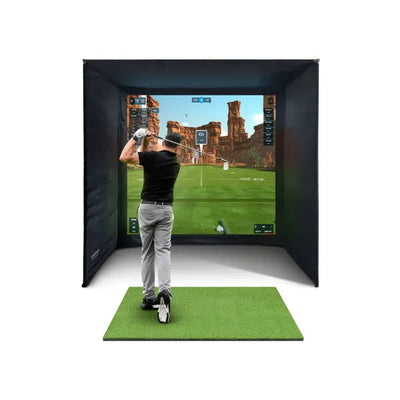

The impact screen is the most visible and most physically abused component in any golf simulator. Every session, it absorbs hundreds of full-speed ball strikes while simultaneously serving as your projection surface. Get the screen right and your simulator looks sharp, sounds solid, and lasts for years. Get it wrong and you'll be dealing with blurry projections, excessive ball bounce-back, and a replacement bill you didn't budget for.
If you've read our impact screens and enclosures overview, you already know the basics. This article goes significantly deeper on screens specifically: the material science behind different fabrics, how construction methods affect performance, sizing and aspect ratios, grommet versus channel fixing systems, proper tensioning techniques, and an honest assessment of every screen available in the UK market.
How an Impact Screen Works
An impact screen solves two contradictory engineering problems at once.
Problem one: energy absorption. A golf ball struck with a driver leaves the clubface at 130-170 mph (210-275 km/h), carrying roughly 100 joules of kinetic energy. The screen must absorb that energy over a controlled deceleration distance (typically 5-20 cm of deflection) without tearing the fabric or bouncing the ball dangerously back towards the golfer.
Problem two: projection quality. The same surface needs to reflect projector light evenly, without hotspots, colour distortion, or visible fabric texture. It needs to be white or near-white, smooth enough for a clear image, and flat enough that the projected picture doesn't warp.
These demands pull in opposite directions. A screen that's extremely tough tends to be thick and textured, which scatters light. A screen optimised for projection tends to be thinner and more fragile. The best screens find the optimal balance between these two requirements.
Screen Materials: A Deep Dive

Every impact screen falls into one of three material categories, each with distinct strengths and trade-offs.
Knitted Polyester
Knitted screens use interlocking loops of industrial-grade polyester yarn. The loop structure gives them their defining characteristic: stretch. When a ball hits, the loops deform around the impact point, spreading energy across a wider area and over a longer deceleration distance. This produces a softer catch with less bounce-back and lower impact noise.
- Advantages: Quieter ball catch, less bounce-back, more forgiving mounting, longer life in the centre strike zone
- Trade-offs: Slightly softer projected image due to loop texture, more susceptible to sagging, needs tension adjustment every 2-3 months
- Best for: Terraced houses or rooms with shared walls where impact noise matters, and families with junior players where minimising bounce-back is a safety priority
Woven Polyester/Nylon
Woven screens use threads crossing at right angles (warp and weft), creating a tighter, more rigid fabric. The tighter weave creates a smoother surface that reflects projector light more evenly. However, the reduced stretch means the screen decelerates the ball more abruptly, producing a louder impact sound and slightly more bounce-back.
- Advantages: Sharper projected image, better dimensional stability, more consistent tension between adjustments
- Trade-offs: Louder impact sound, more bounce-back, less tolerant of overtensioning
- Best for: Simulators where projection quality is the top priority, in garages or outbuildings where noise isn't a concern
Multi-Layer (Baffle) Construction
The best screens aren't a single layer. They're multi-layer constructions — typically two to four layers of different materials laminated or stitched together:
- Front layer: Smooth white woven polyester optimised for light reflection and image clarity
- Middle layer(s): Dense fabric that does the heavy lifting of decelerating the ball
- Rear layer: Reinforcing layer that prevents tearing through mounting points
The SimSpace Platinum triple-layer impact screen — included as standard in every OpenGolfer bundle — uses this approach. The white front surface is optimised for short-throw projectors, the middle layer handles energy absorption across all club-head speeds, and the third layer reinforces the grommet zones where stress concentrates.
Multi-layer screens are heavier (typically 400-700 g/m² versus 200-350 g/m² for single-layer), requiring sturdier mounting, but the combined performance benefits are worth the trade.
Screen Weight: What the Numbers Mean
Weight in grams per square metre (GSM) is the most useful indicator of durability and energy-absorption capability.
| GSM Range | Classification | Typical Use | Durability |
|---|---|---|---|
| 150-250 | Lightweight | Practice nets, non-projection setups | 1-2 years |
| 250-400 | Mid-weight | Home simulators, casual use | 2-4 years |
| 400-600 | Heavy-weight | Serious home builds, frequent use | 3-5 years |
| 600+ | Commercial | Commercial bays, high-traffic setups | 5+ years |
Higher GSM doesn't automatically mean better. Beyond 600 g/m², additional weight adds diminishing durability returns while increasing frame load and reducing projection brightness. The sweet spot for most UK home simulators is 350-550 g/m².
Sizing and Aspect Ratios

16:9 (widescreen) matches the native aspect ratio of most projectors and simulation software — the most common and natural-looking choice. 4:3 (standard) offers more vertical coverage, useful for seeing high lob shots. Custom/oversized screens are cut to fit common enclosure frames regardless of aspect ratio — the projector maps its 16:9 image onto part of the surface while the surrounding fabric catches mis-hits.
For most builds, choose a screen at least 30 cm wider and 30 cm taller than your projected image area.
| Room Width | Screen Width | Screen Height | Projected Image (16:9) |
|---|---|---|---|
| 2.7-3.0 m | 2.5 m (8 ft) | 2.0 m (6.5 ft) | 2.2 m x 1.2 m |
| 3.0-3.5 m | 3.0 m (10 ft) | 2.3 m (7.5 ft) | 2.7 m x 1.5 m |
| 3.5-4.0 m | 3.5 m (11.5 ft) | 2.5 m (8 ft) | 3.2 m x 1.8 m |
| 4.0 m+ | 4.0 m+ (13 ft+) | 2.5-2.7 m | 3.5 m x 2.0 m |
These assume 15-20 cm clearance between screen edges and walls. For detailed room planning, see our size and space guide.
Mounting: Grommet vs Channel
Grommet and Bungee
Metal grommets punched into the screen edges at 15-25 cm intervals, with bungee cords hooking onto the frame. This is the standard for most home enclosures.
- Pros: Easy to install, adjustable tension per grommet, simple screen replacement, forgives slight sizing mismatches
- Cons: Stress concentrates at grommet points (the most common failure point), can create slight edge scalloping, bungees lose elasticity after 12-18 months
Tip: When tensioning, work from the centre of each edge outward. Tension the middle grommet first, then alternate left and right toward the corners. This produces the most even tension.
Channel (Sleeve) Systems
A fabric sleeve sewn along the screen edges, through which a pole or rail slides. The pole mounts to the frame, distributing load continuously along the entire edge.
- Pros: Even tension distribution, no scalloping, cleaner appearance, no grommet holes to tear
- Cons: More complex installation, less adjustable, requires precise sizing with no bungee stretch to compensate
Channel systems are more common on premium and commercial enclosures. For most UK home builds, grommet-and-bungee is the practical choice.
Tensioning: Getting It Right
The same screen can look brilliant or terrible depending on tensioning. The target is approximately 5-15 cm of deflection when you push firmly in the centre with your palm — taut enough for a flat projection surface, loose enough to flex on impact.
- Hang the screen loosely from the top edge first. Let it settle under its own weight for 30 minutes.
- Attach the bottom edge, centre outward, with light tension only.
- Attach the sides, centre outward, matching the existing tension.
- Fine-tune by standing back, identifying wrinkles or sags, and adjusting individual bungees.
- Test with a projector — display a grid pattern and adjust until it appears straight.
- Recheck after 48 hours. New screens stretch slightly during their first sessions.
Common mistakes: Starting from the corners (creates uneven pull), overtensioning the top edge (accelerates grommet failure), ignoring temperature (polyester contracts in cold, expands in heat), and using cable ties instead of elastic bungees (concentrates stress).
Every UK Impact Screen: Reviewed

An honest assessment of every standalone impact screen in our range, ranked by price.
SimSpace Deluxe — £100
The SimSpace Deluxe is a single-layer screen designed primarily for practice net setups without projection. Ships with 20 bungee cords. Projection quality is fair — surface texture is visible in the image. Expect 1-2 years of regular use.
Verdict: Solid for net-based practice without a projector. If you're building a projector-based simulator, spend the extra on the Close Knit Baffle.
Close Knit Baffle — £236
The Close Knit Baffle is the most popular standalone screen in the UK market. The close-knit construction creates a surface smooth enough for a clear, bright projected image — you won't see fabric texture at normal viewing distances. Handles full-speed driver shots without issue. Expect 3-4 years with 3-5 sessions per week.
Verdict: The price-to-performance sweet spot for most UK home builds. If you're buying one screen and want to get it right first time, this is it.
GolfBays LITE — £274
The GolfBays LITE is engineered with projection quality as the primary design goal. Noticeably sharper and brighter than the Close Knit Baffle — colours are more vivid and edges crisper, particularly noticeable with projectors above £700. Expect 3-4 years of use.
Verdict: A worthwhile upgrade if projection quality is your top priority. The £38 premium buys a genuinely visible improvement. Pairs well with short-throw projectors — see our projector guide for pairing advice.
Commercial Archery Baffle — £286
The Commercial Archery Baffle was originally designed for archery backstops — extreme durability against high-velocity, pointed impacts. The thicker construction absorbs slightly more projector light (marginally less bright image), but the difference is only noticeable in side-by-side comparison. Expect 4-5+ years even with daily use.
Verdict: The durability champion. Choose this if you hit hard, practise frequently, have multiple users, or want the longest-lasting screen possible. Also the best choice for commercial installations.
Close Knit Baffle for SimBox — £379
The Close Knit Baffle for SimBox is the same material as the £236 version, precision-cut for GolfBays SimBox enclosures. Only relevant if you own a SimBox and need a fitted replacement.
GolfBays Pro+ — £1,045
The GolfBays Pro+ is the flagship screen. Exceptional projection quality — the best in the range for brightness, colour accuracy, contrast, and sharpness. If you're running a 4K projector, this screen resolves the detail. Handles full-speed impacts well despite the projection-optimised surface. Expect 3-5 years.
Verdict: For premium builds in the £8,000-15,000 range. For budget and mid-range builds, the Close Knit Baffle or LITE delivers 80-90% of the image quality at a fraction of the price.
SimSpace Platinum Triple-Layer (Bundle-Only)
Not sold separately — included in every OpenGolfer bundle. Projection performance sits between the Close Knit Baffle and GolfBays LITE, with durability comparable to the Commercial Archery Baffle thanks to the triple-layer construction. If you're buying a bundle, the screen decision is already made.
Screen Comparison Table
| Screen | Price | Projection | Durability | Best For |
|---|---|---|---|---|
| SimSpace Deluxe | £100 | Fair | Moderate | Net setups, no projection |
| Close Knit Baffle | £236 | Good | Good | Most home builds |
| GolfBays LITE | £274 | Very good | Good | Image quality priority |
| Commercial Archery | £286 | Good | Excellent | Heavy use, max durability |
| Close Knit (SimBox) | £379 | Good | Good | SimBox replacement only |
| GolfBays Pro+ | £1,045 | Exceptional | Very good | Premium/commercial builds |
Foam Protection: Extending Screen Life
Foam accessories absorb residual energy and protect both the screen and wall behind it. Optional but strongly recommended.
- Foam Layer Backing (£189) — sits behind the screen, absorbing pass-through energy. The single most cost-effective way to extend screen life — can delay replacement by 1-2 years. Also significantly reduces impact noise.
- Foam Triangle Wedge Pelmet (£149) — protects the vulnerable top edge where topped shots and high hooks strike hardest.
- DIY Pelmet Kit (£340) — complete foam border system for all edges. Professional finished appearance plus full perimeter protection.
If budget is limited, prioritise the foam backing at £189 — it provides the most protection per pound spent.
Screen Maintenance

A well-maintained screen lasts 3-5 years. A neglected one lasts 1-2.
Monthly cleaning: Remove ball marks with warm water and mild washing-up liquid on a soft cloth. For stubborn marks, use a melamine sponge (magic eraser) gently. Never use alcohol, acetone, bleach, or solvent-based cleaners — these strip protective coatings and weaken the fabric.
Quarterly tension check: Push the screen centre with your palm — maintain that 5-15 cm deflection target. Gradual stretching under gravity and impacts is normal; periodic retensioning is routine maintenance.
Quarterly grommet inspection: Check for fabric fraying around grommet holes, grommets pulling through, or metal deformation. Early catches can be reinforced with heavy-duty fabric adhesive (Stormsure, £6-8). Extensive tearing usually means replacement time.
Seasonal adjustment (UK garages): Cold causes polyester to contract; heat causes expansion. Adjust tension at the start of each season if your space experiences 20°C+ temperature swings. Condensation is the bigger threat — it promotes mould that stains the projection surface and weakens fabric. A dehumidifier or low-wattage tubular heater in winter prevents this. For comprehensive seasonal guidance, see our maintenance guide.
Matching Screen to Projector
Short-throw projectors (throw ratio 0.5-0.8) project at steep angles from close range. Screens with smooth, matte surfaces scatter light evenly regardless of angle — the GolfBays LITE and Pro+ are both optimised for this. Standard-throw projectors (ratio 1.2-1.5) are less demanding; any screen rated "Good" or above works well.
In rooms with ambient light (garage windows, garden room glass panels), you need a brighter projector and more reflective screen. The LITE and Pro+ handle ambient light better than budget options. Our lighting guide covers ambient light management, and the projector guide helps you choose the right unit.
Which Screen Should You Buy?
- Net-only practice (no projector): SimSpace Deluxe (£100)
- First home simulator on a budget: Close Knit Baffle (£236) — best overall value
- Projection quality priority: GolfBays LITE (£274)
- Maximum durability: Commercial Archery Baffle (£286)
- Premium build: GolfBays Pro+ (£1,045)
- Complete bundle: Any bundle — SimSpace Platinum included and matched to the enclosure
For the broader picture of how screens fit into a complete simulator, see our screens and enclosures overview. For software, see our software comparison. For room planning, the room size guide ensures your space fits your chosen screen.
Frequently Asked Questions
What is the best golf impact screen for a home simulator in the UK?
For most UK home builds, the Close Knit Baffle Impact Screen (£236) offers the best balance of projection quality, durability, and value. It handles full-speed driver impacts, produces a clear projected image, and lasts 3-4 years with regular use. For maximum image quality, the GolfBays LITE (£274) is a worthwhile step up. For maximum durability, the Commercial Archery Baffle (£286) is the toughest available.
How long does a golf simulator impact screen last?
A quality mid-range screen lasts 3-5 years with regular home use (3-5 sessions per week). Budget single-layer screens last 1-2 years. Lifespan depends on screen quality, ball speed, session frequency, and maintenance. Adding a foam backing layer (£189) can extend screen life by 30-50%. Proper tensioning and regular cleaning are the two biggest factors within your control.
Can I project onto any golf impact screen?
You can project onto most impact screens, but image quality varies significantly. White or light grey screens with smooth surfaces produce the best image. The GolfBays LITE, Pro+, and Close Knit Baffle are all designed for dual-purpose use. The SimSpace Deluxe at £100 is primarily a ball-catching surface — projection is possible but noticeably inferior. Never use a standard cinema projection screen for golf — it will be destroyed on the first shot.
What's the difference between grommet and channel screen mounting?
Grommet mounting uses metal rings with bungee cords connecting to the frame — easy to install, adjustable, and the standard for home enclosures. Channel mounting uses fabric sleeves through which poles slide, producing more even tension and a cleaner appearance but harder to install and less adjustable. For most UK home builds, grommet-and-bungee works well when tensioned correctly.
Should I buy a foam backing for my impact screen?
Yes, if your budget allows. The foam backing (£189) absorbs residual energy passing through the screen, reducing wear, lowering impact noise, and protecting the wall behind. The £189 spent on foam can delay a £236-286 screen replacement by 1-2 years, making it the most cost-effective screen accessory available. It also significantly reduces impact sound — important in terraced properties or rooms with shared walls.

Free Home Golf Simulator Design Consultation
Not sure on space, screen or launch monitor? Chat directly with Tom, OpenGolfer’s founder — he has designed hundreds of home setups and will tell you exactly what fits your room and budget.
- Send your room size (or a photo) — get a tailored layout and spec for your space, ceiling height included
- Personal replies from a real golfer, not a call centre
- Honest advice on what to buy — and what not to
Usually replies within the hour, 8am–8pm · prefer to talk? 02033 768500



Leave a comment