
Home Golf Simulator Weight & Structural Considerations UK

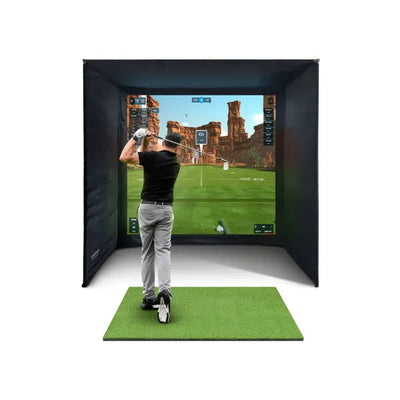
Installing a home golf simulator in the UK is an exciting project, but there is one critical question many buyers overlook: can your floor, walls, and ceiling actually support the equipment? From projector mounts drilled into joists to heavy enclosures sitting on suspended timber floors, the structural demands of a simulator setup deserve serious attention before you spend a penny on hardware.
This guide covers everything UK homeowners need to know about weight loading, wall mounting, and structural considerations for a home golf simulator installation. Whether you are converting a garage, spare bedroom, or garden building, understanding these fundamentals will protect both your investment and your property.

Why Structural Planning Matters for Your Home Golf Simulator
A complete home golf simulator setup is heavier than most people expect. Once you add up the enclosure frame, impact screen, projector, hitting mat, launch monitor, and PC equipment, you could be looking at 80 to 150 kg of equipment concentrated in a relatively small area. That is before you factor in the weight of the person swinging a club and the dynamic forces generated by a full driver swing.
Garages with concrete slab floors handle this weight without any issues. But if you are installing a home golf simulator on an upper floor, in a loft conversion, or on a suspended timber floor, you need to verify the load-bearing capacity before proceeding. Getting this wrong can lead to cracked plaster, sagging floors, or in extreme cases, structural failure.
Understanding Floor Loading for a Home Golf Simulator
UK building regulations specify minimum floor loading capacities for different types of construction. Residential floors are typically designed to support a distributed load of 1.5 kN per square metre (roughly 150 kg per square metre). This is the distributed load, meaning the weight spread evenly across the entire floor area.
Point loads are different. A heavy enclosure with four corner posts concentrates weight on four small contact points. A 100 kg enclosure on four posts creates a 25 kg point load at each corner. While this is well within the capacity of most floors, it is worth checking if your floor has any existing weaknesses, particularly in older properties.

Garage Floors (Concrete Slab)
If you are installing your home golf simulator in a garage, floor loading is almost never a concern. Concrete slab floors in UK garages are designed to support the weight of vehicles (typically rated for at least 2.5 kN/m2). Your simulator equipment is a fraction of this capacity. The main consideration for garage floors is ensuring the surface is level. Use a spirit level across the installation area and consider self-levelling compound if there are dips greater than 5 mm.
Ground Floor (Suspended Timber)
Many UK homes, particularly pre-1970s builds, have suspended timber ground floors consisting of timber joists supported on sleeper walls. Standard residential timber floors can support 1.5 kN/m2 distributed load, which is adequate for most home golf simulator installations. However, check for signs of rot, woodworm, or previous modifications that may have weakened the joists. If you notice any bouncing or flexing when you walk across the floor, get a structural assessment before proceeding.
Upper Floors and Loft Conversions
This is where you need to be most careful. Upper floors in UK homes are designed for residential loading (bedrooms at 1.5 kN/m2), but a simulator installation can create concentrated loads that approach or exceed this limit, especially in smaller rooms where the equipment occupies a larger proportion of the floor area. Loft conversions may have been built to minimum structural standards and could be particularly vulnerable to heavy point loads.
For upper floor installations, we strongly recommend getting a structural engineer to assess the floor before purchasing equipment. A structural survey typically costs between 300 and 600 pounds and could save you thousands in remedial work.
Home Golf Simulator Enclosure Weight Breakdown
To help you assess your specific situation, here is a typical weight breakdown for a complete home golf simulator setup:
| Component | Typical Weight (kg) |
|---|---|
| Enclosure frame (steel, e.g. SimSpace) | 40-70 |
| Impact screen | 5-10 |
| Hitting mat (premium quality) | 15-30 |
| Projector (ceiling-mounted) | 3-8 |
| Projector mount and bracket | 2-5 |
| Launch monitor | 1-3 |
| PC tower and monitor | 10-15 |
| Cable management and accessories | 2-5 |
| Total setup weight | 78-146 |
Add the weight of the golfer (70-100 kg) and the dynamic force of a swing, and you are looking at peak loads of 200+ kg in a concentrated area. For concrete floors this is negligible. For suspended timber floors, it warrants proper assessment.

Wall Mounting Projectors for a Home Golf Simulator
Mounting a projector is one of the most common structural questions for home golf simulator owners. Short-throw and ultra-short-throw projectors are increasingly popular because they can be wall-mounted behind or above the golfer, reducing the throw distance needed. But the mount must be secured into solid material. Plasterboard alone cannot support a projector.
For our full projector guide, see Choosing the Right Projector for Your Golf Simulator.
Ceiling Mounting
Most UK ceilings are plasterboard fixed to timber joists. To mount a projector safely, you must locate the joists and fix the bracket directly into them using coach bolts or heavy-duty wood screws. Use a stud finder or magnet to locate joists. Never rely on plasterboard fixings alone. Even heavy-duty hollow wall anchors have a maximum safe load of around 15-20 kg in plasterboard, and a projector plus bracket plus vibration from golf swings creates dynamic loads that can work fixings loose over time.
Wall Mounting
Wall-mounted projector brackets transfer the projector weight plus the leverage of the bracket arm to the wall. A 5 kg projector on a 50 cm bracket arm creates a significant moment force at the fixing point. Fix into timber studs, masonry, or use appropriate heavy-duty fixings. For plasterboard-only walls without accessible studs, consider a freestanding projector stand or ceiling mount instead.
When You Need a Structural Survey for Your Home Golf Simulator
Not every installation needs a structural engineer, but certain situations absolutely warrant professional assessment. You should commission a structural survey if:
- You are installing on an upper floor (first floor or above)
- The property is pre-1930s with original floor joists
- You notice any floor bounce, flex, or unevenness
- The room is a loft conversion or extension
- You plan to install on a mezzanine or raised platform
- The enclosure weighs more than 80 kg and sits on a suspended floor
- You want to mount heavy equipment to walls that may not be load-bearing
A RICS-qualified structural engineer can assess your property and provide a written report. This is a small investment compared to the cost of your home golf simulator package, and it gives you complete peace of mind.

Reinforcing Floors for a Home Golf Simulator Installation
If a structural survey identifies that your floor needs reinforcement, the most common solution is joist sistering, which means fixing additional timber joists alongside the existing ones to increase load capacity. This is a relatively straightforward job for a competent builder, typically costing between 500 and 1,500 pounds depending on access and the number of joists involved.
Other reinforcement options include:
- Noggins: Short timber pieces fixed between joists to distribute load laterally
- Steel beams: For larger spans or heavier loads, a steel beam can be installed beneath the joists
- Load-spreading plates: Steel or plywood plates under enclosure feet to distribute point loads
For detailed guidance on garage conversions, see our step-by-step garage build guide.
Vibration and Impact Considerations
Beyond static weight, a home golf simulator generates dynamic forces. Every swing creates vibration through the hitting mat and into the floor. While these forces are modest, they can be noticeable in rooms below or adjacent to the simulator, particularly in terraced or semi-detached houses.
To minimise vibration transfer:
- Place the hitting mat on a dense rubber underlay (horse stall mats work well and cost around 30-50 pounds each)
- Use vibration-dampening pads under enclosure feet
- Avoid placing the simulator directly above living rooms or bedrooms if possible
- Consider acoustic underlay beneath the mat for additional dampening
For noise and vibration management, see our sound and noise reduction guide.
Planning Permission and Building Regulations
In most cases, installing a home golf simulator inside your existing property does not require planning permission. However, there are exceptions:
- Garden buildings: A new outbuilding over 15 m2 with sleeping accommodation, or over 30 m2 in any case, may need planning permission.
- Structural alterations: If you need to remove or modify load-bearing walls to create space, you will need building regulations approval.
- Electrical work: New circuits in garages and outbuildings must comply with Part P of building regulations. See our running costs guide for electrical considerations.
Recommended Products for UK Home Golf Simulator Installations
When choosing a home golf simulator that minimises structural concerns, consider bundle packages that include well-engineered enclosures with distributed weight design. The FlightScope Mevo Gen 2 Bundle is an excellent mid-range option with a lightweight yet sturdy enclosure, while the Foresight GC3S Bundle offers premium accuracy in a well-designed package.
For our complete guide to choosing the right package, visit our UK Golf Simulator Buyers Guide 2026.

Frequently Asked Questions
Can I install a home golf simulator on an upper floor?
Yes, but you should get a structural survey first. Upper floors in UK homes are designed for residential loading (1.5 kN/m2), and a simulator setup can approach this limit. A structural engineer can confirm whether reinforcement is needed, typically costing 300-600 pounds for the assessment.
How much does a typical home golf simulator setup weigh?
A complete setup including enclosure, mat, projector, and PC typically weighs between 78 and 146 kg. Add the golfer weight and dynamic swing forces, and peak loads can exceed 200 kg in a concentrated area. Concrete floors handle this easily; suspended timber floors may need assessment.
Do I need planning permission to install a home golf simulator at home?
Internal installations within your existing property generally do not require planning permission. However, new outbuildings, structural alterations, and certain electrical work may need approval. Always check with your local planning authority if you are unsure.
What is the safest way to mount a projector for a home golf simulator?
Fix the projector bracket directly into ceiling joists or masonry. Never mount into plasterboard alone. Use a stud finder to locate joists, drill pilot holes, and use coach bolts or heavy-duty wood screws. For plasterboard-only ceilings without accessible joists, use a freestanding projector stand instead.
How can I reduce vibration from my home golf simulator?
Place dense rubber matting beneath your hitting mat, use vibration-dampening pads under enclosure feet, and consider acoustic underlay for additional dampening. These measures significantly reduce vibration transfer to rooms below or adjacent to your simulator.

Free Home Golf Simulator Design Consultation
Not sure on space, screen or launch monitor? Chat directly with Tom, OpenGolfer’s founder — he has designed hundreds of home setups and will tell you exactly what fits your room and budget.
- Send your room size (or a photo) — get a tailored layout and spec for your space, ceiling height included
- Personal replies from a real golfer, not a call centre
- Honest advice on what to buy — and what not to
Usually replies within the hour, 8am–8pm · prefer to talk? 02033 768500



Leave a comment