
Golf Net Cage for Simulator Setup: Complete Guide

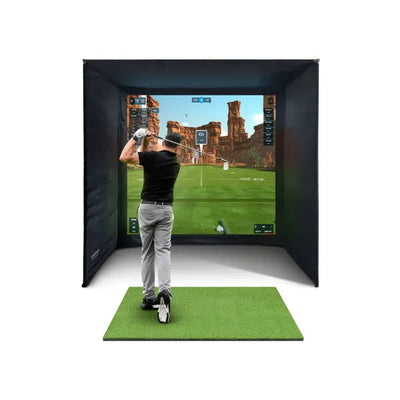
A golf net cage is more than a practice enclosure — it is the structural foundation for a complete golf simulator setup. By adding an impact screen, a projector, a launch monitor, and simulation software, you transform a simple garden cage into an immersive golf experience that lets you play virtual rounds on world-famous courses from your own back garden or garage. This guide explains how to build a simulator setup around your golf net cage, what components you need, how they fit together, and what the realistic costs look like for UK golfers in 2026.

Why a Golf Net Cage Is the Ideal Simulator Frame
A golf net cage provides the rigid, enclosed structure that every simulator needs. The rear panel holds your impact screen at the correct angle and tension. The side panels and top panel contain mis-hits that miss the screen. The frame provides mounting points for screen hardware, and the overall structure creates a defined practice bay that separates your simulator space from the rest of your garden or garage.
The alternative to using a golf net cage is building a custom frame from timber, steel, or PVC pipe specifically for simulator use. While this works, it means designing and constructing a frame from scratch when commercially available cages already provide the structure you need at a tested and proven specification. Using a cage as your starting point saves construction time, ensures structural integrity, and gives you the flexibility to use the cage as a standalone practice net when you do not want the full simulator experience.
In our testing, we installed a launch monitor inside a standard 3m cage and found that the enclosed space actually improved tracking consistency compared to an open net setup.
The Forza Golf Practice Cage at 3m x 3m x 3m is perfectly sized for a simulator build. The 3m width accommodates impact screens up to 2.5m wide, the 3m height provides ample overhead clearance for projected images and full swings, and the 3m depth gives adequate distance between the golfer and the screen for safe ball impacts and clear projection.
Component 1: The Impact Screen
The impact screen is the surface that the ball strikes and that displays the projected simulator image. It is the single most important component in a cage-based simulator build because it serves a dual purpose — ball stopping and visual display.
A quality golf simulator impact screen is made from heavy-duty woven fabric that absorbs ball energy on impact without tearing, stretching, or allowing excessive bounce-back. The front surface is smooth and light-coloured to provide a clear projection surface. The screen needs to be tensioned correctly — too loose and it will swing excessively on impact, distorting the projected image. Too tight and it will not absorb energy effectively, causing hard bounce-backs.
For a cage-based install, the screen mounts to the rear top tube of the golf net cage using bungee cords, hooks, or a dedicated mounting rail. The bottom edge can hang freely with weights, attach to the base tube, or be pinned to the floor. Side edges should overlap the rear netting panels by at least 15cm to prevent balls from sneaking between the screen edge and the cage frame.
Screen size depends on your cage dimensions and projector throw distance. For a 3m wide cage, a screen width of 2.4 to 2.7m provides an excellent image size while leaving clearance on each side. The height should be at least 1.8m to display a full simulator image with sky, fairway, and HUD information.
Component 2: The Projector
The projector displays the simulator software image onto the impact screen. For a cage-based setup, the projector typically mounts behind the golfer, either on a shelf, a ceiling mount, or a dedicated stand. This front-projection arrangement means the golfer stands between the projector and the screen.

GolfBays SimBox Golf Simulator Enclosure
£1,161
Complete enclosure with impact screen — ready for a projector and launch monitor.
View ProductFor cage simulator builds, the key projector specifications are throw ratio, brightness, and resolution. The throw ratio determines how far back the projector needs to sit to fill your screen. A standard throw projector in a 3m deep cage produces an image roughly 2 to 2.5m wide, which fills a typical impact screen nicely. Short-throw projectors can sit closer to the screen but are more expensive.
Brightness needs to overcome ambient light. In a garage with controlled lighting, a projector with 3,000 lumens is adequate. In an outdoor cage where daylight competes with the projected image, you need 4,000 lumens or more. For daytime outdoor use, consider a laser projector which maintains image quality in brighter conditions.
Resolution of 1080p (Full HD) is the minimum for a good simulator experience. 4K projectors provide sharper detail on larger screens but cost significantly more. For most cage-based builds, 1080p provides excellent visual quality that accurately represents course features, ball flight, and data overlays. Read our projector guide for detailed recommendations.
Component 3: The Launch Monitor
The launch monitor is the sensor that tracks your ball and club data, feeding this information to the simulator software to calculate realistic ball flight. This is the brain of your simulator — without it, you have a projector showing pictures on a screen rather than an interactive golf experience.
For cage-based simulator builds, the two leading options are the FlightScope Mevo Gen 2 and the Foresight GC3S. Both provide the accuracy and data richness needed for realistic simulation, but they use different tracking technologies.
The FlightScope Mevo Gen 2 uses radar tracking and sits behind the golfer, roughly 2 to 3 metres back from the ball position. In a cage setup, this means the monitor sits outside the cage entrance or just inside the rear of the cage behind you. It tracks both ball and club data including ball speed, launch angle, spin rate, and club path.
The Foresight GC3S uses high-speed camera technology and sits beside the ball at ground level. In a cage setup, it positions just inside the cage on the hitting mat or adjacent surface. Camera-based monitors excel at spin measurement accuracy, which translates to more realistic ball flight curves in the simulator software.
Both monitors connect to simulator software via WiFi or USB, sending shot data in real time. The software receives the ball parameters, calculates the complete ball flight trajectory, and displays it on the projected image within a second of impact.
Component 4: Simulator Software
Simulator software creates the virtual golf experience — courses, ball flight visualisation, scoring, and practice modes. The software receives data from the launch monitor and renders the shot on screen, displaying the ball flight, landing position, and next shot setup.
The main software options for UK golfers are E6 Connect, Awesome Golf, GSPro, and TGC 2019. Each has a different pricing model, course library, and visual quality. E6 Connect offers the most polished graphics and includes a licence with most launch monitor purchases. GSPro is popular for its extensive course library and active community. Awesome Golf provides a competitive experience with regular updates and good value pricing.
Software runs on a PC connected to the projector via HDMI. For cage-based builds, the PC sits outside the cage in a weatherproof enclosure or inside an adjacent garage or shed. Cable management is important — route the HDMI cable from the PC to the projector along the cage frame and ceiling, keeping it clear of the swing path and protected from ball impacts.
For golfers who want a simpler setup without a PC, some launch monitors offer standalone simulation on a tablet or phone. The visual experience is smaller but the ball tracking and game play are identical. You can start with tablet-based simulation and upgrade to a projected setup later as your cage simulator evolves. Our buyer's guide compares all software options in detail.
Building a Golf Net Cage Simulator: Step by Step
Here is the assembly sequence for converting your golf net cage into a working simulator.
Step 1: Set up the cage. Assemble your golf net cage in its intended location and anchor it securely. Ensure the rear panel is flat and vertical — this is where your impact screen will hang. If the cage is on grass, consider laying a hard surface (plywood, rubber matting, or artificial turf) on the cage floor for the hitting area.
Step 2: Hang the impact screen. Attach the impact screen to the rear top tube using bungee cords or hooks. Tension the screen so it hangs flat against the rear netting. The screen should be smooth with no wrinkles that would distort the projected image. Step back and check alignment — the screen should be parallel to your hitting position for undistorted projection.
Step 3: Position the projector. Mount the projector behind the hitting position, aimed at the impact screen. Adjust the throw distance, zoom, and keystone correction until the image fills the screen evenly. The bottom of the image should sit approximately 30cm above the floor, and the top should reach as high as the screen allows. Run the projector's auto-focus and calibration if available.
Step 4: Place the launch monitor. Position the launch monitor according to its specifications — radar behind, camera beside the ball. Run the monitor's calibration routine and hit a few test shots to confirm it is tracking accurately. Check that the monitor communicates with the software and that shot data appears on screen.
Step 5: Connect and configure software. Install your chosen simulator software on the PC, connect to the projector via HDMI, and pair the launch monitor. Run a calibration session of ten to twenty shots to verify that the displayed ball flights match your typical shot patterns. Adjust software settings for realistic distances based on your usual club performance.
Step 6: Cable management and weatherproofing. Route all cables along the cage frame using cable ties, keeping them clear of the swing arc and ball impact zone. If the setup is outdoors, protect electrical components from rain using weatherproof enclosures for the PC and projector, and use outdoor-rated extension cables with RCD protection.
Costs: What Does a Cage-Based Simulator Setup Cost?
A complete golf net cage simulator setup in the UK ranges from around one thousand pounds for a budget build to over four thousand pounds for a premium setup. Here is a breakdown by component.
Golf cage: one hundred fifty to three hundred pounds depending on size and quality. The Forza Golf Practice Cage sits at the quality end of this range.
Impact screen: one hundred to three hundred pounds. Budget screens work but may show wear marks from repeated ball impacts. Premium screens maintain their surface quality and projection clarity over years of use.
Projector: three hundred to eight hundred pounds. A 3,000-lumen 1080p projector suitable for indoor or covered use starts at around three hundred pounds. Higher brightness and 4K resolution push the price toward the upper end.
Launch monitor: four hundred to three thousand pounds. The FlightScope Mevo Gen 2 and Foresight GC3S represent the sweet spot of accuracy and value for simulator use. Budget monitors are available but may lack the accuracy needed for satisfying simulation. Browse our simulator bundles for packages that combine monitor, software, and accessories at bundle pricing.
Software: zero to three hundred pounds annually. Some software is included with launch monitor purchases. Others require separate licences. GSPro offers a one-time purchase option while E6 Connect and Awesome Golf use subscription models.
Hitting mat and accessories: fifty to two hundred pounds. A quality hitting mat with a built-in tee position is essential. Add a ball tray, cable management supplies, and optional extras like side curtains for light control.
For more on projector specifications suitable for simulators, Projector Central provides detailed technical comparisons.
Ready to Build Your Home Golf Simulator?
Our SimSpace enclosures are used by hundreds of UK golfers. Get a premium enclosure with a 4K impact screen, velour interior panels, and rock-solid steel frame.
Not sure which size? Book a free consultation and we'll help you plan the perfect setup for your space.
Recommended Products


Will a Simulator Fit Your Space?
Use our free sim space planning tool to check your room dimensions, ceiling height, and find the right enclosure size. Takes 2 minutes and we'll send you a personalised recommendation.
Check Your Space →Frequently Asked Questions
Can I use a golf net cage for a simulator outdoors?
Yes, but outdoor use adds challenges. Ambient light washes out projected images during the day, requiring a higher-brightness projector or evening-only use. Rain and humidity threaten electrical components, requiring weatherproof enclosures. Wind noise and ball impact sounds are more noticeable outdoors. A garage is the ideal location for a cage simulator — it provides shelter while the cage provides the structure.
What size golf net cage do I need for a simulator?
A 3m x 3m x 3m cage is the minimum recommended size for a simulator build. This accommodates a 2.4m wide impact screen, a full swing arc, and adequate projection distance. Smaller cages restrict the image size and may position the projector too close to the screen for a focused image.
Do I need a PC for a golf simulator in a cage?
For the best experience with a projector, yes. The PC runs the simulator software and outputs to the projector via HDMI. A mid-range gaming PC with a dedicated graphics card provides smooth frame rates and good visual quality. Budget options include using a laptop, or running tablet-based simulation software on an iPad mounted near the hitting position.
Can the golf ball damage the projector?
The projector should be positioned behind the golfer, facing the impact screen. In this position, the ball travels away from the projector toward the screen. There is no direct line of impact between the ball and the projector. However, extreme mis-hits in a cage could theoretically send a ball toward the rear — positioning the projector slightly to one side rather than directly behind you adds an extra margin of safety.
Is a cage simulator as good as a commercial indoor golf bay?
A well-built cage simulator using quality components provides an experience comparable to many commercial indoor golf facilities. The launch monitor accuracy, software quality, and image size are equivalent. Where commercial facilities have the advantage is in dedicated climate-controlled spaces, professional lighting, and larger screen sizes. Where a home cage simulator wins is in convenience, cost per session, and unlimited access without booking.
Our #1 garden cage, ready to play
The Pro Golf Cage & Hitting Mat Bundle pairs a galvanised 42mm steel cage with a driver-rated double net and a tour-density mat — a buy-once, all-weather practice station for the UK garden. Best seller, 2-year warranty, 30-day returns.
Shop the Pro Golf Cage Bundle →⛳ Free resource: the 90-Day Golf Cage Practice Programme
A cage stops your golf balls — a plan lowers your scores. The free interactive golf cage practice programme gives you 39 structured 25-minute sessions, a 24-drill library, and progress scorecards you can track online — built around the Pro Golf Cage & Hitting Mat Bundle and open to every garden golfer.
Free email series: Dream Home Golf Cage Setup
Six short emails from Tom on the five decisions behind a brilliant garden practice space.
📏 Free tool: the Garden Golf Cage Planner
Planning a garden golf cage? The free Garden Golf Cage Planner answers the space, base, netting and cost questions in one place — including the Will-It-Fit calculator: enter your garden size and see which cages fit. No sign-up.

Free Home Golf Simulator Design Consultation
Not sure on space, screen or launch monitor? Chat directly with Tom, OpenGolfer’s founder — he has designed hundreds of home setups and will tell you exactly what fits your room and budget.
- Send your room size (or a photo) — get a tailored layout and spec for your space, ceiling height included
- Personal replies from a real golfer, not a call centre
- Honest advice on what to buy — and what not to
Usually replies within the hour, 8am–8pm · prefer to talk? 02033 768500



Leave a comment