
The Best Golf Simulator for Beginners (UK 2026)

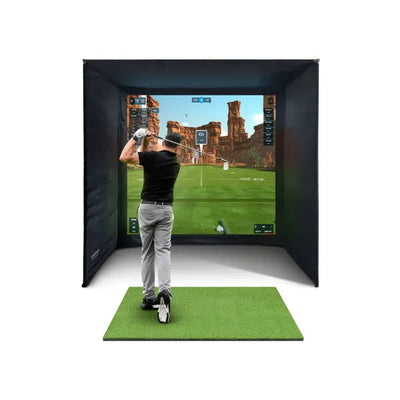
Here is the truth about golf simulators that nobody in the industry wants to admit: beginners benefit from them more than any other group of golfers. A 25-handicapper who can only get to the range once a fortnight will improve faster with 30 minutes of daily practice in their garage than a 5-handicapper who plays three times a week. The data, the repetition, the zero-pressure environment, the ability to practise at 9pm on a Tuesday — it all compounds.
And yet, most golf simulator content is written for experienced golfers with dedicated rooms and £5,000 budgets. It assumes you already know what a launch monitor is, that you have strong opinions about GSPro versus E6 Connect, and that your primary concern is whether the Foresight GC3 measures spin axis to within 0.3 degrees.
If you are a beginner — someone who has been playing for a year or two, shoots in the high 90s or above, and wants to improve without spending every Saturday at the range — this guide is for you. We will cover what you actually need, what you definitely do not need, how to get started for under £350, and when it makes sense to invest in a proper full simulator setup. Every price is in GBP, every dimension is metric first, and every recommendation comes from our experience helping hundreds of UK golfers set up their first home practice spaces.
If you have already decided you want the full simulator experience and want to compare bundles, our complete UK buyer's guide covers every tier. If you are specifically worried about room size, our room size guide addresses UK-specific constraints like low ceilings and narrow garages.
Why Beginners Benefit Most From Home Practice
When you are learning golf, the single biggest factor that determines how quickly you improve is volume of quality repetitions. Not lessons. Not equipment upgrades. Not YouTube tips. Repetitions — specifically, repetitions where you get feedback on what happened and can adjust for the next shot.
At a driving range, you get limited feedback. You see the ball fly, roughly gauge the distance, and maybe notice a slice. But you do not know your club speed, your launch angle, your spin rate, or whether that "good" shot actually went 140 yards or 155 yards. You are practising, but you are practising somewhat blind.
A home simulator — even a very basic one — changes this. Suddenly you can see that your 7-iron averages 128 yards carry with a 15-yard fade. You can see that your swing speed is 82 mph, which tells you that distance gains will come from speed, not from a new driver. You can see that your putting has a consistent 2-degree push. This data turns aimless range sessions into structured practice, and structured practice is how beginners become intermediate golfers.
There is also the frequency factor. Most UK beginners get to the range once a week, perhaps once a fortnight. A home setup — even a net in the garage with a basic launch monitor — lets you hit 50 balls every single evening. That is 350 swings a week versus 50-100 at the range. Over a year, that is roughly 15,000 additional practice swings. The maths is overwhelming, and it explains why so many golfers who invest in home practice see their handicap drop faster than golfers who spend the same money on lessons or equipment.
What beginners actually need
- A safe place to swing a club — This could be a garage, a spare room with enough ceiling height, a garden with a net, or even a hallway for putting
- Something to hit into — A net, an impact screen, or a garden (for real balls outdoors)
- Something to hit off — A hitting mat protects your floor and your joints
- Feedback on your shots — This is where a launch monitor, simulator software, or even a putting mat with alignment aids comes in
What beginners do not need
- A projector and impact screen on day one — Viewing your data on a phone or tablet is perfectly fine for learning. The projected course experience is lovely, but it does not make you improve faster
- Tour-grade accuracy — If your launch monitor says your 7-iron carries 133 yards when it actually carries 136 yards, that 3-yard difference is irrelevant to your development. You need consistent, directionally correct data — not sub-1% precision
- A £2,000+ launch monitor — Devices under £500 give beginners more than enough data to work with. Spin accuracy? You are not ready to optimise spin. Club path to 0.5 degrees? You are trying to stop slicing 30 yards right. Perspective matters
- A dedicated room — A corner of a garage, a pop-up net that stores in 30 seconds, or a putting mat in the living room are all legitimate starting points
- Simulation software — Playing virtual St Andrews is fun, but it does not teach you to strike the ball better. Drills, repetition, and data-driven feedback do. Software can come later when you want the entertainment factor
The Minimum Viable Setup: What You Can Start With Today

Let us strip away the marketing and the Instagram simulator rooms and talk about what actually works for a beginner on a budget. There are three tiers of entry, and each one is a legitimate way to start improving at home.
Tier 1: Under £150 — Putting and Short Game
If you are on a tight budget or do not have space for full swings, start with putting and chipping. These are the shots that account for roughly 65% of your total strokes as a beginner. Improving your putting from 40 putts per round to 34 putts is a 6-shot improvement — more than most golfers achieve in a year of full-swing practice.
Setup:
- PGA Tour 6ft Auto Return Putting Mat — £34.99. A simple practice putting mat with automatic ball return. Lay it out in your living room, hallway, or office and practise your stroke for 10 minutes a day. The auto-return keeps balls coming back to you so you can build rhythm without walking to collect balls
- PGA Tour Pop-Up Chipping Net — £9.99. A collapsible target net for chip shots in the garden. Use foam balls indoors or real balls outdoors. At under a tenner, this is the most cost-effective practice aid in golf
Total cost: £44.98
This is not a golf simulator in the traditional sense, but it is where many beginners should genuinely start. If you can get your putting and short game sharp, everything else becomes less critical. And you need zero dedicated space — the mat rolls up, the net folds flat, and both store in a cupboard.
Tier 2: £300–£550 — Full Swing With Basic Data
Once you want to practise full swings with some shot data, you need a net, a mat, and ideally a basic launch monitor or a connected practice device.
Option A: Budget Net Setup (£380)
- Leadbetter Pop-Up Driving Net — £99.99. A portable pop-up net that takes 30 seconds to set up and folds away just as quickly. Use it in the garden for real balls or in a garage for foam balls. Solid build quality for the price
- GolfBays Standard Hitting Mat (1.5m x 1.5m) — £199. A proper hitting mat with decent turf feel at 1.5 metres by 1.5 metres (4ft 11in x 4ft 11in). Large enough for a comfortable stance and durable enough to take thousands of swings without developing dead spots
- Your own phone for video analysis — Free. Film your swing in slow motion using the standard camera app. Compare your positions to a reference swing. This is basic data, but it is data
Option B: Connected Practice System (£299–£520)
- PhiGolf 2 Home Golf Simulator — £299. A swing sensor that attaches to any club (or the included practice club) and connects to your phone or tablet for simulated golf. You do not need a net, a screen, or even a real golf ball — you can swing indoors in a room with 2.4 metres (8 feet) of ceiling height. It tracks swing path, club speed, and tempo, and lets you play virtual courses. For beginners who want the "simulator experience" without the space or budget for a full setup, this is a genuinely clever solution
- PRGR HS-130A Portable Launch Monitor — £219.99. A compact, radar-based launch monitor that measures ball speed, club speed, and estimated carry distance. No app needed — it displays the numbers on its own screen. Pair it with the net setup above and you have instant feedback on every shot. It does not measure spin or launch angle, but for a beginner tracking swing speed and carry distance, it is everything you need
Tier 3: £500–£1,200 — Serious Practice Station
At this level, you are building a proper practice station that could last you years. The difference from Tier 2 is a better net or enclosure, a better mat, and more detailed shot data.
Recommended Setup (approximately £700-£1,000):
- EazyNet Golf Practice Net — £279.99. A full-size practice net that is substantially sturdier than pop-up nets. Large enough to catch mishits confidently, with a proper frame that stays taut. Set it up permanently in a garage or use it in the garden
- GolfBays Quad Tech Hitting Mat (1.5m x 1.5m) — £229. Four different turf surfaces on one mat — fairway, rough, driving range, and tight lie. This is excellent for beginners because you can practise from different lies and learn how turf type affects your contact. At 1.5 metres by 1.5 metres (4ft 11in x 4ft 11in), it is generous for any stance
- PRGR HS-130A Launch Monitor — £219.99. As above — ball speed, club speed, and estimated carry on every shot
Or, with a dedicated practice cage (approximately £710):
- Forza ProFlex Pop-Up Golf Driving Net Cage — £279.99. An enclosed cage design that catches balls from all angles — including shanks and skied shots that a flat net might miss. Excellent peace of mind for garage use where a miss could hit a car or wall
- GolfBays Standard Hitting Mat — £199
- PRGR HS-130A Launch Monitor — £219.99
At this tier, you have a setup that gives you meaningful data on every swing, safely catches your worst mishits, and can be used daily for years. Many serious golfers never go beyond this — a quality net, a quality mat, and reliable basic data. It is not glamorous, but it works.
Recommended Starter Packages: Complete Simulator Bundles

If you have the space (a garage, a dedicated room, or a garden building) and the budget, stepping up to a complete simulator bundle transforms your practice into an experience. You get a projected course, immersive gameplay, and detailed shot data — all in one package designed to work together straight out of the box.
For beginners, we recommend two bundles that balance quality, value, and ease of setup.
Best Entry Bundle: Forza Game Improvement Bundle — £1,778.98
The Forza Game Improvement Bundle at £1,778.98 is designed specifically for golfers who are new to home practice. It includes everything you need to start hitting at home: a practice enclosure, hitting mat, and net in one cohesive package. The "game improvement" name is not marketing — this is genuinely configured for the golfer who wants to get better, not the golfer who wants the most impressive spec sheet.
What is included: Full enclosure with net, hitting mat, and all hardware. You add your own launch monitor and software.
Why it works for beginners: The all-in-one design means no compatibility guesswork. Everything fits together, the instructions are clear, and two people can assemble it in an afternoon. It is not the cheapest way to build a net setup, but it eliminates the risk of buying components that do not work well together — a common beginner trap.
Space required: Check the product listing for exact dimensions, but plan for at least 3 metres (10 feet) wide by 3.5 metres (11.5 feet) deep with 2.5 metres (8 feet 2 inches) of ceiling clearance.
Best Mid-Range Bundle: FlightScope Mevo Gen 2 Bundle — From £2,498
The FlightScope Mevo Gen 2 Bundle starting at £2,498 is, in our honest assessment, the sweet spot for a beginner who knows they are committed to golf and wants a setup that will serve them for years without needing replacement.
What is included: FlightScope Mevo Gen 2 launch monitor, a full enclosure with impact screen, hitting mat, and everything needed for a complete simulator. Add a projector and PC, and you have a full projected simulator. Use it with just a tablet or phone, and you have a detailed data station with course play on your device.
Why it works for beginners: The Mevo Gen 2 tracks 16 data points including ball speed, launch angle, spin rate, carry distance, and club speed. That is far more data than a beginner strictly needs — but it means you will never outgrow the device. As you improve from a 25-handicapper to a 15-handicapper, the Mevo Gen 2 will still be giving you data that challenges and teaches you. It also works outdoors, so you can take it to the range or the course in summer.
Software compatibility: Works with E6 Connect (licence included), GSPro, Awesome Golf, and Creative Golf 3D. For beginners, E6 Connect is an excellent starting point — polished graphics, user-friendly interface, and well-known courses. As you get more into the simulator community, GSPro is the overwhelming favourite for its massive course library and one-time purchase price. Read our software comparison guide for the full breakdown.
The honest case for spending more: The price gap between the Forza bundle (£1,778.98) and the Mevo Gen 2 bundle (from £2,498) is roughly £720. That gap buys you the FlightScope Mevo Gen 2 launch monitor — a device that measures 16 data points, works indoors and outdoors, and is compatible with every major simulator software. If you skip it now and want it later, you will buy it separately for £1,199 anyway. For golfers who are serious about improving, spending the extra now saves money in the long run.
Bundle Comparison Table
| Feature | Forza Game Improvement (£1,778.98) | Mevo Gen 2 Bundle (from £2,498) |
|---|---|---|
| Enclosure | Included | Included |
| Hitting Mat | Included | Included |
| Launch Monitor | Not included (add separately) | FlightScope Mevo Gen 2 (16 data points) |
| Software | Depends on your monitor | E6 Connect licence included |
| Outdoor Use | Monitor-dependent | Yes (Mevo Gen 2 works outdoors) |
| Upgrade Path | Add monitor + projector + PC | Add projector + PC for full projection |
| Best For | Budget-conscious beginners who want a proper setup | Committed beginners who want a system they will not outgrow |
For a detailed cost breakdown of what a complete setup costs at every budget level, see our full UK price guide. For launch monitor comparisons beyond these bundles, read our launch monitor guide.
The Best Software for Beginners

If you have a launch monitor that connects to simulator software, you have several options. Here is what matters for beginners specifically — not for experienced sim golfers, but for someone loading up their first session.
E6 Connect — Best for First-Time Users
E6 Connect has the most polished, beginner-friendly interface of any simulator software. The courses look excellent, the menus are intuitive, and the experience of playing a virtual round is immediately engaging. It is subscription-based (approximately £250/year), but many launch monitors — including the FlightScope Mevo Gen 2 — include a licence.
Why beginners like it: It just works. Load it up, choose a course, and play. The data overlay during play shows your key numbers (carry, ball speed, club speed) without overwhelming you. The learning curve is almost zero.
GSPro — Best Long-Term Value
GSPro is the most popular simulator software in the UK by a wide margin. It costs approximately £200/year and offers a library of over 100,000 courses created by the community, including faithful recreations of Augusta National, St Andrews, Pebble Beach, and virtually every course you can think of.
Why beginners grow into it: The interface is less polished than E6 Connect, and the initial setup requires a bit more technical confidence. But once configured, GSPro offers more courses, more game modes, more practice features, and a more active community than any competitor. Most beginner sim golfers start with E6 Connect and migrate to GSPro within 6-12 months.
Awesome Golf — Best for iPad Users
If you want to run your simulator from an iPad rather than a PC, Awesome Golf is the standout option. It offers excellent graphics, a growing course library, and a smooth iPad experience. For beginners who do not own a gaming PC and do not want to buy one, Awesome Golf plus a compatible launch monitor is the simplest possible full simulator setup.
PhiGolf App — Best for No-Ball Practice
The PhiGolf 2 has its own app that lets you swing a club (or the included practice stick) indoors without hitting a ball. The sensor tracks your swing and simulates the shot on your phone or tablet. It is not the same as hitting a real ball, but for beginners working on swing path and tempo in a small flat or apartment, it is genuinely useful.
For a detailed comparison of all simulator software options, including pricing, course libraries, and hardware requirements, read our software comparison guide.
Common Beginner Mistakes (And How to Avoid Them)

We speak to beginners every week who have made these mistakes. Learn from them so you do not have to learn the hard way.
1. Buying too much too soon
The single most common beginner mistake is spending £3,000-£5,000 on a full simulator setup before knowing whether they will actually use it regularly. A significant number of home simulators end up gathering dust after the initial excitement fades — not because the equipment is bad, but because the owner overestimated how often they would practise.
The fix: Start with a Tier 1 or Tier 2 setup (£45-£550). Use it consistently for 2-3 months. If you are practising 3+ times a week and wanting more, upgrade. If the net has been untouched for three weeks, you have saved yourself thousands. The progression from putting mat to net setup to full simulator is a natural path that matches your commitment level at each stage.
2. Ignoring ceiling height
Standard UK ceiling heights are 2.4 metres (8 feet). If you are of average height (1.75 metres / 5 feet 9 inches), you can swing most clubs in this space — carefully. If you are taller than 1.85 metres (6 feet 1 inch), a driver swing in a 2.4-metre room is going to clip the ceiling. Measure before you buy. Stand in the space with your longest club and take a full swing (slowly, without a ball) to check clearance.
The fix: If your ceiling is borderline, start with irons only. A 7-iron swing has a lower apex than a driver swing. You can practise your iron game in a lower ceiling and save the driver for the range or a garden net. Many beginners find this is actually better for their development anyway — irons demand better contact and teach fundamentals that transfer to every club.
For detailed room dimension advice, our room size guide covers every common UK space.
3. Obsessing over data too early
A launch monitor that shows 16 data points is powerful, but a beginner does not need to understand all 16 from day one. If you are spending more time analysing spin axis and angle of attack than actually hitting balls, the technology is slowing your progress rather than accelerating it.
The fix: For your first three months, focus on three numbers only: club speed (are you generating power?), carry distance (how far does the ball go?), and direction (left, right, or straight?). These three tell you everything you need to guide early development. Add spin rate and launch angle once your swing is consistent enough to make those numbers meaningful.
4. Neglecting the short game
Most beginners build a full-swing setup and ignore putting and chipping entirely. This is backwards. If you shoot 105, roughly 40 of those strokes are putts and another 15-20 are chips and pitches. Cutting 5 putts and 5 short-game shots per round gets you to 95 — and none of that improvement requires a launch monitor, a projector, or a single full swing.
The fix: Dedicate at least 30% of your practice time to short game. A putting mat (£34.99) in the living room and a chipping net (£9.99) in the garden is all you need. Use them on the days you do not do a full-swing session. Alternate: full swing Monday, putting Tuesday, full swing Wednesday, chipping Thursday, and so on.
5. Practising without purpose
Hitting 100 balls into a net with no target, no routine, and no tracking is barely better than not practising at all. You are grooving randomness. The difference between productive practice and wasted time is structure.
The fix: Every session should have a goal. "Today I am working on hitting 10 straight 7-irons in a row" or "Today I am trying to get my club speed above 85 mph" or "Today I am putting 50 balls from 2 metres and tracking my make percentage." Write it down. Track your results. Review weekly. Our practice drills guide has structured routines for every aspect of the game.
6. Skimping on the mat
A cheap, thin hitting mat will hurt your wrists, elbows, and shoulders within weeks of regular practice. This is not a minor issue — it is the number one reason beginners stop using their home setup. The impact of a club on a hard rubber mat sends shock waves up your arms that accumulate over hundreds of repetitions.
The fix: Budget at least £199 for your mat. The GolfBays Standard (£199) and GolfBays Quad Tech (£229) both have proper cushioning that absorbs impact like real turf. Your joints will thank you after the first hundred swings, and the mat will last years. For a full comparison of mats, see our hitting mat guide.
7. Expecting instant accuracy from budget devices
A £220 launch monitor will not give you the same data quality as a £3,300 Foresight GC3S. That is fine — you do not need it to. But some beginners buy a budget monitor, compare its readings to what they saw on a professional simulator fitting, and conclude the device is "broken" because the numbers differ by 5-10 yards.
The fix: Understand what your device measures and what it estimates. The PRGR HS-130A measures ball speed and club speed accurately but estimates carry distance. That estimate is consistently useful — the same swing will give you a similar number each time — but it might differ from a premium monitor's reading. Use it for tracking improvement ("my average carry went from 125 to 133 this month"), not for absolute distance claims. For a deep dive into accuracy across price tiers, read our guide on how accurate golf simulators actually are.
Your Upgrade Path: From Beginner to Full Simulator
One of the smartest things about starting small is that every purchase you make can be part of a larger setup later. Here is the natural upgrade progression for a beginner who starts basic and grows into a full simulator over 12-24 months.
Stage 1: Net + Mat + Basic Monitor (Month 1-6)
Start with a practice net, a quality hitting mat, and either the PRGR HS-130A (£219.99) or the PhiGolf 2 (£299). Total investment: £400-£750. Practise regularly and confirm that home practice is something you will sustain.
Stage 2: Upgrade the Launch Monitor (Month 6-12)
Once you are committed, upgrade to the FlightScope Mevo Gen 2 (£1,199) for detailed shot data and software compatibility. Keep your net and mat — they still work perfectly. Your PRGR or PhiGolf becomes a portable practice tool for trips to the range. Total additional investment: £1,199.
Stage 3: Add Projection (Month 12-18)
With a quality launch monitor in place, add a projector (£300-£600 for a 1080p short-throw model), connect it to a PC or laptop, install GSPro or E6 Connect, and project the image onto your net or onto a proper impact screen. This transforms your practice station into a genuine simulator experience. Total additional investment: £400-£900 (projector + PC if needed + software).
Stage 4: Upgrade the Enclosure (Month 18-24)
If you have been projecting onto a practice net, consider upgrading to a proper impact screen and frame for a clearer, more immersive image. Or, if you started with a pop-up net, move to a permanent frame enclosure. Your existing launch monitor, mat, projector, and software all carry over — you are only upgrading the physical structure.
Total investment over 24 months: £2,000-£3,500 for a complete, high-quality simulator — spread across two years rather than dropped in one lump sum. And at every stage, you had a functional, useful practice setup.
Compare this to buying a complete bundle from day one (from £2,498). The bundle is cheaper overall and gets you to the full experience immediately — but the staged approach lets you spread the cost and confirm your commitment before investing heavily. Both paths are valid. The worst option is spending £3,000 in month one and discovering in month three that you only use it once a fortnight.
Quick-Reference: Best Products for Beginners by Category
| Category | Product | Price | Why It Suits Beginners |
|---|---|---|---|
| Budget Launch Monitor | PRGR HS-130A | £219.99 | Simple, reliable, shows club speed and ball speed on-device |
| Mid-Range Launch Monitor | FlightScope Mevo Gen 2 | £1,199 | 16 data points, indoor/outdoor, wide software compatibility |
| Swing Sensor Simulator | PhiGolf 2 | £299 | No ball needed, minimal space, simulated courses on phone/tablet |
| Putting Practice | PGA Tour 6ft Auto Return Putting Mat | £34.99 | Cheap, effective, practise anywhere |
| Putting Simulator | ExPutt RG Golf Putting Simulator | £399.99 | Projects virtual greens, reads speed and line, gamified practice |
| Budget Net | Leadbetter Pop-Up Driving Net | £99.99 | Portable, fast setup, stores easily |
| Full Practice Net | EazyNet Golf Practice Net | £279.99 | Sturdy, full-size, catches mishits confidently |
| Practice Cage | Forza ProFlex Net Cage | £279.99 | Enclosed design, maximum safety for garage use |
| Standard Mat | GolfBays Standard Mat | £199 | Good quality at the best price, proper cushioning |
| Multi-Surface Mat | GolfBays Quad Tech Mat | £229 | Four turf types, learn different lies |
| Chipping Net | PGA Tour Pop-Up Chipping Net | £9.99 | Under a tenner, folds flat, great for garden chipping |
| Entry Bundle | Forza Game Improvement Bundle | £1,778.98 | Complete enclosure package, add your own monitor |
| Best Overall Bundle | Mevo Gen 2 Bundle | From £2,498 | Complete simulator, everything included, grows with your game |
Frequently Asked Questions
What is the cheapest way to start practising golf at home?
A putting mat (£34.99) and a chipping net (£9.99) gets you started for under £45. For full swings, add a pop-up net (£99.99) and a hitting mat (£199) for under £350. You do not need a launch monitor, projector, or simulation software to start building your swing at home.
Do I need a dedicated room for a golf simulator?
No. Many beginners use a corner of their garage, a pop-up net in the garden, or a putting mat in the living room. A dedicated room is ideal for a permanent simulator with a projector and screen, but it is not required to start practising. Our room size guide covers minimum dimensions for every type of space, and our garage setup guide shows how to make the most of the space you have.
Is a golf simulator worth it for a high handicapper?
High handicappers actually get more value from a simulator than low handicappers. A golfer shooting 100+ has large, easily fixable issues in their swing — a simulator provides the feedback and repetition volume to address them faster than weekly range visits. Many of our customers who started as high handicappers report dropping 10-15 shots within 6-12 months of regular home practice. The key is consistency — 20 minutes daily beats 2 hours once a week.
What launch monitor should a beginner buy?
For pure budget, the PRGR HS-130A (£219.99) gives you club speed and ball speed on every shot. For the best balance of data, versatility, and future-proofing, the FlightScope Mevo Gen 2 (£1,199) is the monitor you will never outgrow. Both are radar-based, work indoors and outdoors, and do not require a PC.
Can I use a golf simulator with low ceilings?
Standard UK ceiling heights of 2.4 metres (8 feet) work for most golfers with irons and wedges. Driver swings may be restricted if you are taller than 1.80 metres (5 feet 11 inches). Options include practising irons only indoors, modifying your tee height, using a garden net for driver practice, or converting a space with higher ceilings such as a garage with open rafters. Never force a full driver swing in a space where you feel restricted — it trains a shortened swing that transfers to the course.
What is better for a beginner: a net or a full simulator?
A net is the better starting point for most beginners. It costs less, requires less space, and lets you focus on hitting balls rather than learning software. A full simulator adds the projected course experience and more detailed data, which is fantastic for motivation and game-play variety — but it is a luxury, not a necessity, for improvement. Start with a net, confirm your practice habit, and upgrade to a full simulator when you are ready.
How much space do I need for a beginner golf simulator?
For a pop-up net and mat, you need about 3 metres (10 feet) of depth, 2 metres (6.5 feet) of width, and 2.4 metres (8 feet) of ceiling height. For a full simulator with a projector and screen, aim for 3.5 metres (11.5 feet) deep by 3 metres (10 feet) wide with at least 2.5 metres (8 feet 2 inches) of ceiling clearance. A single UK garage (approximately 5 metres by 2.5 metres) typically works well for a full setup. See our room size guide for detailed layouts.
Should I buy a bundle or build my own setup?
For beginners, a bundle is almost always the smarter choice. Bundles guarantee compatibility between components, save money versus buying separately, and come with clear setup instructions. Building your own from individual components gives you more flexibility but requires research to ensure everything works together — and beginners often make expensive compatibility mistakes. Our Mevo Gen 2 Bundle (from £2,498) is the most popular choice for first-time simulator owners in the UK.
Getting Started
The best time to start practising at home was last winter. The second best time is now. Whether you begin with a £35 putting mat or a £2,498 complete bundle, the important thing is to begin. Every swing you take at home is a swing you would not have taken otherwise, and those swings compound over weeks and months into genuine, measurable improvement.
Here is the honest, practical path for a beginner:
- Assess your space. Measure the room you plan to use. Note the ceiling height, the length, and the width. If in doubt, read our room size guide
- Set a budget you are comfortable with. There is no shame in starting at £45 with a putting mat and chipping net. There is also nothing wrong with going straight to a bundle if you can afford it and know you are committed
- Buy the mat first. Whatever else you buy, do not skimp on the mat. Your joints, your consistency, and your data accuracy all depend on it
- Commit to a practice schedule. Three sessions of 20 minutes beats one session of 90 minutes. Consistency is the variable that separates golfers who improve from golfers who do not
- Track your progress. Even if you are just writing down your average club speed each week, having a number to aim for transforms practice from routine to mission
Browse our full range of golf simulators, launch monitors, hitting mats, and practice equipment to find the right starting point for your space and budget. Every product on our site is available with UK delivery, and our team is happy to answer questions if you are not sure where to begin.

Free Home Golf Simulator Design Consultation
Not sure on space, screen or launch monitor? Chat directly with Tom, OpenGolfer’s founder — he has designed hundreds of home setups and will tell you exactly what fits your room and budget.
- Send your room size (or a photo) — get a tailored layout and spec for your space, ceiling height included
- Personal replies from a real golfer, not a call centre
- Honest advice on what to buy — and what not to
Usually replies within the hour, 8am–8pm · prefer to talk? 02033 768500



Leave a comment