
Home Golf Simulator Upgrade Path: From Budget to Premium UK (2026)

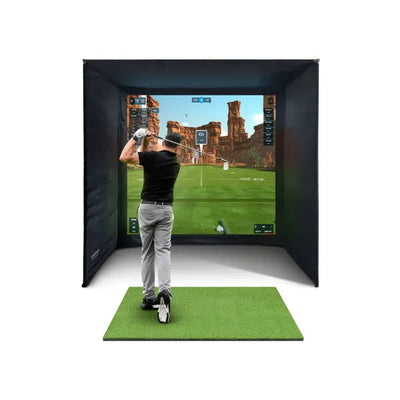

One of the smartest things about buying a home golf simulator is that you do not have to buy everything at once. Many UK golfers start with a budget-friendly setup around 2,000 to 3,000 pounds, then upgrade individual components over months or years. The upgrade path from a radar-based launch monitor to a camera-based premium system is well-trodden, and understanding it before you buy saves you money at every stage.
This guide maps the complete home golf simulator upgrade path from entry-level to premium and tells you exactly what to upgrade first, what to upgrade last, and when each upgrade makes the biggest difference to your game. Whether you are starting with a Mevo Gen 2 and dreaming of a GC3, or wondering if you should just buy the premium bundle from day one, this article has the answers.

The Three Tiers of Home Golf Simulator Setup in the UK
Before planning upgrades, it helps to understand where each tier sits in terms of price, accuracy, and features. UK simulator setups broadly fall into three categories, each serving different needs and budgets.
Tier 1: Entry Level (2,000 to 3,500 pounds)
This is where most UK golfers start. A radar-based launch monitor like the FlightScope Mevo Gen 2 bundle provides solid ball data including carry distance, ball speed, spin rate, and launch angle. You pair it with a basic impact screen, a hitting mat, and a standard projector. The total package gets you playing simulated rounds on software like E6 Connect or Awesome Golf. Accuracy is good enough for most handicap golfers, typically within 2 to 3 yards on carry distance. The main limitation is fewer data points compared to camera systems, and club data relies on metallic stickers attached to the clubface.
Tier 2: Mid-Range (5,000 to 8,000 pounds)
The mid-range tier centres on camera-based launch monitors like the Foresight GC3S bundle. Camera systems photograph the ball at impact, giving you far more accurate spin data including spin axis and removing the need for metallic stickers. The GC3S is the sweet spot for most serious UK simulator owners as it delivers premium-level accuracy at a manageable price. You also typically upgrade the enclosure, mat, and projector at this tier to match the monitor quality.
Tier 3: Premium (8,000 to 15,000+ pounds)
Premium setups use top-tier launch monitors like the Foresight GC3 or GCQuad. These add overhead cameras for comprehensive club data including face angle, club path, angle of attack, and dynamic loft alongside ball data. The enclosure is typically a full SimSpace with a premium impact screen, a multi-surface hitting mat, and a short-throw projector with high lumens. This tier is used by PGA professionals and club fitters across the UK.
What to Upgrade First on Your Home Golf Simulator
This is the question every UK simulator owner asks within six months of their first setup. The answer depends on what currently limits your experience the most. Here is the priority order that gives you the biggest improvement per pound spent, based on feedback from hundreds of UK golfers who have walked this exact upgrade path.

Priority 1: The Hitting Mat (200 to 500 pounds)
If you started with a basic rubber-backed mat, upgrading to a premium hitting mat is the single best bang-for-buck improvement you can make. A poor mat causes wrist strain over time, gives unrealistic turf interaction that teaches bad habits, and does not let you practise different lies. A quality mat like a Fiberbuilt or TrueStrike gives realistic strike feel, reduces joint impact significantly, and lasts for years of daily use. This upgrade improves every single session from day one, regardless of what launch monitor you own.
Priority 2: The Impact Screen (150 to 400 pounds)
A basic white screen or cheap import dulls the projected image and can develop tears after heavy use. Upgrading to a triple-layer impact screen like the SimSpace Platinum improves image quality dramatically. Colours are sharper, the image is brighter and more vivid, and ball marks are virtually invisible even after thousands of hits. A good screen also absorbs ball impact more quietly, which matters enormously if your simulator room shares a wall with your living room or bedroom.
Priority 3: The Projector (400 to 1,200 pounds)
Most budget bundles include a standard 1080p projector with around 3,000 lumens. This works in a pitch-dark garage but washes out with any ambient light at all. Upgrading to a short-throw projector with 3,500 or more lumens and native 1080p or 4K resolution transforms the visual experience completely. Short-throw projectors also let you mount the unit closer to the screen, reducing the room depth needed. See our projector guide for specific model recommendations and mounting advice.
Priority 4: The Enclosure (800 to 2,000 pounds)
Many entry-level setups use a basic frame with side nets or even a wall-mounted screen with no enclosure at all. Upgrading to a proper enclosure like the SimSpace adds side panels that catch mishits safely, a foam-padded frame that protects you and your walls, and a professional appearance that transforms the room into a genuine golf studio. It also improves acoustics significantly. Read our enclosure guide for a full comparison of your options.
Priority 5: The Launch Monitor (3,000 to 6,000 pounds)
The launch monitor is deliberately last on this list, and that surprises most people. It is the most expensive single component, but upgrading it only makes sense once everything around it is already at a decent level. There is no point owning a 5,000 pound launch monitor if you are projecting onto a bedsheet with a dim projector and hitting off a thin rubber mat. Upgrade the environment first, then upgrade the brain of the system when you can truly appreciate the accuracy difference.
When to Upgrade Your Home Golf Simulator Launch Monitor
The launch monitor upgrade is the biggest single investment in the entire upgrade path. Here are the signs that tell you it is time to make the move from radar to camera technology.
You want accurate spin axis data. Radar-based monitors like the Mevo Gen 2 measure total spin but not spin axis. If you are working on shot shaping including draws, fades, and controlled curves, you need a camera system that measures spin axis directly. The GC3S is the most popular upgrade for exactly this reason.
You are tired of metallic stickers. Radar monitors that use Doppler effect need metallic dots on the clubface to track club data. Camera systems do not require these at all. If the sticker routine is annoying you and slowing down your practice sessions, a camera upgrade eliminates it entirely and permanently.
You want club data for fitting. If you want face angle, club path, angle of attack, and dynamic loft measurements, the Foresight GC3 adds an overhead camera unit providing all of this data. The GC3S provides ball data only, which is more than enough for most golfers who are not doing club fitting at home.
You play competitive online leagues. Some online simulator leagues and competitions require camera-based launch monitors for accuracy verification. If you want to enter competitions on GSPro or E6 Connect, check their specific requirements before assuming your current monitor qualifies.

The Most Common Home Golf Simulator Upgrade: Mevo Gen 2 to GC3S
This is the most common upgrade path in the UK market right now. Here is exactly what changes when you move from the FlightScope Mevo Gen 2 to the Foresight GC3S and whether the price difference is justified.
Accuracy: The GC3S uses high-speed cameras to photograph the ball at impact rather than tracking it with radar. Carry distance accuracy improves from plus or minus 2 to 3 yards to plus or minus 1 yard. Spin accuracy improves even more significantly as the GC3S measures spin axis directly rather than inferring it from trajectory.
Setup: The Mevo Gen 2 sits behind you and needs 6 to 8 feet of distance from the ball to work correctly. The GC3S sits beside the ball on the floor, requiring less total room depth. No metallic stickers are needed on your clubs, which simplifies every practice session.
Software: Both monitors support E6 Connect, Awesome Golf, and GSPro. The GC3S additionally works with FSX Play, which is Foresight own simulator software featuring over 100 courses including many famous championship layouts.
Price difference: The GC3S bundle typically costs 2,500 to 3,500 pounds more than the Mevo Gen 2 bundle. That premium buys you measurably better accuracy, a more streamlined user experience, and broader software compatibility.
The GC3S to GC3 Upgrade: When It Makes Sense
The jump from GC3S to GC3 is smaller than the Mevo to GC3S jump. The GC3 adds an overhead camera bar that provides comprehensive club data alongside the ball data. Ball data accuracy between the two is virtually identical because both use the same photometric technology for ball measurement.
The GC3 is worth the upgrade if you are a low-handicap golfer working with a coach who needs club data, if you do club fitting at home regularly, or if you simply want the most complete data set possible from your setup. For the majority of UK golfers playing for enjoyment and general improvement, the GC3S provides everything needed. Read our detailed GC3 vs GC3S comparison for the full data breakdown.
Complete Home Golf Simulator Upgrade Timeline
Here is a realistic upgrade timeline that many UK golfers follow, spreading the total cost over 12 to 24 months so that the financial impact is manageable.
Month 0: Buy your entry-level bundle with Mevo Gen 2, basic enclosure, hitting mat, and standard projector. Total investment approximately 2,500 to 3,500 pounds. Start playing and practising immediately.
Month 3 to 6: Upgrade the hitting mat and impact screen. By now you have had enough sessions to know exactly what bothers you most about the current setup. Total upgrade cost approximately 300 to 700 pounds.
Month 6 to 12: Upgrade the projector to a short-throw model. The image quality improvement is immediately obvious and transforms the visual experience of every session. Total upgrade cost approximately 500 to 1,200 pounds.
Month 12 to 18: Upgrade the enclosure to a SimSpace or similar premium unit. The room now looks and feels like a professional golf studio. Total upgrade cost approximately 800 to 2,000 pounds.
Month 18 to 24: Upgrade the launch monitor to a GC3S or GC3. By now your environment is premium-quality and the monitor upgrade completes the system. Sell your Mevo Gen 2 to offset the cost. Total upgrade cost approximately 3,000 to 6,000 pounds minus resale value.
The total spent over two years is similar to buying a premium bundle from day one, but you spread the cost across your budget, learn what genuinely matters to you through experience, and never have a single month where you cannot play golf at home.

Resale Value: Funding Your Upgrades
One underappreciated benefit of the incremental upgrade path is that your old components retain significant value on the secondhand market. A used Mevo Gen 2 in good condition sells for 800 to 1,200 pounds on eBay and Facebook Marketplace. A basic projector resells for 150 to 300 pounds. Even hitting mats and screens have resale value if they are in reasonable condition. Check our resale value guide for current UK market prices on all simulator components.
Many UK golfers also keep their old radar monitor as a portable outdoor practice device. The Mevo Gen 2 runs on battery power and works perfectly outdoors at the driving range or in the back garden, which is something an indoor-optimised camera system simply cannot do.
Common Upgrade Mistakes to Avoid
Upgrading the launch monitor first. As covered above, this is the most expensive upgrade and gives the least noticeable return if your screen, mat, and projector are still entry-level quality. Upgrade the environment first and you will appreciate the monitor upgrade far more when you eventually make it.
Ignoring room dimensions. Before upgrading your enclosure, measure your room carefully and check clearances. A larger enclosure needs more ceiling height, more width for your swing, and more depth for the projector throw distance. Check our room size guide before placing any order.
Buying components that do not match. Make sure your new projector throw ratio matches your room depth. Make sure your new screen size matches your enclosure frame dimensions. Make sure your new launch monitor is compatible with your preferred simulator software. Mismatched components lead to frustrating compromises.
Spending on software subscriptions before hardware. Premium software subscriptions like FSX Play annual plans and E6 Connect premium tiers make sense once your hardware can display them properly. A beautifully rendered 4K golf course looks identical to a standard course when projected through a dim 720p projector onto a wrinkled bedsheet.
Frequently Asked Questions
Can I upgrade my simulator one piece at a time?
Yes, and this is the recommended approach for most UK golfers. Start with a budget bundle, then upgrade individual components over 12 to 24 months as your budget allows and your experience tells you what matters most. The hitting mat and impact screen are the best first upgrades, followed by projector, enclosure, and finally the launch monitor.
Is the Mevo Gen 2 good enough to start with?
The Mevo Gen 2 is an excellent starting point. It provides accurate carry distance and ball speed data, works with all major simulator software packages, and costs significantly less than camera-based systems. Many golfers use it happily for years before considering an upgrade.
What is the total cost of a fully upgraded setup?
A fully upgraded home golf simulator in the UK typically costs between 8,000 and 15,000 pounds depending on the launch monitor chosen. Spread over two years of incremental upgrades, this works out to approximately 350 to 625 pounds per month, which is comparable to a golf club membership plus weekly range sessions and green fees.
Should I buy a premium bundle from the start?
If your budget allows it, buying a complete premium bundle saves time and ensures all components are properly matched. Browse our simulator bundles to see complete packages at every price point. However, the upgrade path lets you spread costs over time and learn what matters most to you before committing to premium components.
Will my old launch monitor have resale value?
Yes. Radar-based launch monitors like the Mevo Gen 2 hold their value well on the UK secondhand market. Expect to recover 60 to 75 percent of the original purchase price if selling within the first two years. This significantly offsets the cost of upgrading to a camera-based system.
Ready to start your upgrade journey? Read the complete home golf simulator UK buyers guide or browse our simulator bundles to find the right starting point for your budget and goals.

Free Home Golf Simulator Design Consultation
Not sure on space, screen or launch monitor? Chat directly with Tom, OpenGolfer’s founder — he has designed hundreds of home setups and will tell you exactly what fits your room and budget.
- Send your room size (or a photo) — get a tailored layout and spec for your space, ceiling height included
- Personal replies from a real golfer, not a call centre
- Honest advice on what to buy — and what not to
Usually replies within the hour, 8am–8pm · prefer to talk? 02033 768500



Leave a comment