
Can Your Golf Simulator Projector Double as a TV? (Sky, Films & Sport)

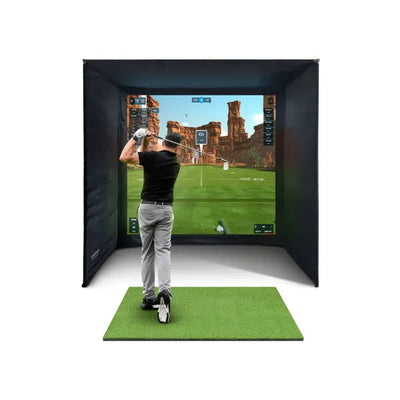
James, a customer planning his golf room build, asked us a question on WhatsApp that I hear more and more: “If I'm spending proper money on a projector for the simulator, can it double as the telly? Sky, films, the football on a Saturday?” It's the dual-use dream — golf simulator by day, cinema room by night — and I'm pleased to report the answer is a straightforward yes. A projector has no idea it's a “golf projector”; it just displays whatever you plug into it. Done right, the golf-room-slash-lounge is genuinely one of the best-value rooms in the house: you get a simulator, a 3m-wide cinema screen and a sports bar for the price of one fit-out. But a projector chosen only with golf in mind can make a frustrating telly, and a few decisions — inputs, brightness, mounting, where the sofa goes — are much easier to get right before you buy than after. Here's exactly what I told James to check.

Yes — a projector is just a big telly without the tuner
Strip the mystique away and a projector is a display with HDMI sockets. Your simulator PC or laptop goes into one input; your TV source — a Sky box, a streaming stick, a games console — goes into another. Golf night, you select input one. Film night, input two. That's the whole trick, and it's why the dual-use room works so well: the expensive parts (projector, screen, dark-ish room) are already bought for the golf.
What a projector doesn't have is a TV tuner or, usually, decent speakers — so your channels come from a plugged-in source and your sound comes from a soundbar or speakers. Neither is a problem; both need a socket and a cable planned in. More on that below.
The four things to check before you buy
1. HDMI inputs — you want at least two
This is the spec that makes or breaks daily dual use. With two or more HDMI inputs, the sim PC and the TV source both stay permanently plugged in, and switching is one button on the remote. With a single input, every film night starts with someone up a ladder swapping cables behind a ceiling-mounted projector — which is exactly as tedious as it sounds, and in my experience means the “TV mode” quietly stops being used. Two inputs minimum; three is luxury.
2. Smart sticks and Sky
The simplest TV source is a streaming stick — Fire TV, Google TV, Apple TV box — pushed into one of those spare HDMI ports and powered off USB or a nearby socket. That alone gets you Netflix, iPlayer, Prime and most of the football. For Sky specifically, it's no different from a normal telly: a Sky Q box or Sky's streaming puck outputs over HDMI like any other source, so Sky Sports on a 3m screen is absolutely on the menu. The one planning point: whatever source you choose needs power and (for streaming) decent Wi-Fi at the projector position, so add a double socket up there when you're running cables.
3. Lens shift — the underrated dual-use feature
Cheaper projectors aim the image by physically tilting the unit and then “fixing” the distorted picture with digital keystone correction, which softens it — noticeable on crisp 4K film text. A projector with optical lens shift can nudge the image up, down or sideways optically, with zero quality loss, without moving the unit. For a dual-use room that's gold: you can set the picture perfectly on the impact screen for golf, then trim its position for sofa viewing — or simply compensate for a mounting position that had to suit the room rather than the textbook — all from the remote, all pin-sharp.
4. Brightness — the daytime TV question
Golf simulators are mostly used with the blinds down, so sim-only buyers get away with modest brightness. Daytime telly is a different job: Saturday lunchtime football with light coming in needs roughly 3,000 ANSI lumens to look punchy, where a darkened evening film is happy at 2,000–2,500. So either buy brighter than golf alone requires, or fit proper blackout blinds and watch your sport in cinema conditions — which, honestly, is no hardship. What you shouldn't do is buy a dim projector for a bright south-facing room and expect washed-out rugby to be fun.
The dual-use checklist at a glance
| Feature | Why it matters for TV use | What to look for |
|---|---|---|
| HDMI inputs | Sim PC and TV source both stay plugged in | 2 minimum, 3 ideal |
| Brightness | Daytime sport with ambient light | ~3,000 ANSI lumens, or blackout blinds |
| Lens shift | Reposition the image with no quality loss | Optical shift, not just digital keystone |
| 4K support | Films and sport on a 3m-wide image | 4K input, decent contrast spec |
| Audio out | Projector speakers won't fill a room | HDMI ARC, optical or 3.5mm to a soundbar |
| Power at the mount | Streaming stick + projector both need it | Double socket at the projector position |

Mounting and cables: plan both jobs at once
For a dual-use room, ceiling mounting behind the hitting position wins almost every time. It's the best golf position — beam over your head, nothing on the floor to hit — and it's also the best cinema position, because the projector ends up behind or above the sofa where nobody's head crosses the beam. A floor enclosure, fine for a golf-only garage setup, is a worse housemate for film night: a box on the floor in your lounge with the beam rising from shin height straight through anyone walking to the sofa.
Cable-wise, remember the projector doesn't connect to the launch monitor directly. A radar unit like the FlightScope Mevo Gen2 talks wirelessly to the PC, laptop or iPad running your sim software — the official requirements are on FlightScope's site — and it's that device that feeds the projector over HDMI. So the runs you're planning are: HDMI from the sim device to the projector, the streaming stick living at the projector itself, power at the mount, and sound down to wherever the soundbar lives. If the room's still being built, first-fix two HDMIs and power to the mount point and thank yourself later. The full geometry homework — throw ratio, mounting distance, screen size — is in our guide to choosing a golf simulator projector, and it applies unchanged to the TV job because it's the same image on the same screen.
The screen: your impact screen is the cinema screen
Here's the part that surprises people: you don't need a second screen. The impact screen you hit golf balls into is the cinema screen — but screen quality suddenly matters twice. Budget impact screens with a coarse, heavily perforated weave look acceptable displaying sim graphics, then distinctly bedsheet-ish showing a film, with visible texture and soft detail. A tight-weave, projection-grade surface is a different experience: we run 4K on the SimSpace platinum screen and the first time I tested a film on it after a golf session, the picture quality honestly embarrassed the telly in our lounge — a properly cinematic image at a size no TV in your budget will match. If dual use is the plan, the screen is the last place to save £100.

The sofa problem: one layout that works for both
The layout tip I gave James, and the one I'd give anyone drawing this room: put the sofa against the back wall, behind the hitting position, and mount the projector on the ceiling just in front of it. Golf mode: the sofa is out of the swing, spectators sit safely behind the golfer with a perfect view of the screen. TV mode: you're sitting centred on the screen at maximum viewing distance, and because the projector hangs forward of your seating position, nobody's head shadows the picture when they stand up mid-film. Check seated head height clears the beam — stand a torch at the proposed mount and sit someone tall on the sofa — and you've got a room that swaps modes in the time it takes to change input.
The catch is depth: hitting position, swing space and a sofa behind it all add up, which is why the dual-use room needs honest measuring before anything's ordered — our simulator room size guide gives the minimum, comfortable and ideal figures. The happy coincidence is that a room deep enough to swing a driver in puts the sofa at a lovely viewing distance for a 3m-wide picture anyway. If the maths genuinely doesn't work indoors, don't torture the room: a customer of ours in exactly that position put a heavy-duty golf cage and mat bundle in the garden for full swings, kept a compact net-and-monitor setup inside, and let the lounge stay a lounge. And if you're still choosing the unit that feeds all of this, start with our launch monitor range — the projector shows whatever the sim device sends it.
Frequently asked questions
Can I watch Sky through a golf simulator projector?
Yes. A Sky Q box or Sky's streaming puck connects over HDMI exactly as it would to a television. Plug it into a spare HDMI input on the projector (or an HDMI switch), add a soundbar for audio, and Sky Sports runs at 3m wide.
Is an impact screen good enough to watch films on?
A good one is. Tight-weave, projection-grade screens like the SimSpace platinum show genuinely crisp 4K — we tested films on ours and it outperforms most living-room TVs for sheer impact. Coarse budget weaves show visible texture and soften detail, so if dual use matters, don't economise on the screen.
How bright does a projector need to be for daytime TV?
Around 3,000 ANSI lumens holds up with ambient daylight in the room. Below that, either fit blackout blinds — which you may want for golf anyway — or accept that daytime viewing will look washed out. Evening films are comfortable at 2,000–2,500 lumens in a darkened room.
Do I have to move the projector between golf and TV modes?
No — that's the beauty of it. Same projector, same ceiling position, same screen; you're only changing HDMI input. If the image needs a nudge between modes, optical lens shift repositions it from the remote with no quality loss and no ladder.

Free Home Golf Simulator Design Consultation
Not sure on space, screen or launch monitor? Chat directly with Tom, OpenGolfer’s founder — he has designed hundreds of home setups and will tell you exactly what fits your room and budget.
- Send your room size (or a photo) — get a tailored layout and spec for your space, ceiling height included
- Personal replies from a real golfer, not a call centre
- Honest advice on what to buy — and what not to
Usually replies within the hour, 8am–8pm · prefer to talk? 02033 768500


Leave a comment