
Filming Your Swing in a Garden Cage: iPad Mounts, Tripods & Practice With Intention

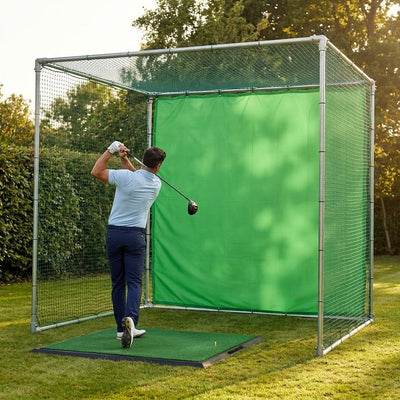
A question from Kelvin’s WhatsApp thread, while he was planning a garden cage his kids would practise in as much as he would: “how do people film their swings in these — is there a mount for an iPad or do I need a tripod?” Great question, because a cage plus a camera is a different machine from a cage alone. Video is the cheapest coaching tool in golf — free, in your pocket, brutally honest — and a garden cage is the perfect studio for it: same lie, same background, same distances every single session. Here’s how to rig it, where to put the camera, which free apps to use, and how to make sure the kids (and you) are actually practising rather than just bashing balls.
OUR #1 GARDEN CAGE, READY TO PLAY
The Pro Golf Cage & Hitting Mat Bundle pairs a galvanised 42mm steel cage with an archery-grade impact panel and a tour-density mat — a buy-once, all-weather practice station for the UK garden. Best seller, includes the free 90-day practice programme.
Shop the Pro Golf Cage Bundle →Mounting an iPad or phone on the cage frame
The good news: a steel-framed cage is a ready-made camera rig. The 42mm galvanised tube on our heavy-duty garden golf cage is exactly the diameter that cheap clamp mounts — the £10–20 kind sold for bikes, mic stands and gym equipment — are made to grip. A spring-jaw phone clamp goes straight on; for an iPad, spend slightly more on a screw-tightened clamp with a ball head, because tablets catch the wind like a small sail and a spring clip will eventually donate one to the turf. I’ve run a phone clamp on my own cage frame for two seasons: mount it on an upright at chest height for face-on, and it lives there permanently, ready in the ten seconds it takes to drop the phone in. Two practical rules we’ve learned: mount on the frame, never the netting (the net moves with every shot and wrecks the footage), and position any mount outside the ball’s line of fire — behind you or level with you, never between you and the impact panel.
Tripod placement: the two angles that matter
Coaches use two views, and your cage has room for both. Down-the-line (DTL): camera behind the ball, looking along the target line toward the impact panel, lens at hand height (roughly hip height when you’re at address). This is the view for swing plane, takeaway and where the club drops from the top. In a cage setup you’ll typically stand the tripod 2–3m behind the ball — conveniently, right where a radar launch monitor lives, so the two share real estate happily. Face-on: camera directly opposite you, square to your chest, lens at sternum height — this is the frame-mount’s natural home on the cage upright. Face-on shows ball position, weight shift and impact. Get the heights right and hold them constant: footage from the same two positions every week is what makes progress visible.
| Angle | Camera position | Lens height | What it shows |
|---|---|---|---|
| Down-the-line | 2–3m behind the ball, on the target line | Hand height at address | Swing plane, takeaway, path |
| Face-on | Directly opposite, square to chest (cage upright) | Sternum height | Ball position, weight shift, impact |
One habit that pays off from day one: film a couple of swings before you change anything, so you have an honest baseline. And know what you’re looking for at each angle — from down-the-line, check that the club roughly traces the shaft plane you set at address; from face-on, watch where your head and lead hip are at the top versus impact. You don’t need a coaching qualification to spot the big stuff: a sway, a club dropped miles under plane, a ball position that’s wandered forward. When you do work with a coach (in person or over one of the apps’ lesson features), footage from these two standard positions is exactly the format they’ll ask for, so you’re building a library they can use from your very first session.
The free apps that do the work
You don’t need to buy software. Your phone’s built-in slow-motion mode (240fps on most recent iPhones and Androids) is genuinely good enough to see clubface and body positions. One step up, the free tiers of the dedicated swing apps add the tools coaches actually use: V1 Golf and OnForm both give you frame-by-frame scrubbing and on-screen drawing so you can trace your swing plane against a line; Swing Profile auto-detects the swing and clips the video for you, which is brilliant with kids because nobody has to press record between shots. And if a Garmin launch monitor ends up in your cage, the free Garmin Golf app pairs the video with shot data. Start with the phone’s slo-mo; add an app when you find yourself wanting to draw lines.
Practising with intention (especially with kids)
This was the real heart of Kelvin’s thread — he didn’t want a cage his kids would just empty buckets into. The camera is the answer, because it converts hitting into a feedback loop. The structure we recommend to every family cage customer: hit three, watch one. Three balls at a specific target on the impact panel with a specific intention (“start it right of the tape line”), then thirty seconds reviewing the last swing on video before the next three. A 40-ball session with review beats a 200-ball thrash — juniors who can watch themselves on an iPad clipped to the frame tend to stop swiping and start rehearsing positions, simply because they get curious about what they look like. A strip of tape on the impact panel as a target, a tee-gate drill on the mat, and the camera running: that’s a junior practice station, not a ball pit. Our garden practice guide has more on keeping sessions structured (and the neighbours friendly).
Siting the cage for cameras: two things to check before it goes up
Look up before you site it. Overhanging trees drop debris — leaves, twigs, seed pods — straight onto the roof net, where it sits until you brush it off. I know because my own cage corner sits under a neighbour’s ash and every autumn I pay for it. Debris on the roof net also means specks in the top of every DTL frame. If you can shift the cage clear of the canopy, do. Then think about the sun. UK sun sits low for most of the year, and a camera pointing into it gives you a silhouette with a swing somewhere inside it. Ideally, site the cage so your face-on camera shoots with the sun behind it — roughly, camera on the south side looking north — and remember the light moves: the Met Office daylight tables will tell you where the sun will be at your usual practice hour. An overcast day, which Britain generously provides, is actually the best filming light there is: soft, even, shadow-free. If you’re still choosing where the cage goes, the siting section of our step-by-step setup guide covers clearances, access and ground prep alongside the camera angles.
A simple rig that works
To make this concrete, here’s the rig I’d spec for a family cage from scratch, all-in under £50 on top of the phone you already own: one screw-clamp ball-head mount on the cage upright for face-on; one cheap aluminium tripod (or a second clamp mount on a fence post) for DTL; a strip of white gaffer tape on the impact panel as the target; and the phone’s slo-mo mode. That’s it. Every upgrade after that — apps, a launch monitor from the launch monitor range, a second camera — slots into the same two positions you’ve already established.
Frequently asked questions
How do I attach an iPad to a golf cage frame?
Use a screw-tightened clamp mount with a ball head, sized for 40–45mm tube — the kind sold for gym rigs and mic stands fits a 42mm cage frame perfectly. Spring clips are fine for phones but risky for tablets outdoors.
Where should the camera go for down-the-line video?
On the target line, 2–3m behind the ball, lens at hand height. In a garden cage that’s the strip behind your hitting position — the same zone a radar launch monitor uses.
What’s the best free app for recording a golf swing?
Start with your phone’s built-in slow-motion camera. When you want drawing tools and frame-by-frame scrubbing, the free tiers of V1 Golf and OnForm cover it; Swing Profile auto-clips swings, which is ideal for kids’ sessions.
Can kids use a garden golf cage safely for filmed practice?
Yes — that’s half the point of a cage: every shot is contained. Keep mounts and tripods behind or level with the hitting position, one child hitting at a time, and use the hit-three-watch-one structure to keep sessions purposeful.
The studio comes first
The Pro Golf Cage bundle — 42mm steel frame your mounts clamp straight onto, archery-grade impact panel to aim at, and an all-weather mat — is the practice studio the camera turns into a coach.
Build Your Practice Studio →
Free Home Golf Cage Setup Design Consultation
Not sure on size, base or mat? Chat directly with one of our experts — real golfers who practise from their own garden cage most days and has designed hundreds of home setups.
- Send a photo of your garden with rough measurements — get a tailored layout and spec for your space
- Personal replies from a real golfer, not a call centre
- Honest advice on what to buy — and what not to
Usually replies within the hour, 6am–10pm · prefer to talk? 02033 768500


Leave a comment