
Launch Monitor Only vs Full Golf Simulator: Which Should You Buy?

Should you buy a launch monitor on its own, or go the whole way to a full golf simulator? It's the fork-in-the-road question behind most of the enquiries I take, and the price gap makes it worth getting right: a capable launch monitor starts around £500, while a proper simulator bundle starts around £3,000 and climbs well past £10,000. Having sold and installed both for years — and having started my own home setup with a bare launch monitor and a net — I can tell you the right answer depends far less on budget than people assume, and far more on how you'll actually practise. Here's the honest decision guide.
What a launch monitor on its own actually gives you
A launch monitor is the measuring device: radar or cameras that capture ball speed, carry distance, launch angle, spin, club path and more, displayed on a phone, tablet or PC. Buy one on its own and pair it with a net or cage, and you get:
Looking for a ready-made setup? Our Pro Golf Cage & Hitting Mat Bundle (3m × 3m × 3m) covers exactly this — available cage-only or with a professional hitting mat.
- Every number that matters. Carry distances for every club, dispersion patterns, strike quality, gapping. This is the data that actually improves your golf — most coaches will tell you the numbers matter more than the pretty picture.
- Range sessions at home. Mat, net, monitor, tablet: a full practice session in the garage or garden in the time it takes to drive to the range. After a few hundred shots at home you'll know your real distances better than most club golfers ever do.
- A unit you can take anywhere. Most monitors at this level are portable — home net today, driving range tomorrow, and radar units work brilliantly outdoors with real ball flight.
- A modest footprint and budget. No projector, no impact screen, no gaming PC. A net, a decent mat and the monitor itself, from well under £1,500 all-in at the entry level.
What you don't get is the visual: no rendered ball flight on a screen in front of you, no courses, no playing 18 holes on a winter evening. You hit into a net, the flight appears as a trace on a tablet, and the experience is "practice" rather than "golf".
What a full simulator adds
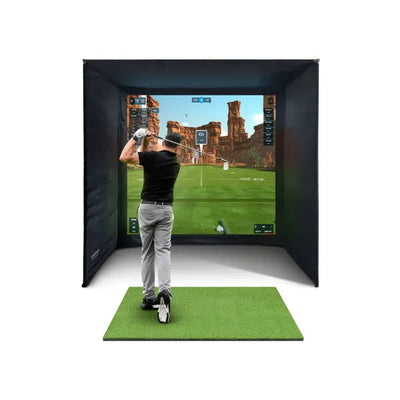
A full simulator takes the same launch monitor and wraps it in an enclosure with an impact screen, a projector, a hitting mat and simulation software. The launch monitor still does the measuring — the rest is presentation. But that presentation changes everything about how the setup gets used:
- You watch the ball fly. Hitting into a life-size projected fairway and seeing your actual shot shape play out is a completely different experience from reading a trace on a tablet. It's the difference between a treadmill and a run outside.
- You play golf, not just practise. Software like GSPro and E6 Connect gives you real courses, competitions and online play. On a January evening, "18 holes at St Andrews" gets you into the room; "50 seven-irons into a net" often doesn't.
- The family uses it. This is the pattern I see over and over: launch-monitor-only setups get used by the golfer; full simulators get used by the household. One customer in Leeds told me his sim room logged more hours from his two teenagers than from him.
- Practice quality goes up too. Seeing flight on a screen makes feedback instant and intuitive — you self-correct faster when you can see the block cut sail right rather than deciphering it from numbers.
The costs of that upgrade: money (roughly £2,000–£4,000 on top of the monitor for enclosure, screen, projector and mat), space (you need a dedicated room-sized area — see the room size guide), and permanence — a full sim is an installation, not a gadget.
The cost tiers, honestly
Here's how the market actually breaks down in the UK in 2026. Prices are loose ranges — see the full cost breakdown for line-by-line detail.
| Tier | What you get | Rough all-in cost |
|---|---|---|
| Swing-stick / entry | PhiGolf-style sensor games — fun, not measurement | Around £200 |
| Launch monitor + net | Mevo-class radar monitor, net or cage, mat, tablet app | Around £1,000–£2,000 |
| Full simulator, value | Radar bundle — monitor, enclosure, impact screen, mat (e.g. Mevo Gen 2 bundle) plus projector | Around £3,000–£4,500 |
| Full simulator, premium | Camera-based bundle (e.g. Foresight GC3S), projector, gaming PC, GSPro | Around £8,000–£15,000 |
| Luxury / commercial-grade | Golfzon Wave class, bespoke room fit-out | £15,000+ |
Note the jump between rows two and three: roughly £2,000 buys the transformation from "practice station" to "simulator". Whether that £2,000 is the best money you'll spend or an unnecessary luxury is exactly what the next two sections answer.
Who should buy just a launch monitor
I recommend the monitor-only route without hesitation when one or more of these applies:
- You're space-limited. If you can't give up a 5m × 3.5m × 2.8m space permanently, a monitor and net you can fold away beats a simulator you can't fit. Garden cage in summer, garage net in winter.
- You're a practiser, not a player. Some golfers genuinely love structured range work — gapping sessions, wedge matrices, dispersion drills. If that's you, the data is the product and the screen is decoration.
- You want to spend under £2,000 total. A good radar monitor like the FlightScope Mevo Gen 2 plus a quality net and mat is a complete, no-compromise practice setup at this budget. A £2,000 "full simulator" built from the cheapest possible parts, by contrast, is compromise everywhere.
- You mostly practise outdoors or at the range. Radar monitors are portable and thrive outdoors; a fixed simulator room can't come with you.
Browse the launch monitor range and my 2026 launch monitor comparison guide to match a unit to your budget — the guide covers which models are radar vs camera and what each needs for space.
Who should go straight to a full simulator
Equally, there are buyers I steer straight past the monitor-only stage:
- You want to play golf at home, not just practise. If the January-evening picture in your head is playing courses with a beer, not hitting 60 balls into a net, buy the simulator. I've seen too many monitor-only setups gather dust because the owner found net practice boring within a month.
- The family is part of the plan. Nothing about a net and a tablet excites a 12-year-old. A projected course does. If the justification for the spend includes "the kids will use it", it needs a screen.
- You have the room and the budget together. Buying a matched bundle — monitor, enclosure, screen and mat sized to each other — is cheaper and cleaner than assembling the same parts in two stages, and you skip the awkward months of owning half a simulator.
- You're replacing club membership or lessons spend. At £3,000–£4,500 for a value bundle, a full sim costs roughly two to three years of an average UK club subscription and gets used year-round. Framed that way, plenty of buyers find the full sim easier to justify than the halfway house.
The simulator bundle collection is built around exactly this buyer, and the complete UK buyers guide walks through every decision from monitor tech to software.
The upgrade path: monitor first, simulator later
Here's the good news if you're torn: this isn't a one-way door, provided you choose the first purchase carefully. The launch monitor is the heart of any future simulator, so buy a monitor that simulator software supports well — the Mevo Gen 2, for instance, connects to E6 Connect and other platforms, so the same unit that runs your net sessions today can drive a projector and impact screen next year (check current software compatibility on flightscope.com before buying, as supported platforms change). I started exactly this way myself: monitor and net first, then enclosure, screen and projector eighteen months later, and the only thing I'd change in hindsight is that I'd have bought the bigger mat from day one.
Two rules make the upgrade path cheap instead of painful. First, avoid closed-ecosystem monitors that only talk to their own app — a bargain unit that no simulator software supports is a dead end. Second, when you do upgrade, buy the enclosure, screen and mat as a matched package rather than mixing sizes; mismatched screen-to-enclosure sizing is the most common and most annoying self-build fault I get called about.
Launch monitor vs full simulator FAQ
Is a launch monitor worth it without a simulator?
Yes — for improvement-focused golfers it's arguably the best value in golf equipment. Real carry numbers, gapping and dispersion data from home practice will do more for your scores than most club upgrades, for £500–£1,500 plus a net.
How much more does a full simulator cost than a launch monitor?
Budget roughly £2,000–£4,000 on top of the monitor for an enclosure, impact screen, projector, mat and software. A complete value bundle like the Mevo Gen 2 simulator package lands around £3,000–£4,500 all-in versus £1,000–£2,000 for the same monitor with a net.
Can I turn a launch monitor into a full simulator later?
Usually, yes — if the monitor is supported by mainstream simulator software (E6 Connect, GSPro and similar). Check software compatibility before you buy the monitor; that single spec decides whether your upgrade path is a simple add-on or a fresh start.
Which is better for improving my golf?
The data is identical — the same monitor measures the shot either way. The honest difference is usage: full simulators get used more because they're more fun, and volume beats everything. Buy whichever one you'll genuinely step into on a wet Tuesday in February.


Free Home Golf Simulator Design Consultation
Not sure on space, screen or launch monitor? Chat directly with Tom, OpenGolfer’s founder — he has designed hundreds of home setups and will tell you exactly what fits your room and budget.
- Send your room size (or a photo) — get a tailored layout and spec for your space, ceiling height included
- Personal replies from a real golfer, not a call centre
- Honest advice on what to buy — and what not to
Usually replies within the hour, 8am–8pm · prefer to talk? 02033 768500


Leave a comment