
SimSpace Golf Enclosure Review (UK): Sizes, Screens and the Honest Verdict

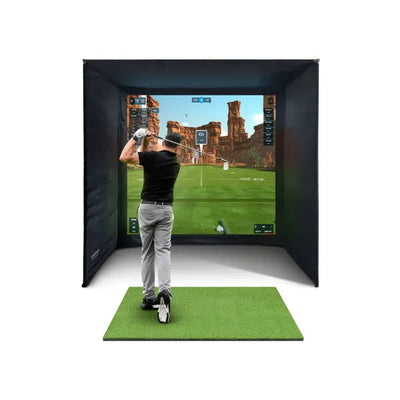
Full disclosure before a single word of this SimSpace enclosure review: we sell these. SimSpace is the enclosure that sits inside most of the home simulator packages we build for UK customers, so I am not a neutral bystander. What I can offer instead is something rarer than neutrality: repetition. I have put these enclosures up in garages, garden rooms, spare bedrooms and one memorably awkward loft conversion, I answer questions about them on WhatsApp most days, and I hear back from owners months after delivery. This is the review I would want to read if I were spending £1,300 to £1,900 on the thing my projector image, my impact screen and frankly my golf balls all depend on.

What a SimSpace enclosure actually is
A SimSpace enclosure is a freestanding frame-and-fabric bay for indoor golf: a sturdy steel pole frame, black surround netting and side panels to contain mishits, and a tensioned impact screen across the front that doubles as your projection surface. You hit real balls into it from a mat a few paces back, a launch monitor reads the shot, and the projector paints the course onto the screen. It is the piece of a simulator build that people spend the least time researching and then stare at for hundreds of hours, because the enclosure is the room once the lights go down.
The range splits two ways. First by footprint: the standard SimSpace enclosure comes in five sizes, SIM 1 through SIM 5, from a compact 2.6m-wide bay up to a full 3×3×3m cage. Second by screen tier: the standard build uses the white 3-layer Platinum impact screen, while the SimSpace UltraMAX upgrades to a high-contrast grey screen and adds a sixth, 4m-wide footprint at the top of the range. Same family, two levels of finish.
Decoding the sizes: SIM 1 to SIM 6
The naming is not self-explanatory, so here is the full size table with current prices for the frame, netting and screen (mats are an optional extra on the standard model, and the launch monitor, projector and computer are always separate):
| Model | Footprint (W × H × D) | Standard price | UltraMAX price |
|---|---|---|---|
| SIM 1 | 2.6 × 2.5 × 1.5m | £1,299.01 | £1,499.99 |
| SIM 2 | 3 × 2.5 × 1.5m | £1,349.01 | £1,549.99 |
| SIM 3 | 3.6 × 2.5 × 1.5m | £1,400.00 | £1,599.99 |
| SIM 4 | 4 × 2.5 × 1.5m | £1,449.99 | £1,649.99 |
| SIM 5 | 3 × 3 × 3m | £1,599.99 | £1,799.99 |
| SIM 6 | 4 × 3 × 3m | — | £1,899.99 |
The crucial thing to understand is the depth figure. SIM 1 to SIM 4 are 1.5m deep: they are screen-surround bays that wrap the impact area, and your hitting position sits out in the room in front of them. SIM 5 and SIM 6 are 3m deep, which makes them proper walk-in cages with far more netting around and above the ball's flight path. If your ceiling allows the 3m height, the deeper models are noticeably more forgiving of the shots you are embarrassed about, which are precisely the shots an enclosure exists for.
Do not confuse enclosure depth with room depth. Whatever you buy, you still need space behind the ball for your swing, and if you are pairing the bay with a radar launch monitor such as a FlightScope Mevo, the radar needs roughly 2.4m behind the ball to read the shot, on top of ball-to-screen distance. Camera units that sit beside or in front of the ball are more forgiving of shallow rooms. Our simulator room size guide walks through the full arithmetic; measure before you order, not after.
The screen tiers: Platinum, UltraMAX grey, and the budget Elite
The screen is where SimSpace earns its reputation, and it is the honest reason I steer people toward this range over cheaper frames with bedsheet-grade screens. The standard enclosures ship with the white 3-layer Platinum impact screen; to be clear, the included white screen and the standalone Platinum are the same range of material, not two different tiers. The Platinum impact screen is also available separately from £399.99 in ten sizes if you are building a DIY bay or replacing a worn screen. It takes real driver speed, projects cleanly and quietens the thump of impact compared with entry-level material.
The UltraMAX's high-contrast grey screen is the upgrade I find hardest to convey in writing and easiest to sell in person. White screens wash out when the room has any ambient light; the grey material holds black levels and colour saturation so the projected image looks closer to a television picture. In a garden room with windows, or any space where you cannot fully black out, the difference every single session is bigger than the £200 gap between tiers suggests. In a windowless garage with a decent projector, the standard white screen is genuinely fine, and I tell people so.
At the bottom of the ladder sits the Elite impact screen from £199.99. It is the entry-level material: perfectly serviceable for slower swing speeds and tighter budgets, but if you carry the ball with any real pace, spend up on the Platinum. A screen is a wear item that lives at the exact point where all the energy in your golf swing arrives; it is a poor place to economise twice.
Living with it: assembly, noise and durability
Assembly is a two-person job in the way flat-pack wardrobes are: technically possible alone, much happier with help. The poles are labelled, the fittings are straightforward and the honest time estimate for a first build is an afternoon, with most of it spent tensioning the screen evenly so the projected image sits flat. Take your time on that step; a rippled screen will annoy you every session, and a well-tensioned one disappears.
After 6 weeks with an UltraMAX SIM 5 in my own testing space, the things I noticed were mundane in the best way. The frame does not creak or walk across the floor under repeated driver strikes. Mishits into the side netting drop dead instead of ricocheting, including the low thin ones that cheaper single-layer bays spit back at shin height. Impact noise is a dull thud rather than a crack, which matters enormously if the bay shares a wall with a bedroom or a neighbour. And the black surround does real optical work: it frames the screen, swallows stray projector light and makes the picture feel bigger than it is.
Durability reports from owners have been reassuring. We found the common wear pattern is exactly where you would predict, a slowly forming bruise patch on the screen at the point where a golfer's stock shot lands, and that is a replacement-screen problem years down the line rather than a frame problem. A customer in Chester who runs one in a converted double garage with three golfing sons, which is about as brutal a duty cycle as domestic golf gets, reported the frame untouched and only the screen showing its workload when he checked in with us months later.
Where SimSpace falls short
No honest review skips this section. First, the 2.5m height on SIM 1 to SIM 4 is workable for most golfers but tighter for very tall players with steep swings; if you are 6'4" with a long driver, stand in the space and rehearse a full swing before committing, or step up to the 3m-tall SIM 5 or SIM 6. Second, these are permanent-footprint bays. They assemble and disassemble, but not nightly; if the space must revert to a car or a dining room every evening, a retractable system is the better tool and this is the wrong product. Third, the price. You can buy a whole enclosure elsewhere for less than the UltraMAX costs, and if your swing speed is modest and your room is dark, a cheaper bay with the Elite screen will do a fair job. You are paying SimSpace money for screen quality, containment and the thing not needing replacing in eighteen months.
The verdict, and who should buy which
My recommendations after a lot of these builds: if you have the ceiling for it, the SIM 5 at £1,599.99 is the sweet spot of the range, a proper full-depth cage at a mid-range price. If your room has ambient light you cannot kill, buy the UltraMAX version of whichever footprint fits; the grey screen is the single biggest picture-quality upgrade per pound in the whole build. If you are on a strict ceiling of 2.5m, the SIM 2 or SIM 3 screen-surround with good side clearance serves most golfers well. And if you would rather have the whole thing specified in one go, the enclosures also come inside our complete simulator packages with launch monitor, projector, screen and mat matched to each other, which removes the compatibility guesswork entirely. Pair whichever you choose with a projector picked for the screen size; our projector guide covers that decision properly.
Frequently asked questions
Will a SimSpace enclosure fit in a UK single garage?
Usually, with care. A typical UK single garage is around 2.4 to 2.7m wide, which rules out everything except the SIM 1 in width, and ceiling height is often the harder constraint. Measure width, depth and the lowest point of the ceiling along the swing arc, then check the SIM 1's 2.6 × 2.5 × 1.5m footprint against it. Double garages comfortably take SIM 3 to SIM 6.
What is the difference between the standard SimSpace and the UltraMAX?
The screen. The UltraMAX uses a high-contrast grey impact screen that holds a dramatically better projected image in rooms with ambient light, and the range adds the 4 × 3 × 3m SIM 6 footprint. The frame concept and containment netting are the same family; you are paying roughly £200 more per size for picture quality.
Can I hit driver into a SimSpace enclosure?
Yes. The Platinum-grade screen material is built for full-speed driver impacts, and the surround netting exists to catch the mishits that miss the screen. The screen is a wear item on any simulator, so a stock-shot bruise patch appearing over years of use is normal and replaceable, not a fault.
Do I need to buy the screen separately?
No. Every SimSpace enclosure includes its impact screen, white Platinum-range or UltraMAX grey depending on tier. The separate Platinum and Elite screen listings exist for DIY frame builds and for replacing a screen that has finally absorbed enough of your golf.
The short version of this review: the SimSpace range is the enclosure I put my own name behind because it is the one that generates the fewest problems after the box is opened. It is not the cheapest way into a bay, and in a blackout room the UltraMAX upgrade is money you can keep. But sized correctly for your space, it is a buy-once piece of the simulator puzzle, and there are few enough of those.
Not sure which option fits your space or budget? Message Tom on WhatsApp for a free consultation — no obligation, real answers from someone who installs this kit weekly.

Free Home Golf Simulator Design Consultation
Not sure on space, screen or launch monitor? Chat directly with Tom, OpenGolfer’s founder — he has designed hundreds of home setups and will tell you exactly what fits your room and budget.
- Send your room size (or a photo) — get a tailored layout and spec for your space, ceiling height included
- Personal replies from a real golfer, not a call centre
- Honest advice on what to buy — and what not to
Usually replies within the hour, 8am–8pm · prefer to talk? 02033 768500


Leave a comment