
From Golf Cage to Golf Simulator: The Budget Upgrade Path

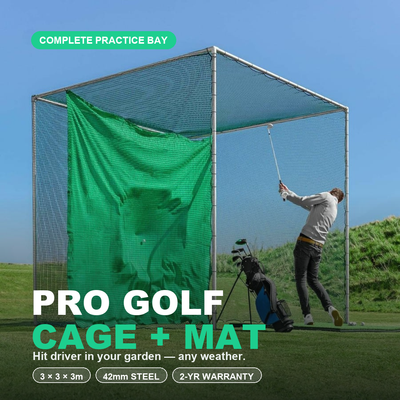
The single most common conversation I have with customers goes like this: "I want a golf simulator eventually, but I can't justify four grand right now. What should I buy today that won't be wasted money later?" The good news is that the answer is genuinely satisfying. A golf cage is not a consolation prize on the way to a simulator; it is stage one of the simulator itself. Buy the right cage and mat now and every pound of it carries forward when you add a launch monitor, and later a screen and projector. This article maps out that upgrade path stage by stage: what each step costs in rough terms, what you actually gain, and where the money traps are. If you want the nuts and bolts of physically converting a cage into a sim space, I have written a separate complete cage-to-simulator setup guide; this piece is about the spending decisions.
Why the staged path beats saving up for the full bundle
You could save for a year and buy everything at once, and for some people that is right. But after years of selling both routes, I have noticed the staged buyers end up happier more often, for three reasons.
First, you are practising from month one instead of month twelve. A golfer hitting 200 balls a week into a cage for a year improves more than a golfer waiting for a perfect setup. Second, each stage teaches you what you actually want from the next one. Customers who live with a cage for six months make far better launch monitor choices, because they know whether they crave data, virtual courses, or just somewhere to groove a swing. Third, the staged path spreads roughly £3,000 to £5,000 of total spend over one to three years, which is a very different proposition for a household budget.
The one condition: every stage has to be bought with the end state in mind. That mostly means one thing, and it is the next section.
Stage 1: the cage and mat (around £500 to £1,200)
Your stage-one decision quietly determines whether the whole upgrade path works, and the key variable is depth. A simulator needs the ball to fly a few metres before it meets a screen, and radar launch monitors need space behind and in front of the ball to track it. A shallow net gives you nowhere to put any of that.
This is why I steer upgrade-minded buyers towards a full-size cage from the golf cage collection rather than a pop-up net. The Forza 3m x 3m x 3m cage is the workhorse choice: steel-framed, enclosed, and deep enough to hang an impact screen inside later. If you have the garden space, the LinksCube XL at 3m x 3m x 3.8m is the one I recommend most often for this journey, because the extra 80cm of depth is exactly what you want when a launch monitor and screen eventually move in.
Do not economise on the mat. A thin mat wrecks wrists and gives false feedback off the bounce, and it is the component you touch on every single shot at every stage. Something like the GolfBays premium 1.5m x 1.5m mat will still be under your feet when the projector goes in years later.
What you gain at this stage: unlimited full-swing practice with every club, in your own garden, in ten-second walking distance. No data, no courses, but the habit that everything else builds on. For plenty of golfers, the cage-only year is where the biggest handicap drop happens, before any technology arrives, purely on volume of balls hit.
Stage 2: add a launch monitor (around £200 to £2,000)
This is the stage with the widest price range and the most important fork in the road, because there are two genuinely different philosophies on offer.
The budget fork: PhiGolf 2, around £200
The PhiGolf 2 is a swing-stick simulator: a weighted sensor stick and phone app that let you play simulated courses without hitting a real ball. Paired with a cage, it becomes more interesting than it first appears, because you can swing the sensor for course play and then hit real balls in the cage to keep the feel honest. It will not measure your actual ball flight, and I am always straight with customers about that. What it does is answer the question "will my household actually use simulator golf?" for the price of a night out rather than the price of a holiday. Start here, confirm the family loves it, and you can upgrade within the year with total confidence.
The proper fork: FlightScope Mevo Gen 2, around £2,000
The FlightScope Mevo Gen 2 is the launch monitor I recommend most for cage conversions. It is a radar unit from FlightScope, whose tracking technology comes from professional radar systems, and it measures your real ball with real club data: ball speed, carry, launch, spin, club path. Sat behind the mat in a cage, it turns every practice session into a data session, and it runs full simulation software on a phone, tablet or laptop, no projector required. This is the moment the cage quietly becomes a simulator: you are playing Pebble Beach off your own lawn, reading the shot result off a screen propped on a garden chair.
What you gain at this stage: numbers and courses. Practice stops being guesswork because every shot is measured, and the cage earns its keep in winter when range trips stop. In my experience this is the stage with the biggest jump in usage; the data is what keeps people coming back nightly.
Stage 3: impact screen and projector (around £700 to £1,500)
The final stage is the cinematic one: an impact screen from the impact screens collection hung at the back of the cage, a projector throwing the simulation onto it, and suddenly you are hitting into the picture rather than glancing at a tablet. Budget around £300 to £600 for a quality screen and £400 to £900 for a suitable projector; my projector guide covers the short-throw and brightness decisions in detail.
Two honest warnings from installations I have done. First, outdoor cages and projectors are an awkward marriage: electronics need to come in after each session unless the cage is inside a garage or shed, and daylight washes out any projector, so this stage shines for covered or indoor cages and evening use. Second, do not buy a standard net cage and then try to fire balls at a hung impact screen without checking clearances; screen mounting, ball rollback and projector position are exactly what the cage-simulator setup guide exists for, so I will not repeat it here.
What you gain at this stage: immersion. The numbers were already there at stage two; stage three is what makes non-golfing family members ask for a go, and it is the difference between a practice tool and a games room.
The full path at a glance
| Stage | You buy | Rough cost | You gain |
|---|---|---|---|
| 1. Cage + mat | Forza 3m cage or LinksCube XL, quality mat | £500 to £1,200 | Unlimited full-swing practice at home |
| 2a. Budget monitor | PhiGolf 2 | Around £200 | Simulated course play, proof of concept |
| 2b. Real monitor | FlightScope Mevo Gen 2 | Around £2,000 | Real ball data plus simulation software |
| 3. Screen + projector | Impact screen, short-throw projector | £700 to £1,500 | Full visual immersion, hitting into the picture |
Total for the full journey lands somewhere between £3,000 and £4,500 depending on the choices at each fork, which is right in line with buying a packaged bundle in one go. You pay a similar total either way; the staged path just lets you spread it and change your mind cheaply. For context on what one-shot bundles cost, my UK simulator cost breakdown covers the whole market.
The money traps to avoid
- Buying a shallow net at stage one. The most expensive mistake on this path, because it forces a rebuy at stage three. Depth is the upgrade currency; buy it first.
- Buying a £500 no-name launch monitor to split the difference. The cheap photometric units I have tested misread enough shots to make the data worse than useless. Go PhiGolf-cheap or Mevo-proper; the middle ground is where money dies.
- Buying the projector before the screen. Screen size and position determine throw distance, not the other way round.
- Ignoring the mat. It is the only component you physically hit at every stage; a bad one costs you joints and feedback for years.
Frequently asked questions
Can I really use a garden cage as a full golf simulator?
Yes, with caveats. The cage provides containment and the mounting structure; you add launch monitor, screen and projector over time. Weather is the main constraint, since electronics need to come indoors between sessions unless the cage sits inside a garage, shed or covered area. It is a common and sensible setup.
Is the PhiGolf 2 a waste of money if I'll upgrade later?
I do not think so, at around £200. It answers whether your household will use simulator golf before you commit thousands, and it stays useful afterwards as a portable and travel option. What I would avoid is spending £500 to £800 on an in-between monitor, because that money is better saved towards a Mevo Gen 2.
Should I skip straight to a full bundle instead?
If the budget is already there and you have an indoor space, a packaged bundle is simpler and arrives matched and complete. The staged path wins when the budget arrives in instalments, when you are unsure how much you will use it, or when the cage is going outdoors first. The totals end up similar either way.
What order should the upgrades come in?
Cage and mat, then launch monitor, then screen and projector. The launch monitor before the screen, always: data changes how you practise from day one, while the screen only changes how it looks. Nobody regrets that order in reverse.
⛳ Free resource: the 90-Day Golf Cage Practice Programme
A cage stops your golf balls — a plan lowers your scores. The free interactive golf cage practice programme gives you 39 structured 25-minute sessions, a 24-drill library, and progress scorecards you can track online — built around the Pro Golf Cage & Hitting Mat Bundle and open to every garden golfer.
Free email series: Dream Home Golf Cage Setup
Six short emails from Tom on the five decisions behind a brilliant garden practice space.
📏 Free tool: the Garden Golf Cage Planner
Planning a garden golf cage? The free Garden Golf Cage Planner answers the space, base, netting and cost questions in one place — including the Will-It-Fit calculator: enter your garden size and see which cages fit. No sign-up.


Free Home Golf Cage Setup Design Consultation
Not sure on size, base or mat? Chat directly with Tom, OpenGolfer’s founder — he practises from his own garden cage most days and has designed hundreds of home setups.
- Send a photo of your garden with rough measurements — get a tailored layout and spec for your space
- Personal replies from a real golfer, not a call centre
- Honest advice on what to buy — and what not to
Usually replies within the hour, 8am–8pm · prefer to talk? 02033 768500


Leave a comment