
Garmin Approach R50 Review (UK): Hands-On With the All-in-One Simulator

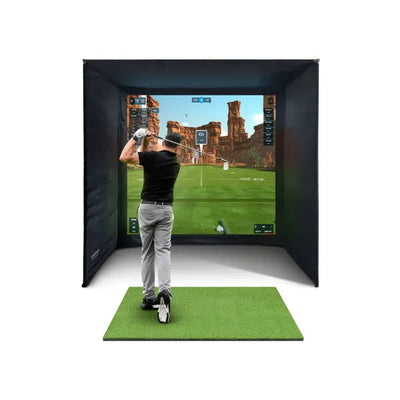
Every so often a product turns up that quietly rearranges a whole category, and for home golf in the UK the Garmin Approach R50 is that product. It is a camera-based launch monitor with a triple camera array, a built-in 10” touchscreen and simulator software running on the device itself, which means, for the first time at this level, you can unbox one unit, stand it in front of the ball and play simulated golf with no laptop, no projector and no subscription to a PC ecosystem. At £4,299 it is a serious purchase, so this review is the honest version: what it does brilliantly, where it falls short, and the specific kind of golfer I’d steer towards it rather than the alternatives.

What the R50 actually is
The R50 is Garmin’s flagship launch monitor and the big brother to the radar-based Approach R10. Where the R10 sits behind you bouncing radar off the ball, the R50 is a photometric unit: it sits in front of the ball and photographs the strike with three cameras, calculating ball data directly from what actually happened at impact rather than inferring it from flight. That puts it in the same measurement class as units like the Foresight GC3S, which is the comparison that matters at this price.
The headline feature, though, is the screen. The R50 has a 10” touchscreen built into the back of the unit, and Garmin’s Home Tee Hero simulation runs on the device itself. No PC. No phone propped on a tripod. You set it down, it finds the ball, and you are playing a simulated course or running a range session with your numbers displayed right there behind the ball. For golfers who have been putting off a simulator because of the perceived faff of laptops, cables and software licences, this is the whole pitch in one sentence.
Setup and day-to-day use
I tested the R50 the way our customers actually use these things: indoors into a screen, outdoors into a net, and on grass at the range. Setup is genuinely quick. Because it is camera-based it sits in front of the ball rather than needing the ~2.4m of clear space behind the ball that radar units demand, so total room length requirements drop noticeably. If you have been told your garage is too short for a radar simulator, the R50 is one of the units that can change that answer; our room size guide covers the exact measurements to check before you spend anything.
Two practical things stood out after 6 weeks of regular use. First, alignment is far less fiddly than with radar. Radar units want to be lined up precisely down your target line and repositioned when a left-hander steps in; the R50 handles right-handed and left-handed golfers without being moved, which sounds minor until you share a setup with a leftie. In my own household that single feature ends arguments. Second, the touchscreen changes how often the thing gets used. There is no boot-a-laptop ritual, so ten spare minutes actually becomes a ten-minute session. We found with customers that the gear which gets used is the gear with the fewest steps between “fancy a hit” and ball in the air, and the R50 is currently the best in class at shortening that gap.
Accuracy: how it compares to the GC3S class
I will not invent precision percentages, because nobody outside a lab can honestly give you them. What I can tell you is how it behaves. Hitting the same wedges, mid-irons and drivers through the R50 and through camera units we sell in the same bracket, the ball data was consistent and believable: carry distances matched what I know I hit, shot shapes matched the flight I could see outdoors, and mishits were punished the way mishits should be. That is the practical test that matters. Camera-based measurement at this level is trustworthy enough to practise with, club-gap with and play simulated rounds on, and the R50 sits comfortably in that company.
The honest caveat: the Foresight GC3S costs £3,990, roughly £300 less, and Foresight’s data pedigree is the tour-proven benchmark camera units get measured against. If you already own a capable computer and you want the most established photometric ecosystem for the money, the GC3S remains a completely rational choice. What the GC3S cannot do is work as a self-contained simulator with nothing else attached. That is the R50’s trick, and it is why the two units suit different buyers rather than one simply beating the other.
The simulator side: Home Tee Hero vs a PC setup
On-device, you get Garmin’s Home Tee Hero simulation, which maps real courses and is far better than it has any right to be for something running on the unit itself. For casual rounds, practice games and winter competitions with mates, it is genuinely enough, and the fact it works on the built-in screen means you can run it into a net in the garden with zero extra kit.
If you want the big-screen experience with third-party software such as GSPro or E6, you will need a PC, exactly as you would with any other launch monitor. That is not a criticism of the R50, it is just where the line sits: basic and mid-level sim use needs nothing, the full projector-and-GSPro experience needs a computer such as our sim-spec gaming laptop at £1,595. Plenty of buyers start on the touchscreen and add the PC and projector a year later, which is a healthier way to spend than buying everything on day one and hoping you use it.
What I don’t love
No review is worth reading without this section. The price is real money, and if your honest use case is checking carry distances at the range a few times a month, the £421 R10 covers that for a tenth of the cost and you should not let anyone talk you out of it. The built-in screen, while excellent for solo practice, is small for group play; if simulator nights with four mates are the dream, you will end up wanting the projector setup anyway, which narrows the convenience gap against cheaper camera units. And like every photometric unit it wants reasonable, consistent lighting and clean ball placement in its capture zone, so it rewards a settled setup over being endlessly shuffled around the house.
R50 at a glance vs the obvious alternatives
| Garmin R50 | Foresight GC3S | Garmin R10 | |
|---|---|---|---|
| Price | £4,299 | £3,990 | £421 |
| Technology | Camera (triple array) | Camera | Radar |
| Position | In front of ball | ~60cm in front of ball | ~2.4m behind ball |
| Sim without a PC | Yes, on-device 10” touchscreen | No | No |
| Left + right handers | No repositioning | Handles both | Reposition required |
| Best for | All-in-one home sim | PC-based sim on a budget for the class | Range practice, entry sim |
If you are weighing the wider field beyond these three, our full UK launch monitor comparison guide goes deeper on the radar options in the middle of the market.
Who should buy the R50
I recommend the R50 to three kinds of golfer. The first is the person who wants a proper simulator but has been paralysed by the component shopping list; the R50 deletes the list. The second is the household with both left- and right-handed players, where radar’s repositioning dance gets old within a week. The third is the golfer with a shorter room, because camera placement in front of the ball claws back the depth radar throws away. A customer in Harrogate summed it up after his first month: he had budgeted for a laptop and projector, started on the touchscreen “temporarily”, and three months on still hasn’t felt the need to add either.
Who shouldn’t? Pure range-practice golfers, who are overpaying for simulation they won’t use, and committed GSPro devotees who already own a gaming PC, for whom the GC3S at £3,990 buys equivalent-class measurement for less.
The full package option
Most R50 buyers here end up in one of two camps: the unit on its own into a net, or the complete room. For the second camp we build the Garmin R50 Home Golf Simulator Full Package from £7,099, which pairs the R50 with an enclosure, impact screen, projector and mat as one matched setup. Buying it as a package mostly saves you from the compatibility research and the drip-drip of separate deliveries; the components are the same ones we would spec if you asked me to design the room from scratch. You can spread the cost at checkout with Klarna or Clearpay on either route.
Frequently asked questions
Does the Garmin R50 need a computer or subscription to work?
No. The R50 runs simulation on its built-in 10” touchscreen out of the box, including Garmin’s Home Tee Hero course play. You only need a PC if you want third-party software such as GSPro or E6 on a projector screen.
How much space does the R50 need?
Less than radar. Because it is camera-based it sits in front of the ball, so you avoid the ~2.4m of clear space behind the ball that radar units require. You still need enough width and height to swing your driver safely; measure before buying, and check the room against our size guide.
Is the R50 accurate enough to practise with seriously?
Yes. It measures the ball directly with cameras at impact, the same fundamental approach as the tour-grade photometric units, and in my testing carry numbers and shot shapes matched real flight. It is comfortably accurate enough for gapping, practice and simulated rounds.
Should I buy the R50 or the cheaper Foresight GC3S?
If you already own a capable PC and want the most established camera ecosystem for the least money, the GC3S at £3,990 is the value play. If you want simulation with zero extra hardware, or you share the setup between left- and right-handers, the R50 justifies its price.
The verdict
The R50 is the most complete single-box home simulator you can currently buy in the UK, and it is the unit I now show first to anyone who says they want a simulator but dreads the technology. It is not the cheapest way to get camera-grade numbers, and it will not replace a projector for group nights, but as one purchase that turns a net and a spare few metres into a real simulator, nothing else we stock does the job this cleanly.
Not sure which option fits your space or budget? Message Tom on WhatsApp for a free consultation — no obligation, real answers from someone who installs this kit weekly.

Free Home Golf Simulator Design Consultation
Not sure on space, screen or launch monitor? Chat directly with Tom, OpenGolfer’s founder — he has designed hundreds of home setups and will tell you exactly what fits your room and budget.
- Send your room size (or a photo) — get a tailored layout and spec for your space, ceiling height included
- Personal replies from a real golfer, not a call centre
- Honest advice on what to buy — and what not to
Usually replies within the hour, 8am–8pm · prefer to talk? 02033 768500


Leave a comment