
Launch Monitors in a Garden Golf Cage: Placement, Space & What to Buy (UK)

A launch monitor turns a garden cage from a net you hit balls into a practice station that tells you the truth. But cage buyers keep hitting the same two questions — will it physically fit inside, and which one is worth it? Two of our customers asked exactly these last week, so here are the real answers, distances included.
OUR #1 GARDEN CAGE, READY TO PLAY
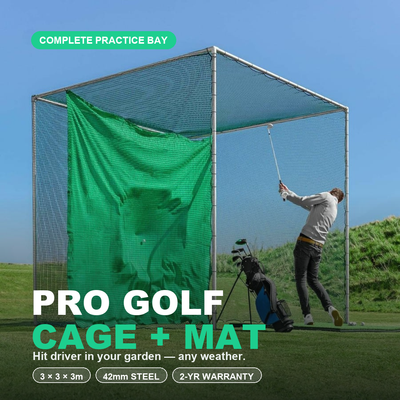
The Pro Golf Cage & Hitting Mat Bundle pairs a galvanised 42mm steel cage with a driver-rated double net and a tour-density mat — a buy-once, all-weather practice station for the UK garden. Best seller, includes the free 90-day practice programme.
See the Cage + Launch Monitor Bundle →Will a launch monitor fit in a 3m cage? Yes — here is the geometry
There are two placement families. Radar units (FlightScope Mevo/Mevo+, Garmin R10) sit BEHIND the ball — the Mevo wants about 2.4m/8ft behind, and needs roughly 2.4m of ball flight in front to read reliably (3–3.5m is comfortable, more is better). With your hitting position ~3m off the impact panel, both distances work inside a standard garden setup. Camera/photometric units (Garmin R50, SkyTrak+) sit just in front of or beside the ball — the R50 sits about 60cm away — so cage width is irrelevant to them. Either family lives happily with the 3m golf practice cage; the radar family just needs you to plan the space behind the mat.
The ladder: what to spend
~£200 — ShotScope LM1: ball speed, carry, basic numbers. A brilliant first step to make practice honest. ~£500–600 — Garmin R10: adds club data estimates and simulator apps; superb value secondhand market too. ~£1,200 — FlightScope Mevo Gen2: the sweet spot for serious practisers — radar accuracy on speed, carry and spin that you can build real distance calibration on (our free 90-day practice programme has a dedicated Mevo track). ~£4,300 — Garmin R50: camera accuracy plus a built-in screen, which makes it a simulator as much as a practice tool — the family-favourite option. We supply all of these; if a model is not on the site, ask.
The details nobody mentions until after purchase
Returns and software: hardware bought from us carries a 14-day return window, but bundled software subscriptions (e.g. FlightScope packages) are usually non-refundable once activated — factor that into which package you buy. Seeing your numbers: mount a phone or iPad on the cage frame or a tripod at hip height; a £30 mount beats squinting at a unit on the floor. Alignment: radar units must point at your target line — two alignment sticks make setup repeatable. Outdoors: all of these are fine in a garden cage; radar actually prefers the space.
Free email series: Dream Home Golf Cage Setup
Six short emails from Tom on the five decisions behind a brilliant garden practice space.
📏 Free tool: the Garden Golf Cage Planner
Planning a garden golf cage? The free Garden Golf Cage Planner answers the space, base, netting and cost questions in one place — including the Will-It-Fit calculator: enter your garden size and see which cages fit. No sign-up.
Do you need one at all?
Honestly — not to start. A £3 can of foot-spray on the clubface and a taped target on the impact panel deliver 80% of the feedback for 0.2% of the price, and that is exactly how the first month of our practice programme works. The launch monitor earns its money when you start calibrating wedge distances and tracking progress numerically. Buy the cage first, add the numbers when the habit is real.
Not sure what fits your garden?
Send me a photo of your garden with rough measurements on WhatsApp and I’ll design your setup with you — free, no obligation. Chat with Tom on WhatsApp →
The distances, measured in my own cage
Numbers beat adjectives here, so I measured my own setup: hitting position 3.1m from the impact panel, Mevo Gen2 on its little tripod 2.4m behind the ball, lens aligned down the target line with two alignment sticks. That gives the radar its required 8ft behind and roughly 3m of ball flight — and readings that agree with the range within a club. When I tested moving the unit closer (1.8m) the spin numbers got flaky; behind 2.4m they settled. If your garden gives you 2m behind the ball, you are one paving slab short, not out of the game — angle the whole setup across the diagonal and the geometry usually appears. The official requirements are on FlightScope’s site and Garmin’s R10 page; my measurements match them.
What the data actually changes
After 4 weeks of logging sessions, the number that changed my practice was not ball speed — it was carry dispersion on wedges. Feel said my 60-yard shot was consistent; the Mevo said 52–68 yards. Calibrating three wedge distances (the clock-system drills in our free programme) took two sessions and shaved more strokes than any driver work since. That is the honest case for spending £1,200: not the numbers themselves, but which practice they tell you to do. Some buyers see the R50 differently — as the thing that keeps the kids in the cage for two hours — which at £4,300 is a different and equally valid purchase.
Mounting, power and rain
Practical bits from living with one: a phone clamped to the cage frame at chest height beats the floor for glanceability; the Mevo battery genuinely lasts a couple of weeks of sessions; and none of this hardware wants to live outside — after each session mine comes in with the balls. If you are choosing between spending on the monitor or the mat and base, buy the mat and base first: clean strike data from a bad lie is garbage in, garbage out.
For the full ranking by room type and budget, see the best golf launch monitors for a home simulator.
Frequently asked questions
Can you use a launch monitor inside a golf cage?
Yes. Camera units like the Garmin R50 sit ~60cm from the ball, well inside any cage. Radar units like the Mevo sit ~2.4m behind the ball and want ~2.4m+ of ball flight — which a standard garden setup with a 3m cage provides.
Which launch monitor is best for a garden golf net?
Budget: ShotScope LM1 (~£200). Value: Garmin R10. Serious practice: FlightScope Mevo Gen2 — radar-accurate carry and spin. Simulator experience: Garmin R50 with its built-in screen.
How much space does a Mevo need behind the ball?
About 2.4m (8ft) behind the ball, plus at least 2.4m of ball flight in front — 3–3.5m is comfortable for reliable readings.
Do launch monitors work outdoors in the UK?
Yes — radar units prefer outdoor space. Weatherproofing is on you: they are electronics, so bring them in after the session.
Do you need a net to use a launch monitor at home?
You need somewhere safe for the ball to go. A cage gives radar units real ball flight to read and keeps every mishit contained — better data and zero risk versus hitting into open garden.
Is the Garmin R10 accurate enough for practice?
For carry distances and clubhead speed trends, yes. Its spin numbers are estimates; if spin-based wedge work matters, that is the Mevo Gen2 tier. For most garden practisers the R10 is the value pick.
Ready to build your garden practice space?
Configure the cage, mat and base in 60 seconds — from £734.99 with a £50 bundle saving and the free 90-day practice programme included.
Build Your Cage + Monitor Setup →

Free Home Golf Cage Setup Design Consultation
Not sure on size, base or mat? Chat directly with Tom, OpenGolfer’s founder — he practises from his own garden cage most days and has designed hundreds of home setups.
- Send a photo of your garden with rough measurements — get a tailored layout and spec for your space
- Personal replies from a real golfer, not a call centre
- Honest advice on what to buy — and what not to
Usually replies within the hour, 8am–8pm · prefer to talk? 02033 768500


Leave a comment