
Golf Simulator, or a Launch Monitor and Net? Which Should You Buy

Buy a full simulator if your room is at least 3.0 × 2.7 × 4.2 m and you want to play courses on a screen. Buy a launch monitor and net for numbers at lower cost or in a smaller space. Buy a garden cage if you practise outdoors. Each route grows into the next, so start with your space.

The three routes, in plain terms
People tend to ask me this as one question, but there are three different setups hiding inside it, and they suit different houses, budgets and goals.
Route 1: a garden cage, with or without a launch monitor. A freestanding 3 m × 3 m × 3 m steel cage with a net, a hitting mat and, if you want numbers, a portable launch monitor beside or behind the ball. You hit real balls at full speed outdoors and read the data on a phone or on the unit's screen. No screen, no projector, no PC.
Route 2: a launch monitor and a net indoors. The same idea inside a garage or spare room: a net to stop the ball, a mat, and a launch monitor sending numbers to a phone, tablet or laptop. You can run range sessions and, with the right unit, play courses on a laptop screen or TV, but you are not watching the ball fly onto a screen in front of you.
Route 3: a full golf simulator. An enclosure with an impact screen, a short-throw projector, a mat and base, and a launch monitor driving the software. You hit into the screen and the shot carries on across the course picture. Our Sim Buyer Docs page on how a golf simulator works explains the chain from launch monitor to software to projector if the parts are new to you.
The launch monitor is the common thread. It is the measuring device, it decides your accuracy and your software, and in two of the three routes it decides how much room you need. The rest is what you hit into and what you look at.
Space first: the numbers that rule each route
I find that the space decides this question more often than the budget does, so take these measurements before you fall in love with anything.
For a full simulator we plan on a room at least 3.0 m wide, 2.7 m to the ceiling and 4.2 m long, with 3 m or more of ceiling being ideal. Those figures allow 30 cm behind the screen, about 2.5 m from ball to screen, and room to swing a driver. They assume a camera launch monitor that sits beside the ball, such as the Garmin R50, Square Golf or Foresight GC3. A radar unit sits behind you, so the FlightScope Mevo Gen2 adds 2.4 m from its manual for a 5.2 m room, and the Full Swing KIT adds 3.05 m for 5.85 m.
A net indoors needs almost the same room. The swing is the same height, you still want the ball to fly a couple of metres before it stops, and a radar still needs its distance behind the ball. What you save is not floor space but the screen, projector and PC. Where the net wins is a space that is a touch short of a full room: under 4.2 m I would not recommend a full-swing simulator from us, but a launch monitor you can also take to the range is still a sensible buy.
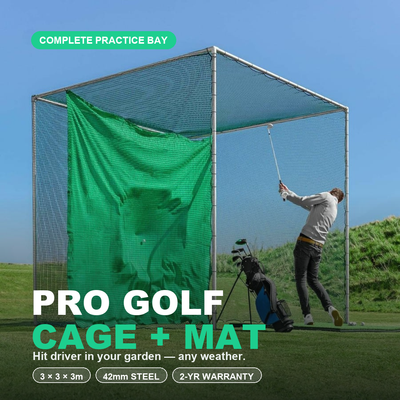
A garden cage removes the ceiling problem entirely. The Pro Golf Cage and Hitting Mat Bundle is 3 m long, 3 m wide and 3 m high, freestanding on grass, patio or artificial turf with no wall fixings or concrete. Add the launch monitor's own clearance behind the ball if it is radar, and a flat patch for the mat, and that is the whole requirement.
Budget bands and what each one buys
I have left prices out of this article because they change; every product link below shows the live figure. The bands are where each route tends to land.
| Route | Typical band | What you get | What you give up | Space needed |
|---|---|---|---|---|
| Garden cage, mat and launch monitor | Under £3k | Full-speed practice outdoors all year, real numbers on a phone | No screen, no course picture, weather and daylight | About 3 m × 3 m × 3 m of garden, plus radar clearance |
| Launch monitor and net indoors | Under £3k to £5k | Numbers in any weather; course play on a laptop or TV with some units | You watch a screen to the side, not the ball flying ahead of you | Close to the full-room minimum, minus the screen depth |
| Full simulator room | £5k to £12k+ | Hit into a screen, play courses, the experience most people picture | The most money, a fixed room, sometimes a PC and yearly software | 3.0 × 2.7 × 4.2 m minimum; longer for radar |
Within the full-simulator band the launch monitor sets most of the price. The golf simulator chooser walks through our room packages by budget and room, from the Square Golf room in the under £5k band to the Foresight and Full Swing rooms at the top.
Route 1 in detail: cage plus launch monitor
This is the route I recommend to anyone whose practice will genuinely happen outdoors, and to anyone who is not yet sure how much they will use it. The Pro cage's 42 mm galvanised steel frame carries a 2.3 mm knotless net rated for full-speed drives, and it stays up all year. Choose the mat and base option in the bundle and you have a practice station.
For numbers, radar is the natural partner outdoors because it follows the whole ball flight. The Garmin Approach R10 is the entry point: Garmin's manual places it 1.8 m to 2.4 m behind the tee, it runs for hours on a charge, and Garmin's own R10 page covers what it measures. The FlightScope Mevo Gen2 sits 2.4 m behind the ball, has no subscription and comes with eight E6 courses you own for life. Camera units such as Square Golf are made for indoors, so for the garden I would stay with radar or the Garmin R50. The launch monitor collection has the full range.
What you lose is the picture. You see the ball hit the net and read carry, ball speed and spin on your phone. For a lot of golfers that is exactly what they wanted, and it is a fraction of the cost of a room. One real example: Kelvin's garden-range enquiry, which is still at the planning stage, started from exactly this logic, a cage and a launch monitor in the garden before any thought of a screen.
Route 2 in detail: launch monitor and net indoors
This is the middle path and the one most often skipped. You get weatherproof practice and real data, and with some units you get course play too, just not on a screen in front of the ball. The R10 and Mevo Gen2 run their apps on a phone or tablet. Square Golf and the Garmin R50 are camera units that sit beside the ball and fit tighter spaces; the R50 even runs Home Tee Hero on its own 10-inch screen, so with an HDMI lead to a TV on the side wall you have a working simulator without a projector or enclosure.
The net itself matters more indoors than people expect. A pop-up net such as the FORZA ProFlex is fine for wedges and irons in a conservatory or garage, but a full driver into a light net is asking a lot of it, and mishits need catching too. For regular driver work indoors I would use a proper enclosure, which is why this route so often becomes Route 3.
Route 3 in detail: the full simulator
Our room packages all share the same parts: a SimSpace enclosure with velour side and ceiling panels and an impact screen, a Tee Turf mat on a rubber base, a BenQ AH500ST short-throw projector in a floor case, and the launch monitor of your choice. Side netting, the HDMI cable and a ball tray are add-ons, and no PC is included.
What you gain is the thing everyone pictures: you hit a real ball into the screen and watch it fly on the course. What you give up is money, a room you can no longer use for much else, and in several cases a Windows PC and yearly software. The Garmin R50 room avoids the PC entirely because the simulator runs on the unit; Foresight, Uneekor and Full Swing rooms need one for course play. Our cost page breaks down what the package covers and what sits outside it.
The upgrade path, so nothing is wasted
The reason I say start with your space rather than your dream is that the routes feed each other. Buy a launch monitor for the cage this year and it becomes the heart of a simulator room next year; the radar units and the R50 work outdoors as well as in, while Square Golf and the Uneekor Eye Mini Lite are indoor units, and the camera units fit a 4.2 m room when you get one. Buy a net indoors and the mat, base and launch monitor all carry over to the enclosure. The only piece that does not travel is the garden cage itself, and that keeps earning its place as the summer practice spot once the room exists.
The one mistake that does cost money is buying a radar unit for a room that cannot take it. If your indoor space is under 5.2 m, buy a camera unit now, whether it starts life in a cage, in front of a net or in a full room. In our experience that single decision saves more regret than any other.
Frequently asked questions
Can I use a launch monitor with a net instead of a simulator screen?
Yes. The launch monitor measures the shot the same way whether the ball hits a net or a screen. You read the numbers, and on some units play courses, on a phone, tablet, laptop or TV. The screen and projector only change what you look at, not the data.
Is a garden cage good enough for driver practice?
The Pro cage is: 3 m high with a 2.3 mm knotless net rated for full-speed drives, on a 42 mm galvanised steel frame. Lighter pop-up nets are better kept for irons and wedges.
How much room does a full simulator need?
At least 3.0 m wide, 2.7 m high and 4.2 m long with a camera launch monitor beside the ball. Radar adds its manual distance behind the ball: 5.2 m for a Mevo Gen2, 5.85 m for a Full Swing KIT. The room-fit page has the table for each enclosure size.
Do I need a PC for any of these routes?
Not for a cage with the R10, Mevo Gen2 or R50, nor for an indoor net with Square Golf, since they run their own apps or screen. In a full room, the R50 still needs no PC; GSPro, Foresight Premier and Uneekor's software do.
Which I would choose
With a garden and no suitable room, the Pro cage bundle and a launch monitor, radar if the practice is outdoors. With an indoor space that measures 3.0 by 2.7 by 4.2 m and a budget in the £5k band or above, go straight to a full room and pick the launch monitor to suit the length. With a space that is close but not quite there, a camera launch monitor and a net now, with the enclosure as the upgrade. Send your measurements to the free 3D room design and I can tell you which of the three your space supports before you spend anything.
Not sure which option fits your space or budget? Message Tom on WhatsApp for a free consultation — no obligation.

Free Home Golf Cage Setup Design Consultation
Not sure on size, base or mat? Chat directly with Tom, OpenGolfer’s founder — he practises from his own garden cage most days and has designed hundreds of home setups.
- Send a photo of your garden with rough measurements — get a tailored layout and spec for your space
- Personal replies from a real golfer, not a call centre
- Honest advice on what to buy — and what not to
Usually replies within the hour, 8am–8pm · prefer to talk? 02033 768500


Leave a comment