
Browse the docs
Start here
What does each part of a golf simulator cost, and what does it cost to run?
 Tom Hayward, founder of OpenGolfer · Last reviewed · 3 min read
The short answer
The launch monitor is most of the cost. Our room packages share the same enclosure, mat and projector, so the price moves with the launch monitor and whether it needs a PC. Running costs are mainly software, from nothing (Mevo Gen2, Square Golf) to $599 a year, plus a replacement impact screen as it wears.
Send our sim experts your room size or a photo. They’ll tell you what fits, free.
Check my room on WhatsAppWhere the money goes
Almost all the difference between a cheap room and an expensive one is the launch monitor. Our SimSpace room packages share the same enclosure, Tee Turf mat (with its own built-in base) and BenQ projector, with the price changing a little by enclosure size. So the budget question is really: which launch monitor, and does it need a PC?
If you're still working out how much a golf simulator costs as a whole room, our buyer's guide sets out every budget band and the room each one needs.
What each part costs
A simulator room is six parts, and only one of them moves the price much. The table below shows a live price for each from our range.
- Launch monitor: the biggest cost and the widest range. It also decides how long the room must be and whether you need a PC, so choose it first.
- Enclosure: our SimSpace enclosures come in seven sizes, SIM 0 to SIM 6. The size changes the price a little; your room's width and ceiling decide the size.
- Impact screen: comes with the enclosure. It is also the part you replace over the years, which is why it appears again under running costs.
- Hitting mat: our room packages use a Tee Turf mat with its own built-in base, so there is no separate rubber base to buy.
- Projector: our room packages include a BenQ short-throw projector, and we plan it on a ceiling mount.
- PC: only if your software needs one. The Garmin Approach® R50 and Square Golf don't; Foresight's Premier, GSPro and E6 Connect need a Windows PC or gaming laptop.
What it costs to run
Software is the main running cost, and it depends on the launch monitor. These are the makers' own prices, checked on 6 October 2026. Some are only published in US dollars, so that's how we show them.
- Garmin Approach® R50: range practice, shot history and stats are free in the Garmin Golf app. Home Tee Hero course play needs a Garmin Golf membership: £8.99 a month or £89.99 a year.
- FlightScope Mevo Gen2: no subscription. The FS Golf app and 8 E6 Connect courses are included for life.
- Square Golf: no subscription. You get 1,000 credits free (1 credit is 1 hole per player), then top-ups from £2.99 for 100 credits to £19.99 for 1,000.
- Foresight GC3: runs Foresight's Premier software with a Foresight+ membership, and every new unit includes a 30-day trial. The Free tier costs nothing. Silver is $199 a year and Gold $599 a year. Course play needs Silver or Gold plus a Course Pass: $295 a year for 35 courses or $595 a year for 111, so the cheapest course play is $494 a year. Older FSX software (Play, Pro, 2020) keeps working.
- Full Swing KIT: Full Swing GOLF for KIT, with 15 courses, is £399 a year; the Premium App is £199 a year (Full Swing Europe's UK prices).
- Uneekor Eye Mini: the Player tier is free for the range; Pro is $199, Champion $399 and Ultimate $599 a year.
- GSPro, on launch monitors that support it: $250 a year, plus a Windows PC to run it.
- Awesome Golf: £14.99 a month, £149.99 a year or £349.99 for life.
- E6 Connect, if you want more than what comes with your launch monitor: Basic is $300 a year and Expanded $600 a year.
The other running cost is the impact screen. Screens wear with use; how fast depends on how often you play, the balls you use and whether you hit the middle. Replacement screens are available, and new, clean balls make yours last longer. If you'd rather spread the cost, you can pay later with Shop Pay at checkout.
Before you settle on a launch monitor, check whether a simulator fits your room: every package needs at least 3.0 × 2.7 × 4.2m. What you need for a golf simulator lists what's in each package and what isn't.
At a glance
| Part | Example from our range | From | What changes the price |
|---|---|---|---|
| Launch monitor | Square Golf | £699.99 | Camera or radar, and how much club data it measures |
| Launch monitor | Garmin Approach® R50 | £4,299 | Runs the simulator on its own screen, no PC |
| Launch monitor | Foresight GC3 | £3,960 | Three cameras and measured club data |
| Enclosure with impact screen | SimSpace SIM 2 | £999.99 | Size (SIM 0 to SIM 6) and whether a mat is included |
| Replacement impact screen | SimSpace Platinum | £399.99 | Screen size |
| Hitting mat | SimSpace Tee Turf mat | £289.99 | Size |
| Projector | BenQ AH500ST | £1,780 | Resolution: 1080p or 4K |
| PC (only if your software needs one) | Golf Simulator Gaming PC (HD Spec) | £1,790 | HD or 4K spec, desktop or laptop |
From prices are the lowest live option. Our room packages bundle the enclosure, screen, mat and projector with the launch monitor. Yearly software costs are extra where they apply.
Best practice
- Set the whole budget firstInclude any PC, the software and any room work, then work back to the launch monitor you can afford.
- Put the money in the launch monitorIt decides accuracy, software and room length. The enclosure, mat and projector are the same across our room packages.
- Compare over three yearsYearly course subscriptions add up. Compare launch monitors on three years of running costs, not just the day you buy.
- Measure before you pick a launch monitorEvery package needs a room of at least 3.0 × 2.7 × 4.2m, and radar units need more length, so measure first.
Gotchas to avoid
- Leaving out the PCThe bundle price isn't the total if your software needs a Windows PC you don't own. Check what runs the software before you budget.
- Comparing a unit with a roomA launch monitor on its own isn't a simulator room. Check the box list: enclosure, mat, base and projector are what make it one.
- Forgetting the subscriptionsCourse software ranges from nothing to $599 a year, depending on the launch monitor. Ask what you'll pay in year two, not just on the day.
- Shortening screen life with old ballsScuffed, marked and soft premium balls wear a screen faster. New, clean balls keep the running cost down.
Our recommendation
Spend on the launch monitor that suits your room and how you want to play, then compare three years of its software. Without a strong preference, the Garmin Approach® R50 room is where I'd start.
- If you want the lowest running cost
- FlightScope Mevo Gen2 or Square Golf: neither needs a subscription.
- If you'd rather not run a PC
- The Garmin Approach® R50 or Square Golf.
- If you want full club data
- The Foresight GC3, plus a Windows PC and a Foresight+ plan for courses.
- If you're working to a set budget
- Our buyer's guide sets out what each budget gets you and the room it needs.
For your room we'd pick…
 The lowest running costSquare Golf Launch MonitorNo subscription: 1,000 credits included, then pay-as-you-play top-ups, and no PC needed to start.£699.99
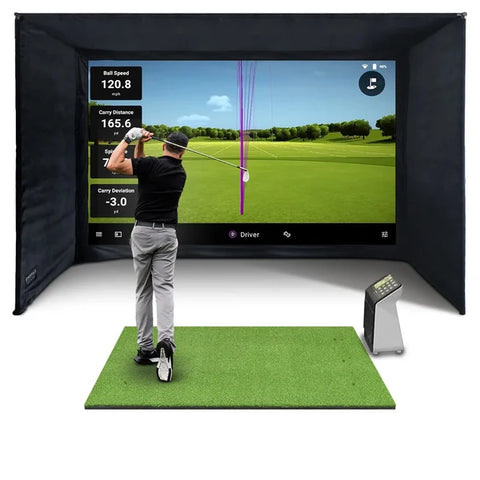 No PC to buyGarmin Approach® R50 Home Golf Simulator Package - Complete Setup, UKCameras beside the ball and a simulator on its own screen. Course play is £89.99 a year with Garmin Golf.from£7,337.98
 For full club dataForesight Sports GC3 Home Golf Simulator Package for Garage - Complete Setup, UKEvery data point from Foresight's cameras; add a Windows PC and choose a Foresight+ plan for courses.from£6,450
Questions people ask
Why do simulator prices vary so much?
Mostly because of the launch monitor. Our room packages share the same enclosure, mat, base and projector, so the launch monitor accounts for most of the difference between them.
Does the price include a PC?
No, except the Full Swing KIT Studio Plus, which includes a gaming laptop. The Garmin Approach® R50 and Square Golf don't need a PC to start. Foresight's software, GSPro and E6 Connect need a Windows PC or gaming laptop.
What does the software cost each year?
It depends on the launch monitor. Mevo Gen2 and Square Golf need no subscription. Garmin Golf for R50 course play is £89.99 a year. GSPro is $250 a year. Foresight GC3 course play starts at $494 a year (Silver plus Course Pass), and Full Swing GOLF for KIT is £399 a year.
Should I spend more on the launch monitor or the room?
The launch monitor. It decides accuracy, software and how long your room must be, and it's the part you'd least want to replace. The enclosure and projector are the same in every one of our room packages.
Can I spread the cost?
Yes. You can pay later with Shop Pay at checkout, subject to approval.
Still unsure? Ask our experts about this page on live chat or WhatsApp. Send your room size and they’ll tell you straight.
Ask an expertGo deeper

Planning a home simulator? Get the Sim Buyers email.
Twice a week from our sim experts: what's new in our buyer guides and docs, launch monitor and software news, and early offers.
Tuesdays and Fridays. Unsubscribe any time.


