
Browse the docs
Enclosures & impact screens
How do I make a home golf simulator safe, especially with children?
 Tom Hayward, founder of OpenGolfer · Last reviewed · 5 min read
The short answer
One person in the hitting area, everyone else behind the golfer. Leave at least 30cm behind the screen, pad hard surfaces, add side netting and a base bar bumper, and check the ceiling with a slow driver swing. Keep children out unsupervised, fit junior clubs by height, and give each child their own profile and tee.
Where the risk actually is
A simulator is a small room with a club moving at full speed and a ball that has to stop somewhere. Almost every problem I hear about comes from one of four things:
- Someone standing in the swing, or too close to it.
- A ball coming back: bounce-back off the screen, or a ricochet off the frame or a hard wall.
- A shank or toe hit that leaves the bay sideways.
- The club hitting the ceiling, a light or the projector on the backswing.
Each has its own fix. If a term is new, the glossary explains it.
Where people stand
This is the one rule that matters most, and the makers all say it. Foresight's enclosure warnings are blunt: always keep a safe distance behind the player, and "NO ONE SHOULD STAND in front of player when in use." Uneekor's EYE MINI manual says swinging a club while others are present "may result in serious injury or death."
- One person in the hitting area at a time. Use the edge of the mat as the line nobody crosses while someone is swinging.
- Everyone else waits behind the golfer, beyond the reach of a full swing, never level with or ahead of the ball.
- With a radar behind the ball, keep the strip between the unit and the ball clear. FlightScope says to keep it clear "of any objects and people" for the Mevo Gen2, so the seating goes to the side of that line, not on it.
- With a camera unit beside the ball, nobody sits by the unit. A Garmin Approach® R50 sits about 0.5m from the tee, inside the swing area.
- When a left-hander takes over, the camera unit moves to the other side of the ball and the safe waiting spot moves with it. Say so out loud each time.
SimSpace adds a simple check: take a few slow practice swings to confirm the club clears everything around you before hitting a ball.
Bounce-back
Bounce-back is the ball coming back off the screen towards the golfer. Three things control it.
Space behind the screen
A screen needs room to give. SimSpace's assembly instructions ask for at least 30cm behind the impact screen and 8cm each side of the enclosure, and that 30cm is on top of the bay's depth. Its safety guidelines go further and ask for 50cm behind and 20cm either side as a buffer for ball impacts. If your room has the extra, use it. Never let the screen touch a wall: SimSpace's care guide asks for 30cm to 40cm (12 to 16in) from any wall. A foam backing layer behind the screen protects the wall and soaks up some of the energy.
Tension
SimSpace puts the trade-off plainly: a tighter screen gives more bounce-back and less wear, a looser one less bounce-back but faster wear. I set them firm, not drum-tight.
Where you hit from
The two suppliers we use don't agree. GolfBays says to hit from about 2.5m in a 2.5m-high bay, because further back sends wedges over the screen into the fabric surround. SimSpace's care guide says to stand at least 10 to 12 feet (3.0m to 3.7m) back to reduce bounce-back. Our rooms are planned at 2.5m from ball to screen, which keeps high shots on the screen in a 2.5m-high SIM 1 to SIM 4. In a 3m-high SIM 5 or SIM 6 you can stand further back and get both.
Ricochets and sideways shots
The impact screen is the only part made to take a full-speed ball. Garmin's R50 manual lists what else the room needs indoors: a net or screen high and wide enough for high-lofted and errant shots, free space behind it, and padding on any frame "to help reduce ball ricochet."
- The velour side and ceiling panels on every SimSpace bay catch mishits inside it. They are in every room package.
- Side netting, a 1.5 x 2.5m panel either side of the bay, catches what leaves it sideways. It is an add-on for every bay except SIM 0, which comes with its own.
- The bumper pack covers the base bar, where topped shots hit metal and come back.
- Foam on any exposed wall. SimSpace asks for all hard surfaces near the screen to be padded. Where to pad and how much works it out for a real room.
The full set of layers is on how to stop balls escaping.
Ceiling strikes
The ceiling is the most common thing to get hit, and it is the club, not the ball. Our minimum is 2.7m, and 3m is comfortable. SkyTrak makes the useful point that safe ceiling height "varies and depends on your physical height and the length of your club", so a tall adult with a driver needs more than a junior with a 7-iron. Before you commit, stand where the tee will be, take a slow full swing with your driver, and look up. In a 2.7m room, pad the ceiling line above the tee. A light fitting or a ceiling projector over the hitting area needs moving; our packages use a floor case for the projector instead.
Children and juniors
Access to the room
SimSpace's own guidelines ask you to think about whether children or pets can get into the room, and suggest a closed door, baby gates or a pen. Keep clubs in a bag or rack out of reach, and treat the room like a workshop: an adult present whenever a club is being swung. Foresight's warning cards say to never let children play "without strict adult supervision."
Club length
A child swinging a cut-down or adult club has a longer, heavier club than they can control, and the arc reaches further than you expect. U.S. Kids Golf sizes its junior clubs by the child's height, measured with shoes on, in bands from 36 to 39 inches up to 66 to 69 inches. Size by height, not age, and re-check every season. A shorter club also needs less ceiling.
Settings for juniors
- Give each child their own player profile. E6 Connect's profile sets the tee box, handedness and tee height per player, and Foresight's software sets tee box, handedness and handicap for each player.
- Use a forward or junior tee so the course plays to their distances.
- Start with wedges and short irons before the driver.
- Foam or plastic balls are fine for toddlers playing about, but most launch monitors won't track them. Garmin and Rapsodo both say so.
Before every session
SimSpace asks for a check before each use: look for wear on the screen and frame, replace damaged parts, keep cables tidy and on a surge protector, and make sure the projector is fixed securely. Keep a first aid kit in the room. It takes a minute.
Safety figures and rules from the makers
| What | Figure or rule | Whose guidance |
|---|---|---|
| Space behind the screen | At least 30cm, added to the bay's depth | SimSpace assembly instructions |
| Space either side of the bay | At least 8cm | SimSpace assembly instructions |
| Buffer for ball impacts | 50cm behind, 20cm either side | SimSpace safety guidelines |
| Screen to any wall | 30cm to 40cm (12 to 16in) | SimSpace care guide |
| Where to hit from | About 2.5m in a 2.5m-high bay | GolfBays screen guidance |
| Where to stand for bounce-back | At least 10 to 12ft (3.0m to 3.7m) | SimSpace care guide |
| Ceiling | 2.7m minimum, 3m comfortable | Our room rule |
| Ceiling-mounted equipment | Ceiling of at least 3m | SimSpace safety guidelines |
| Onlookers | Behind the player; no one in front | Foresight warning card |
| Radar line | Unit-to-ball strip clear of objects and people | FlightScope Mevo Gen2 manual |
| Frame and net | Padded to reduce ricochet; high enough for lofted shots | Garmin Approach® R50 manual |
| Junior clubs | Sized by height with shoes on, 36-39in to 66-69in bands | U.S. Kids Golf |
Where SimSpace's assembly sheet and safety guidelines differ, the safety guidelines give the larger buffer; use it if your room has the space. Our room plans use 2.5m ball to screen and 30cm behind the bay.
Best practice
- One person on the matMake the edge of the mat the line. Nobody crosses it while someone is swinging, and everyone waits behind the golfer.
- Swing-test the ceilingStand at the tee and make a slow full swing with the longest club the tallest player uses. If it is close, pad the ceiling line.
- Give the screen roomAt least 30cm clear behind the bay, more if you have it, and never a wall touching the screen.
- Pad every hard surfaceSide netting either side, a bumper on the base bar and foam on exposed walls, so a ricochet drops instead of flying back.
- A profile per childSet each junior's tee box, handedness and tee height in their own profile, so the course plays to their distances.
Gotchas to avoid
- Sitting in the radar lineThe strip between a radar and the ball looks like a natural place for seats. FlightScope says keep it clear of people.
- Left-handers swap sidesA camera unit moves to the other side of the ball for a left-hander, and so does the safe waiting spot.
- Drum-tight screens bounceSimSpace says a tighter screen gives more bounce-back. Set it firm, not tight, and leave space behind it.
- Adult clubs cut downA cut-down adult club is still heavier than a junior club. Fit by height, and re-check as the child grows.
- Foam balls don't trackFine for toddlers playing about, but Garmin and Rapsodo say their units won't read foam or plastic balls.
Our recommendation
Get the standing rule right first, then add the layers: space behind the screen, side netting, a base bar bumper and padding. Supervise juniors and fit their clubs by height.
- If young children can get into the room
- Keep the door closed or gated and the clubs out of reach, as SimSpace suggests.
- If your ceiling is 2.7m to 2.9m
- Swing-test with the driver and pad the ceiling line above the tee.
- If the bay has a wall close on either side
- Add side netting and foam tiles on that wall before anything else.
- If a left-hander shares the room
- Agree where people wait for each player, and move the camera unit every time.
The safety add-ons I'd fit first
 Either side of the baySimSpace Side Netting 1.5 x 2.5 MtrA 1.5 x 2.5m net panel for SimSpace enclosures that catches shots leaving the bay sideways. SIM 0 has its own.£99.99
 For topped shotsSimSpace Bumper Pack — Enclosure Base Bar ProtectionCushions the base bar so the ball doesn't strike metal and come back at the golfer.from£129.99
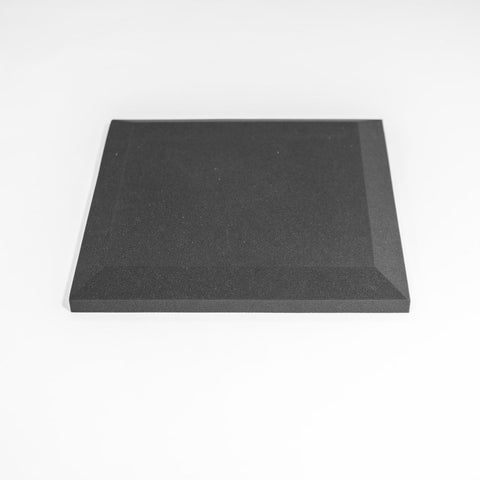 For exposed wallsPremium Wall Foam Tiles Bevelled (Pack of 10) BlackHigh-density 50 x 50cm foam tiles, ten to a pack covering 2.5 square metres.£133
 Behind the screenFoam Layer Backing Screen For Golf Simulator Impact ScreenHigh-density foam behind the impact screen that absorbs residual energy and protects the wall.£189
Questions people ask
Is a home golf simulator safe for children?
It can be, with an adult present whenever a club is swung, one person in the hitting area at a time, and clubs sized to the child. SimSpace suggests a closed room or baby gates if young children or pets can get in, and Foresight says never to let children play without strict adult supervision.
Where should people watch from?
Behind the golfer, beyond the reach of a full swing, never level with or ahead of the ball. With a radar behind the ball, keep the strip between the unit and the ball clear, as FlightScope asks.
How do I stop the ball bouncing back at me?
Leave at least 30cm behind the screen (SimSpace's safety guidelines ask for 50cm), keep the screen firm rather than drum-tight, use new clean balls, and add the bumper pack so topped shots don't hit the metal base bar.
Will I hit the ceiling?
It depends on your height and your club, as SkyTrak says. Our minimum is 2.7m and 3m is comfortable. Stand at the tee and make a slow driver swing before you commit, and pad the ceiling line in a 2.7m room.
What size clubs should my child use?
Junior clubs sized by height, not age. U.S. Kids Golf measures the child with shoes on and has bands from 36 to 39 inches up to 66 to 69 inches. Start them on wedges and short irons.
Is side netting included in a room package?
No. Our room packages include the enclosure with its velour side and ceiling panels. Side netting is an add-on for every bay except SIM 0, which comes with its own.
Still unsure? Ask our experts about this page on live chat or WhatsApp. Send your room size and he’ll tell you straight.
Ask an expertGo deeper

Planning a home simulator? Get the Sim Buyers email.
Twice a week from our sim experts: what's new in our buyer guides and docs, launch monitor and software news, and early offers.
Tuesdays and Fridays. Unsubscribe any time.