
Browse the docs
Set up your simulator
How do I set up a Golfzon WAVE golf simulator?
 Tom Hayward, founder of OpenGolfer · Last reviewed · 3 min read
The short answer
Charge the WAVE Radar, then place it 2.0m to 2.5m (6.5 to 8.2ft) behind the tee, level with the hitting area. Golfzon asks for at least 3.5m from ball to screen, so plan a room about 5.8m long. Join your PC to the radar's own Wi-Fi and run Vision WAVE, which needs Windows 10 or 11 (64-bit).
What's in the box
Golfzon's WAVE quick start guide lists the WAVE Radar, the WAVE Putt putting sensor, a carrying case for the radar, the power adapter and cable, a USB-C cable, a tripod and the quick start guide. If you bought our Golfzon WAVE golf simulator package, the enclosure, Tee Turf hitting mat and BenQ AH500ST projector with its floor case come in separate boxes, with a setup guide. Side netting is an add-on. The package doesn't include a computer or an HDMI cable.
What you need ready
- A Windows 10 or 11 (64-bit) PC with about 70GB free for Vision WAVE, Golfzon's course software.
- A second internet connection on the PC, such as an Ethernet cable to your router. The PC joins the radar's own Wi-Fi, so Golfzon says to use a secondary channel for online play.
- A phone for the WAVE Skills app (iOS or Android, about 500MB), if you want practice stats and swing video.
- A USB power supply or power bank for the WAVE Putt, which runs from its USB-C cable.
- An HDMI cable (the standard lead that carries picture and sound) from the PC to the projector.
Where it goes in the room
Our rooms start at 3.0m wide, 2.7m high and 4.2m long, with about 2.5m from ball to screen. The WAVE needs more length than that, for two reasons. It's a radar that sits behind you, and Golfzon asks for more room in front of the ball.
From Golfzon's quick start guide:
- Leave at least 3.5m (11.5ft) from the screen or net to the ball.
- Place the radar 2.0m to 2.5m (6.5 to 8.2ft) behind the tee, square to the screen.
- Line up the radar's alignment line with the ball.
- Stand it on a floor in line with the hitting area. It must never sit lower than the hitting area, or more than 76mm (3in) higher.
- Keep the ball within its recognition range: 50cm (19.6in) wide, 25cm (9.8in) either side of the line.
- Place the WAVE Putt on a flat surface, parallel to the target line.
Add 0.3m behind the screen, and the room needs to be about 5.8m to 6.3m long. A ceiling of 3m or more is ideal.
Step-by-step setup
- Charge the WAVE Radar with its adapter. Golfzon gives 2 hours to charge and 4 hours of continuous use.
- Hold the power button on the side to turn it on. Its communication and Bluetooth lights flash white while it starts, then go out.
- Plug the USB-C cable into the WAVE Putt and a power source. It connects to the radar by itself.
- On the PC, open Wi-Fi settings and pick the network whose name (SSID) is printed on the back of the radar. The password is in the quick start guide.
- Download Vision WAVE from golfzongolf.com/wave, run setup.exe and open it from the desktop icon.
- Install WAVE Skills on your phone from the App Store or Google Play, if you want it.
- Place the radar 2.0m to 2.5m behind the tee and line it up with the ball.
Connect to the projector
The PC sends the picture. Plug the HDMI cable into the PC's graphics card and the projector's HDMI input, and select that input on the projector. Then press the Windows key and P together and choose Duplicate or Second screen only.
First-shot check
When the radar has joined Wi-Fi, its communication light turns solid green. Open the range in Vision WAVE, tee up inside the recognition range and hit. On the WAVE Putt, the ready light glows green when it's ready for a putt. If the communication and Bluetooth lights flash green together, the radar isn't set up correctly, so check its height and alignment.
Playing courses
Vision WAVE's free plan has 3 courses. Golfzon's paid plans, in US dollars at the time of writing, are Basic at $99 a year with 18 courses and Premium at $199 a year with 150 courses. Golfzon lists both as half-price offers. E6 Connect also works with the WAVE, bought separately from TruGolf, and Golfzon says it doesn't refund or support third-party software.
The three things that most often go wrong
The PC loses its internet
That's expected when the PC joins the radar's Wi-Fi. Give the PC a second connection, such as an Ethernet cable to the router, for online play and updates.
Shots aren't picked up
Check the radar is 2.0m to 2.5m behind the tee, isn't lower than the hitting area or more than 76mm above it, and that the ball is inside the 50cm recognition range.
The WAVE Putt won't connect
It can't join a network by itself; it only pairs with the radar. If its two lights flash together, it isn't connected. A short press of the radar's reset button resets the WAVE Putt pairing, and holding the WAVE Putt's reset button for 3 seconds reboots it.
Official help from Golfzon
- WAVE quick start guide (PDF)
- Manual and guide videos, including firmware updates
- WAVE subscription plans and E6 Connect for WAVE
Setup at a glance
| Step | What you do | Time |
|---|---|---|
| 1 | Charge the WAVE Radar | 2 hours |
| 2 | Power on the radar and the WAVE Putt | 2 min |
| 3 | Join the PC to the radar's Wi-Fi | 5 min |
| 4 | Download and install Vision WAVE | Varies with your broadband |
| 5 | Radar 2.0m to 2.5m behind the tee; ball at least 3.5m from the screen | 10 min |
| 6 | HDMI from the PC to the projector | 5 min |
| 7 | Solid green light, hit | 1 min |
Times are my estimates, except the charge time, which is from Golfzon's quick start guide. Vision WAVE is about 70GB. Plan on a room about 5.8m to 6.3m long.
Best practice
- Measure the length firstGolfzon wants 3.5m from ball to screen and the radar 2.0m to 2.5m behind the tee. With 0.3m behind the screen, that's 5.8m or more.
- Give the PC a wired internet lineThe PC's Wi-Fi is taken up by the radar. An Ethernet cable to the router keeps it online.
- Set the radar heightNever lower than the hitting area and no more than 76mm above it. A block under the radar evens it up.
- Charge weekly in storageGolfzon asks for a charge once a week if you leave it unused, so the battery doesn't drain completely.
Gotchas to avoid
- Longer than our standard roomOur rooms assume 2.5m from ball to screen. Golfzon asks for 3.5m, so the WAVE won't fit a 4.2m room.
- Vision WAVE is Windows onlyGolfzon lists Windows 10 or 11 (64-bit) and about 70GB of space. WAVE Skills and WAVE M are the phone apps.
- E6 is bought separatelyGolfzon says E6 Connect works with the WAVE but is bought separately, and it doesn't refund or support third-party software.
- WAVE Putt needs its own powerIt runs from a USB-C cable to a power adapter or power bank. Plan where that cable goes on the putting surface.
Our recommendation
The WAVE reads putts as well as full shots, but it needs a room around 5.8m long and a Windows PC.
- If your room is under 5.8m long
- Choose a camera unit that sits beside the ball instead.
- If you want a few courses to start
- Vision WAVE's free plan has 3 courses.
- If you want the full course list
- Golfzon's Premium plan has 150 courses.
What you'll need
 The complete WAVE setupGolfzon WAVE Home Golf Simulator Package for Garage - Complete Setup, UKEnclosure, Tee Turf mat and short-throw projector around the WAVE.from£6,690
 The launch monitor on its ownGolfzon WAVE Simulator & Launch MonitorWAVE Radar plus the WAVE Putt sensor, if you already have a bay.£3,999
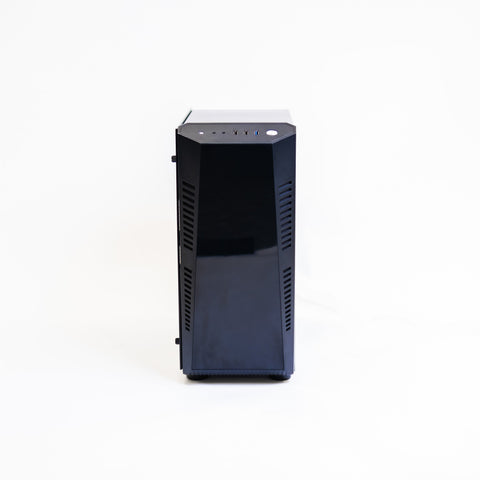 A PC for Vision WAVEGolf Simulator Gaming PC (HD Spec)Vision WAVE runs on Windows 10 or 11 (64-bit). Confirm the PC with us before you order.£1,790
 The HDMI cable4K/8K HDMI 2.1 Cable 10mNot included in the package. 10m runs from the PC to the projector.£29.99
Questions people ask
How long does my room need to be for a WAVE?
About 5.8m to 6.3m. Golfzon asks for at least 3.5m from ball to screen and the radar 2.0m to 2.5m behind the tee, and I add 0.3m behind the screen.
Do I need a PC?
For Vision WAVE and a projector, yes. Golfzon lists Windows 10 or 11 (64-bit) and about 70GB of space. The WAVE Skills and WAVE M apps run on iOS and Android.
How does the putting work?
The WAVE Putt is a separate sensor that sits flat on the floor, parallel to the target line. It runs from a USB-C cable and connects to the radar by itself.
How long does the battery last?
Golfzon gives the WAVE Radar 4 hours of continuous use and 2 hours to charge. Charge it after each session, and once a week if you leave it unused.
What's the warranty?
Golfzon gives two years from the date of purchase, though it says this can vary by country. Damage from misuse isn't covered.
Still unsure? Ask our experts about this page on live chat or WhatsApp. Send your room size and he’ll tell you straight.
Ask an expertGo deeper

Planning a home simulator? Get the Sim Buyers email.
Twice a week from our sim experts: what's new in our buyer guides and docs, launch monitor and software news, and early offers.
Tuesdays and Fridays. Unsubscribe any time.