
Browse the docs
Set up your simulator
How do I set up a SkyTrak+ golf simulator?
 Tom Hayward, founder of OpenGolfer · Last reviewed · 3 min read
The short answer
Charge it for at least 6 hours, install the SkyTrak app, create an account and register the unit in Network Mode. Stand it 15in (38cm) from the ball, level with the mat and parallel to your target line, and put the ball on its red laser dot. Course play needs a SkyTrak Core or Elite membership.
What's in the box
SkyTrak's SkyTrak+ quick start guide lists the launch monitor, a USB cable, a USB splitter cable, a wall charger, the quick start guide and a product information guide. The SkyTrak+ doesn't come with an HDMI cable, a computer or an enclosure.
What you need ready
- A device for the SkyTrak app. SkyTrak publishes it for Windows, macOS, iOS and Android.
- Your home Wi-Fi name and password. SkyTrak recommends Network Mode, where the unit joins your router, because your phone or PC keeps its internet connection.
- An email address for a SkyTrak account. You need it to register the unit.
- For the big screen, a PC or tablet that can connect to the projector, and an HDMI cable (the standard lead that carries picture and sound).
- A hitting mat. SkyTrak recommends a mat designed for golf.
- Clean white balls with a logo or a marked line.
Where it goes in the room
Our rooms start at 3.0m wide, 2.7m high and 4.2m long. A ceiling of 3m or more is ideal, and I plan on about 2.5m from the ball to the screen.
The SkyTrak+ is a camera unit that sits beside the ball, so it needs no extra length behind you. SkyTrak's own room guide points out the same thing. From SkyTrak's guides:
- Place it 15in (38cm) from the ball. That figure is for the SkyTrak+ and ST MAX; the original SkyTrak sat closer.
- Raise it level with the hitting surface. SkyTrak says being too far above or below it affects shot capture and ball flight data.
- Set it parallel to your intended line of play. That may mean your target isn't the centre of the net. Alignment sticks or a club on the floor help.
- Keep it out of direct sunlight.
Step-by-step setup
- Charge it with the wall charger. SkyTrak says to charge for at least 6 hours before first use.
- Press the power button. The power LED turns green.
- Download the SkyTrak app from the App Store, Google Play or SkyTrak's downloads page for PC and Mac.
- Open the app and create a SkyTrak account.
- Pair it. SkyTrak's quick start says to begin in Direct Mode, where your device joins the SkyTrak+'s own Wi-Fi. Your device has no internet while it's connected this way.
- Switch to Network Mode, so the SkyTrak+ joins your home router. You need Network Mode to register.
- Register it: profile menu, About, Register Device, then Yes, Register My Device. SkyTrak asks for registration within 30 days of purchase.
- When it's connected, all three LEDs turn green and a red laser dot appears on the mat.
Connect to the projector
The SkyTrak+ doesn't send a picture itself. The PC or tablet running the SkyTrak app does. On a Windows PC, plug the HDMI cable into the graphics card and the projector's HDMI input, select that input, then press the Windows key and P together and choose Duplicate or Second screen only.
On a PC you can also connect the SkyTrak+ by USB cable. With the splitter cable, the PC keeps the unit charged for all-day use. Stay on your home Wi-Fi when you use USB.
First-shot check
- Start a practice session in the app.
- Put a clean white ball on the red laser dot, or the base of the tee on the dot. SkyTrak says within 2 to 3in (5 to 8cm) of the dot still works.
- Turn the logo or a marked line to face the lens, which helps the spin reading.
- Hit. Your numbers appear in the app and the shot flies on the big screen.
Playing courses
The SkyTrak+ comes with basic functionality and a short trial with practice sessions. Full features need a SkyTrak membership. SkyTrak UK lists these yearly plans:
- Essential: £90. Driving range and practice libraries, no course play.
- Core Foresight: £270. Adds course play, 49 courses.
- Core Trackman: £315. Adds course play, 51 courses.
- Elite: £540. Both course packs.
SkyTrak's current membership pages don't mention GSPro, E6 Connect or Awesome Golf. If you want third-party software, check with SkyTrak before you buy.
The three things that most often go wrong
It isn't registering shots
Work through SkyTrak's checklist: level with the playing surface, 15in from the ball, parallel to the line of play, ball on the laser dot with the logo facing the unit, and not facing direct sunlight.
The app can't see it
Check which mode you're in. In Direct Mode your device must join the SkyTrak+'s Wi-Fi; in Network Mode both must be on the same home network. The LEDs show which state it's in.
Spin or carry looks wrong
Check the lens. SkyTrak says scratches and dust affect it. Wipe it once with a microfibre lens cloth or a clean damp cotton cloth, with no chemicals.
Official help from SkyTrak
- SkyTrak+ quick start guide and getting started videos for Windows, macOS, iOS and Android
- Not-registering-shots checklist and the technical support library
- Downloads and firmware
- SkyTrak UK membership plans
Setup at a glance
| Step | What you do | Time |
|---|---|---|
| 1 | Charge with the wall charger | At least 6 hours |
| 2 | Install the SkyTrak app; create an account | 10 min |
| 3 | Pair in Direct Mode, then switch to Network Mode | 10 min |
| 4 | Register the unit (within 30 days of purchase) | 5 min |
| 5 | Place 15in (38cm) from the ball, level with the mat, parallel to the line | 5 min |
| 6 | HDMI from the PC to the projector | 5 min |
| 7 | Ball on the laser dot, logo to the lens, hit | 1 min |
Times are my estimates, except the charge time, which is from SkyTrak's quick start guide. The battery runs up to 5 hours on a full charge, depending on use.
Best practice
- Use Network ModeSkyTrak recommends it. The unit joins your router, so your phone or PC keeps its internet, and you need it to register.
- Measure the 15 inchesSkyTrak gives 15in (38cm) from ball to unit for the SkyTrak+. Mark the spot on the mat with tape.
- Logo to the lensTurn the ball's logo or a marked line towards the unit. SkyTrak says it helps the spin reading.
- Charge it monthlySkyTrak asks for a full charge at least once a month, and warns that a fully drained battery shortens its life.
Gotchas to avoid
- Register within 30 daysSkyTrak asks for the SkyTrak+ to be registered within 30 days of purchase, and registration needs Network Mode.
- Courses need Core or EliteEssential (£90 a year) has no course play. Courses start with Core Foresight at £270 a year.
- Third-party softwareSkyTrak's membership pages don't list GSPro, E6 or Awesome Golf. Check with SkyTrak before relying on them.
- Don't unplug mid-syncSkyTrak warns never to disconnect or turn off the unit while it's syncing. Wait until it has finished.
Our recommendation
The SkyTrak+ is quick to place beside the ball. Plan the membership before you plan the courses.
- If you want practice and data only
- Essential at £90 a year covers the range and practice libraries.
- If you want to play courses
- Choose Core Foresight or Core Trackman, or Elite for both packs.
- If you want GSPro or E6
- Check with SkyTrak first, because its membership pages don't list them.
What you'll need
 The launch monitorSkyTrak+ Golf Launch MonitorCamera unit that sits 15in from the ball, so it needs no space behind you.£1,195
 The HDMI cable4K/8K HDMI 2.1 Cable 10mNot in the SkyTrak+ box. 10m runs from the PC to the projector.£29.99
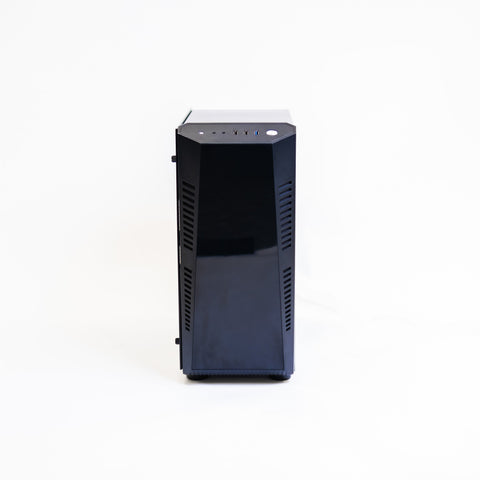 A PC for the big screenGolf Simulator Gaming PC (HD Spec)SkyTrak's app runs on Windows. A PC is the simplest way to drive the projector.£1,790
Questions people ask
Do I need a PC for the SkyTrak+?
No. SkyTrak publishes its app for Windows, macOS, iOS and Android. For a projector, the device running the app sends the picture, and a PC with an HDMI cable is the simplest route.
How far from the ball does it go?
SkyTrak gives 15in (38cm) for the SkyTrak+ and ST MAX. It sits beside the ball, level with the hitting surface and parallel to your line of play, so it needs no space behind you.
Can I play GSPro with it?
SkyTrak's current membership pages don't mention GSPro, E6 Connect or Awesome Golf, and GSPro doesn't list the SkyTrak+ among its supported devices. Check with SkyTrak before you buy for third-party software.
How long does the battery last?
Up to 5 hours on a full charge, depending on use. Charge it for at least 6 hours before first use. On a PC, the splitter cable keeps it charged for all-day sessions.
What does the membership cost?
SkyTrak UK lists Essential at £90, Core Foresight at £270, Core Trackman at £315 and Elite at £540, all a year. Course play needs Core or Elite.
Still unsure? Ask our experts about this page on live chat or WhatsApp. Send your room size and he’ll tell you straight.
Ask an expertGo deeper

Planning a home simulator? Get the Sim Buyers email.
Twice a week from our sim experts: what's new in our buyer guides and docs, launch monitor and software news, and early offers.
Tuesdays and Fridays. Unsubscribe any time.