
Browse the docs
Computers, cabling & electrics
Do I need a PC for a golf simulator?
 Tom Hayward, founder of OpenGolfer · Last reviewed · 5 min read
The short answer
Not always. It depends on the launch monitor and the software. The Garmin Approach® R50 plays Home Tee Hero on its own screen and sends 1080p to the projector with no PC. Square Golf, the Mevo Gen2, SkyTrak and Rapsodo run their own apps on a tablet. Foresight, Uneekor, Full Swing and Golfzon need a Windows PC. GSPro always does.
In summary
Not always. Four of the last five buyers we spoke to on a sales call asked this, usually in the form "how do I control it and see my numbers?" The answer depends on the launch monitor and the software you want to play, not on the projector or the screen. Three groups cover every unit we sell.
- No PC at all: the Garmin Approach® R50. It runs Garmin's Home Tee Hero on its own 10-inch touchscreen and sends the picture to the projector over one HDMI cable, at up to 1080p.
- No PC, but a tablet or phone: Square Golf and the OMNI, the Garmin Approach R10, the FlightScope Mevo Gen2, SkyTrak+ and the Rapsodo MLM2PRO. Each maker's own app runs on an iPad or phone, and you put that picture on the projector.
- A Windows PC every time: Foresight's GC3, GCQuad and Falcon, the Bushnell Launch Pro, Uneekor's EYE MINI, EYE MINI Lite and EYE XO2, the Full Swing KIT and the Golfzon WAVE. Their course software only runs on Windows.
And one rule that cuts across all three: GSPro needs a Windows gaming PC whatever launch monitor feeds it. So does E6 Golf 2026 and Foresight Premier. If those are the graphics you want, budget the PC with the launch monitor.
How you control it without a PC
The thing people picture is a keyboard on a desk. In an R50 room there isn't one. You pick the course, the club and the player on the R50's touchscreen, standing at the mat, and the same picture appears on the big screen through the HDMI cable. Your ball speed, carry, spin and the rest show on the unit and on the projected screen at the same time. Garmin's manual puts the R50's maximum output at 1080p, so a 1080p projector is the right match. Full set-up steps are on how to set up a Garmin Approach® R50.
With a tablet unit the tablet is the control panel. Square Golf's app runs on an iPhone or iPad on iOS 13 or later, an Android phone or tablet on Android 10 or later, or a Windows PC, and course play uses credits rather than a subscription, with 1,000 welcome credits in the box. The Mevo Gen2's FS Golf app is free on iOS, Android and PC, and the 8 E6 Connect courses it comes with run on an iPad. SkyTrak's app runs on Windows, macOS, iOS and Android, and Rapsodo's on iOS and Android. In each case you tap the tablet to choose and play, and the numbers sit on the tablet screen.
Getting the tablet's picture onto the projector is the part the makers say least about. The reliable route is a wired adapter for the tablet's charging port (Lightning or USB-C to HDMI) and an HDMI cable to the projector; wireless mirroring through a box such as an Apple TV also works with an iPad. Square Golf doesn't publish a mirroring guide at all, so for a permanent Square Golf room I'd plan on the Windows version of its app, or a PC for GSPro, from the start.
The PC units are the simplest to describe: the PC is the control panel and the picture. You need a small monitor or touchscreen in the bay to drive it, a keyboard or remote, and the HDMI run goes from the PC to the projector, not from the launch monitor. The Uneekor EYE MINI and Foresight's GC3 and GCQuad still show your numbers on their own screens at the range; the PC is only for courses.
What a PC adds
Three things, and only the first is about the picture.
- Course graphics drawn by a graphics card. GSPro (2,500+ community courses, $250 a year), E6 Golf 2026 (15,000 courses, 4K rendered) and Foresight Premier (rendered in 4K) all draw the course on the PC. Home Tee Hero on the R50 looks simpler because the R50's own processor draws it. Where the picture comes from is on the R50 with GSPro in 4K.
- Resolution. The R50 alone tops out at 1080p. A 4K-spec PC with a 4K projector is the only route to a true 4K picture, on any launch monitor.
- Putting out, online tours and multiplayer. GSPro lets you finish every hole, and its online events need the PC too.
What a PC doesn't add is better shot data. The launch monitor measures the ball; the PC only draws what it is told. A gaming PC on an R50 gives you a prettier picture of the same numbers.
Which PC
The software sets the spec, not the launch monitor. GSPro's 1080p minimum is an RTX 3060-class graphics card and 16GB of memory; for 4K it recommends an RTX 3080 or better and 32GB. E6 Golf 2026 and Uneekor's software ask for 12GB of graphics memory. Our HD Spec gaming PC (RTX 5060 Ti 8GB, 16GB) covers GSPro, E6 Connect, Premier and Full Swing GOLF at 1080p; the 4K Spec (RTX 5070 Ti 16GB, 32GB) covers 4K, E6 Golf 2026 and Uneekor. Every maker's published figure is on what PC or laptop do I need.
Laptop or tower
A tower gives more graphics power for the money and can be upgraded; a laptop can go to the range or another room. Two practical points decide it for most rooms. A tower needs a monitor, so it lives in a cabinet with a screen on top; a laptop is its own screen. And Uneekor's units connect by Ethernet, so a laptop needs a spare Ethernet port or a USB adapter, while the R50, Mevo Gen2 and Square Golf connect to the PC over Wi-Fi, which most laptops have and many towers don't. Check that before either arrives.
Where the PC lives
At the side of the bay, in a ventilated cabinet, with a double socket behind it. From there one HDMI cable runs to the projector and, for Uneekor, an Ethernet cable runs to the launch monitor. In an R50 room that later gains a PC, both the R50 and the PC plug into the projector's two HDMI inputs and you switch between them on the remote. Run the second HDMI at first fix even if the PC comes later: it is the cheapest cable you will ever bury. Cable runs are on golf simulator cabling.
Which I'd choose
If the question is "can I avoid a PC?", the R50 is the only unit that plays courses with nothing else in the room. If you want a tablet unit, the Mevo Gen2 and Square Golf are the easiest to live with. If you already know you want GSPro, E6 Golf 2026 or Premier, the PC is part of the launch monitor cost, so put it in the budget on day one and buy the HD Spec unless you also want 4K.
Do you need a PC? By launch monitor
| Launch monitor | Plays courses with no PC? | What you control it from | A Windows PC is needed for | Notes |
|---|---|---|---|---|
| Garmin Approach® R50 | Yes: Home Tee Hero runs on the unit | 10-inch touchscreen on the unit; HDMI to the projector, 1080p maximum | GSPro, E6 Connect, Awesome Golf (or an iPad for Awesome Golf) | Garmin Golf £8.99 a month or £89.99 a year for Home Tee Hero |
| Square Golf and Square Golf OMNI | Yes: Square's app on a tablet or phone | iPhone or iPad (iOS 13+), Android 10+ or Windows 10+; tablet to projector by HDMI adapter | GSPro (GSPro Square licence), Awesome Golf on PC; E6 Connect runs on PC or iPad | Course play on credits, 1,000 included; no mirroring guide from Square; firmware updates on a Windows PC |
| Garmin Approach R10 | Yes: Home Tee Hero app on a phone | Phone with the Garmin Golf app; mirror to a compatible smart TV | GSPro, E6 Connect, Awesome Golf | Garmin Golf membership for Home Tee Hero |
| FlightScope Mevo Gen2 | Yes: 8 E6 Connect courses on an iPad | FS Golf app on iOS, Android or PC; iPad to projector by HDMI adapter | GSPro; E6 and Awesome Golf also run on iPad | No subscription; 8 E6 courses for life |
| Foresight GC3, GCQuad, Falcon | No | The PC; GC3 and GCQuad show data on their own screens | Foresight Premier (Windows 10/11 64-bit); GSPro and E6 need Foresight+ Gold | Course Pass $295 or Pro $595 a year, on Silver or Gold; legacy FSX keeps working |
| Bushnell Launch Pro and LPi | No | The PC; LPi has no screen of its own | Foresight Premier; Bushnell lists a gaming PC as required and not included | Same Foresight+ tiers as Foresight units |
| Uneekor EYE MINI, EYE MINI Lite, EYE XO2 | No | The PC; EYE MINI has an E-Ink display and an iPad app for range data | Uneekor VIEW and REFINE; GSPro and E6 need Uneekor Pro ($199 a year) | PC needs a spare Ethernet port; unit registered on a PC first |
| Full Swing KIT | No | Phone app and the KIT's own display for data | Full Swing GOLF for KIT (£399 a year), GSPro, E6 Connect | KIT Studio Plus includes a gaming laptop |
| SkyTrak+ and ST MAX | Yes: SkyTrak app on a tablet | SkyTrak app on Windows, macOS, iOS or Android; tablet or PC to projector | Check: GSPro, E6 and Awesome Golf not officially confirmed | Course play needs a Core or Elite membership |
| Golfzon WAVE | No for Vision WAVE | The PC; WAVE M app on iOS or Android for mobile play | Vision WAVE (Windows 10/11, about 70GB); E6 Connect listed by Golfzon | Check: GSPro and Awesome Golf not on official lists |
| TruGolf LaunchBox | Yes: E6 CONNECT Home on an iPad | PC or iPad running E6 | Check: GSPro not on GSPro's official list | 30 E6 courses owned, no subscription |
| Rapsodo MLM2PRO | Yes: Rapsodo app on a phone or tablet | iOS or Android app; HDMI adapter or AirPlay to the projector | Rapsodo PC app (Core membership); GSPro, E6 and Awesome Golf listed, tier to check with Rapsodo | Simulated courses need a Rapsodo membership |
GSPro runs only on Windows 10 or 11 and needs a dedicated graphics card on every launch monitor. The R50's 1080p limit is Garmin's stated maximum output; a 4K picture needs a 4K PC and a 4K projector. Where a cell says Check, the software maker's own compatibility list didn't name the unit when we looked.
Best practice
- Pick the software before the PCThe software sets the spec. If you only want Home Tee Hero, you don't need a PC. If you want GSPro or E6 Golf 2026, buy the PC to their published figures.
- Run two HDMI cables at first fixOne from the launch monitor position, one from where the PC will sit, both to the projector. An R50 room can then add a PC later without lifting a floor.
- Give the PC a cabinet and a socketA ventilated cabinet at the side of the bay with a double socket behind it keeps the tower, the screen and the cables out of the swing.
- Check Wi-Fi and Ethernet before it shipsThe R50, Mevo Gen2 and Square Golf link to the PC over Wi-Fi; Uneekor needs a spare Ethernet port. Many towers have no Wi-Fi card, so ask us to confirm.
- Plan the tablet's route to the projectorA Lightning or USB-C to HDMI adapter and a long HDMI cable is the dependable way. Test it before the enclosure goes up.
Gotchas to avoid
- A PC doesn't improve your dataThe launch monitor measures the ball; the PC draws it. A gaming PC on an R50 gives a better picture of the same numbers, not better numbers.
- GSPro is Windows onlyNo Mac, no iPad, no Android. If you have a Mac, Awesome Golf is the main course software that runs on it.
- Square Golf's mirroring isn't documentedSquare says its app runs on PC, tablet or mobile, but publishes nothing about putting a tablet on a projector. Use an HDMI adapter or the Windows app.
- Graphics memory, not just the card nameE6 Golf 2026 and Uneekor ask for 12GB of graphics memory. Cards with the same name come in 8GB versions, which don't meet the spec.
- A dearer launch monitor can mean two billsForesight and Uneekor need their own paid plan before GSPro or E6 will connect: Foresight+ Gold or Uneekor Pro, plus the software itself.
Our recommendation
No PC if the R50 and Home Tee Hero suit you. Budget a Windows gaming PC with any Foresight, Uneekor, Full Swing or Golfzon unit, and with GSPro on anything.
- If you want the simplest room and no computer
- The Garmin Approach® R50 with Home Tee Hero on its own screen and a 1080p projector.
- If you want a tablet unit under the R50's price
- The Mevo Gen2 or Square Golf on an iPad, with an HDMI adapter to the projector.
- If you want GSPro, E6 Golf 2026 or Foresight Premier graphics
- Add the HD Spec PC for 1080p or the 4K Spec PC for 4K, in a cabinet at the side of the bay.
- If you're buying a Foresight, Uneekor, Full Swing or Golfzon unit
- Treat the Windows PC as part of the launch monitor cost and order the two together.
For your setup we'd pick…
 The no-PC routeGarmin Approach® R50 Launch Monitor & SimulatorHome Tee Hero on its own 10-inch screen, one HDMI cable to the projector, three cameras. Add a PC later only if you want GSPro.£4,299
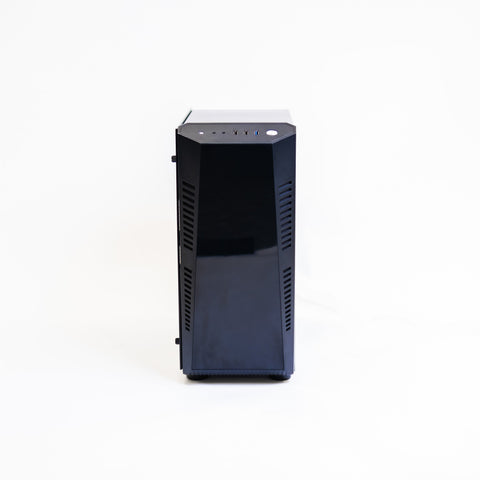 The PC for 1080pGolf Simulator Gaming PC (HD Spec)Core i7-12700KF, RTX 5060 Ti 8GB, 16GB, 1TB: meets GSPro's 1080p recommended spec, Premier's minimum, E6 Connect and Full Swing GOLF.£1,790
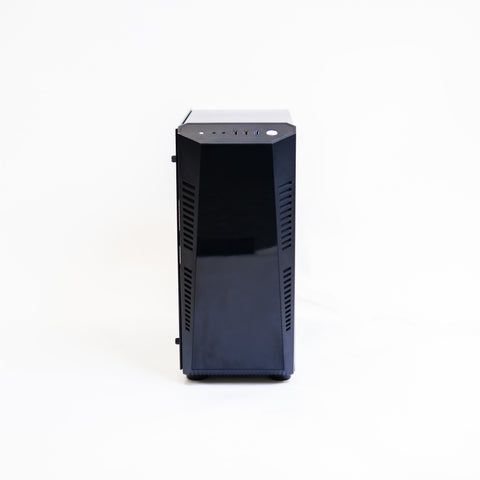 The PC for 4K, E6 2026 or UneekorGolf Simulator Gaming PC (4K Spec)RTX 5070 Ti 16GB and 32GB of memory: above GSPro's 4K recommendation and the 12GB graphics memory Uneekor and E6 Golf 2026 ask for.£2,590
 Where the PC livesGolfBays Golf Simulator PC CabinetA ventilated cabinet for a tower or laptop inside the bay, with the cables tucked away and a surface for the control screen.£379.99
Questions people ask
How do I control the Garmin Approach® R50 without a PC?
From its own 10-inch touchscreen. You choose the course, club and player on the unit at the mat, and the same picture goes to the projector over HDMI at up to 1080p. Your shot data shows on the unit and on the big screen. Home Tee Hero needs a Garmin Golf membership, £8.99 a month or £89.99 a year.
Does Square Golf or the OMNI need a gaming PC?
Not for Square's own software, which runs on an iPhone or iPad (iOS 13 or later), Android 10 or later, or Windows, with course play on credits. A Windows PC is needed for GSPro and for Awesome Golf on PC; E6 Connect runs on a PC or an iPad. Square publishes no guide to mirroring a tablet, so plan the HDMI adapter route.
Can I run a golf simulator from an iPad?
With the right unit. The Mevo Gen2's FS Golf app and its 8 E6 courses, Square Golf's app, SkyTrak's app, Rapsodo's app and E6 CONNECT Home on the LaunchBox all run on an iPad. GSPro, Foresight Premier, Uneekor's software, Full Swing GOLF and Golfzon's Vision WAVE don't.
Will a PC make my launch monitor more accurate?
No. The launch monitor measures ball speed, launch and spin on its own. The PC only draws the course from those numbers. If you want more data, such as impact location or dynamic loft, that comes from a different launch monitor, not a PC.
Laptop or tower for a golf simulator?
A tower gives more graphics power for the money and sits in a cabinet with a monitor on top. A laptop is its own screen and can leave the room. Check connections: Uneekor needs an Ethernet port, and the R50, Mevo Gen2 and Square Golf connect over Wi-Fi, which many towers lack.
Can I add a PC to an R50 room later?
Yes. The R50 stays on one projector input and the PC goes on the other; you switch on the remote. The R50 connects to GSPro over its own Wi-Fi from its Connect menu. Run the second HDMI cable at first fix so nothing has to be lifted later.
Still unsure? Ask our experts about this page on live chat or WhatsApp. Send your room size and he’ll tell you straight.
Ask an expertGo deeper

Planning a home simulator? Get the Sim Buyers email.
Twice a week from our sim experts: what's new in our buyer guides and docs, launch monitor and software news, and early offers.
Tuesdays and Fridays. Unsubscribe any time.