

Buy the standard Square Golf if you'll play indoors and want the cheapest complete room. Pay more for the OMNI if you want to use it outdoors, hit any ball without markings, or get club speed and impact point. Both are camera units beside the ball, so both work in a 4.2 m room, and neither has a subscription fee.

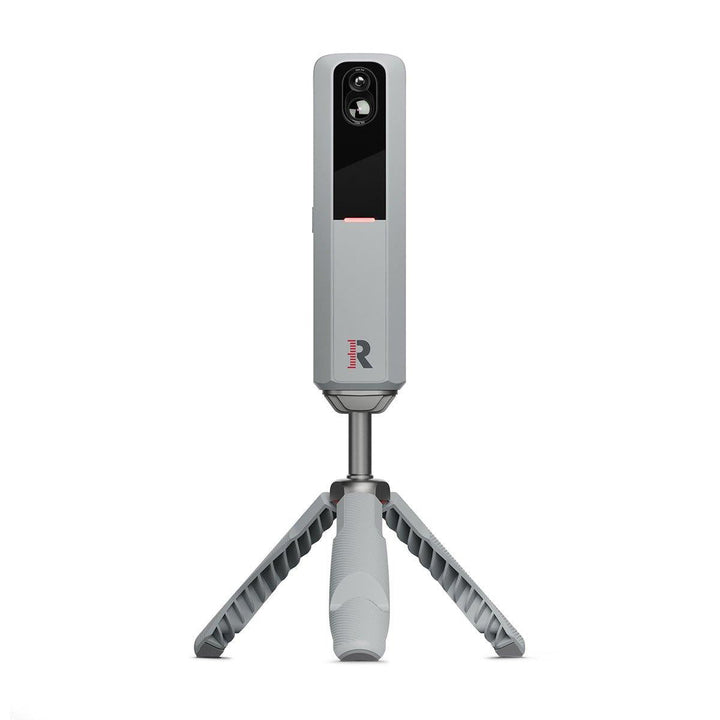
Square Golf now makes two launch monitors. The original, which Square Golf calls the Home Edition and we sell as the Square Golf launch monitor, is a compact indoor unit. The Square Golf OMNI is the newer, dearer model built for indoor and outdoor use. This comparison sticks to what Square Golf publishes on its UK site and in the two user manuals, and finishes with who I think should pay the difference.
The short version, side by side
| Square Golf (Home Edition) | Square Golf OMNI | |
|---|---|---|
| Cameras | High-speed camera with built-in infrared LED lighting | Four high-speed cameras (infrared, per Square Golf UK) |
| Where you can use it | Indoors only, out of direct sunlight | Indoors and outdoors; rated IP44, not waterproof |
| Balls | Patterned balls for measured spin; 3 in the box | Any ball, no markings needed |
| Club data | Club path and attack angle with a marker on the shaft; face angle and loft estimated | Path and attack angle with a shaft sticker; club speed and impact point with shaft and face stickers; face angle and loft estimated |
| Hitting zone | 15 × 15 cm, centred 42 cm in front of the unit | 25 × 25 cm, starting 35 cm in front |
| Screen on the unit | No; status lights only | Yes, LCD with ball data and carry |
| Battery | Up to 8 hours | 5 to 7 hours (manual); up to 6 hours (Square Golf UK page) |
| Extras in the box | Swing stick for virtual shots, remote control | Tripod stand, alignment stick, club stickers |
| Subscription | None; 1,000 welcome credits | None; 1,000 welcome credits |
How the standard Square Golf works
The standard unit sits on the floor beside the ball, level with it, and captures images using a high-speed camera and built-in infrared LED lighting. Square Golf's manual is clear that it belongs indoors: set it up in a room with little or no sunlight, and don't let the front face the sun.
The detail that matters most is the ball. With Square Golf's patterned (dotted) balls, ball speed, direction and both spins are measured. With an ordinary ball, speed and direction are still measured, but the manual marks spin as estimated. Three patterned balls come in the box, and Square Golf UK's Home page also lists TaylorMade TP5 Pix balls (original marking) as compatible. Attach the club marker to the shaft and you get club path and attack angle; face angle and dynamic loft are estimated.
It also has a trick the OMNI doesn't: a swing stick for virtual shots, so you can play a round with no ball at all. The software works out the shot from the stick's path and face angle.
What the OMNI adds
The OMNI keeps the same idea, a camera unit beside the ball, and changes almost everything about it.
Four cameras and any ball
The OMNI manual lists four high-speed cameras capturing ball and club images. Square Golf UK's OMNI page describes them as infrared with a photometric tracking system, and says no marked balls are required. In practice that means you can hit whatever is in your bag, which is the main reason it works outdoors.
Indoors and outdoors
The OMNI is rated IP44, which protects against splashes, but Square Golf says it is not waterproof and shouldn't be used in rain. Its operating range is 0 to 40°C. As with any camera unit, keep direct sun out of the lenses.
More club data
Ball data is measured without anything on the club. Stick the shaft sticker on and you get club path and attack angle; add the face sticker and you also get club speed and impact point. Face angle and dynamic loft are estimated, as on the standard unit.
A bigger zone and its own screen
The Ready Zone, where the ball has to sit, grows from 15 × 15 cm to 25 × 25 cm, so setting the ball down is less fussy. The LCD on the unit shows ball data and carry after each shot, so you can use it at the range without a phone.
Room and placement
Both units sit beside the ball, so neither needs space behind you. Both work in our standard room: 3.0 m wide, 2.7 m high (3 m or more is ideal) and 4.2 m long, with 2.5 m from ball to screen.
- Standard: the hitting zone is centred 42 cm in front of the unit and 23 cm to the side. Keep the unit and the ball at the same height.
- OMNI: the zone begins 5 cm to the side and 35 cm in front of the unit. It compensates for some tilt with an internal sensor, but the zone shrinks as tilt or a height difference grows, so a level floor and the mat at the same height as the unit still matter. Handedness is switched on the device with a long press.
Our Sim Buyer Docs page on the UK launch monitor ladder shows where both sit against other camera units.
Software
Both run the Square Golf app on Android, iOS and Windows, and both come with 1,000 welcome credits for course play. Square Golf UK lists GSPro, E6 Connect and Awesome Golf for the OMNI, and its third-party software page lists the same three for the standard unit; each of those programs is paid to its own maker. Our page on software by launch monitor has the details, and the Square Golf set-up guide walks through connecting it.
Who should pay more for the OMNI
- You'll use it outdoors. The standard unit is indoor only. If the range or the garden is part of the plan, it's the OMNI.
- You don't want special balls. Measured spin on the standard unit depends on patterned balls. The OMNI reads any ball.
- You want club speed and strike location. Only the OMNI lists club speed and impact point.
- You want a screen on the unit. Useful at the range without a phone.
Who should save the money: anyone building an indoor room who mainly wants to play courses and see ball data. The standard unit does that, and it's the one in our Square Golf room package, which adds a SimSpace enclosure, Tee Turf mat (with its own built-in base) and BenQ AH500ST projector in a floor case. If you go for the OMNI for a room, pair it with an enclosure such as the SimSpace SIM 2.
Frequently asked questions
What's the difference between Square Golf and Square Golf OMNI?
The OMNI has four cameras, works indoors and outdoors, reads any ball without markings, adds club speed and impact point with stickers, has a larger hitting zone and a screen on the unit. The standard Square Golf is indoor only and uses patterned balls for measured spin.
Do I need special balls for Square Golf?
For the standard unit, yes for measured spin: Square Golf's patterned balls, or TaylorMade TP5 Pix with original marking. The OMNI doesn't need marked balls.
Does either Square Golf need a subscription?
Square Golf lists no subscription fee for either, and both come with 1,000 welcome credits. Third-party programs such as GSPro are paid to their own makers.
Can I use the standard Square Golf outdoors?
No. Square Golf says it is for indoor use only and shouldn't face direct sunlight. The OMNI is the outdoor model.
For an indoor simulator room on a budget, I recommend the standard Square Golf in our room package. If you'll take it outdoors, don't want special balls, or want club speed and strike location, the OMNI is worth the extra. Check each product page for the live price and availability, and message me if you'd like help choosing.
Not sure which option fits your space or budget? Message our sim experts on WhatsApp for a free consultation — no obligation.
Ready to plan your room?
Your free Sim Design Masterplan
Tell us your room. Our sim experts take it from there, in four steps:
- Unlimited WhatsApp help from our sim experts
- A discovery call about your room
- Your room designed and walked through in 3D
- A final quote, line by line, walked through with you
Not sure it’ll fit?
Get your free Sim Design Masterplan
Our sim experts design your room to its real dimensions, then price every item. Free, and no obligation.
- Unlimited WhatsApp help from our sim experts
- A discovery call about your room
- Your room designed and walked through in 3D
- A final quote, line by line, walked through with you




Leave a comment