

For most UK home simulators, the Foresight GC3 is the one to buy: three cameras beside the ball, Foresight's core ball and club data, and it fits our standard 4.2 m room. Step up to the GCQuad or QuadMAX for face angle, impact location and putting data, or to the ceiling-mounted Falcon for a dedicated room shared by left- and right-handers.

All four are camera launch monitors (also called photometric): they photograph the ball and club at impact rather than tracking the flight with radar. All four run Foresight's Premier simulator software. The differences are in how many cameras they use, how much club data they read, how big the hitting zone is and where the unit lives. Every specification below is from Foresight's own product pages and manuals.
The four at a glance
| GC3 | GCQuad | QuadMAX | Falcon | |
|---|---|---|---|---|
| Cameras | Three | Four | Four | Four, overhead |
| Where it sits | Floor, beside the ball | Floor, beside the ball | Floor, beside the ball | Ceiling, above the hitting area |
| Club data | Club head speed, efficiency, club path, angle of attack | Adds face angle, loft and lie at impact, impact location, closure rate | As GCQuad | As GCQuad |
| Extra ball data | No | No | Ball apex, descent angle, offline | No |
| Hitting zone | 17.8 × 25.4 cm | 45.7 × 35.5 cm | 45.7 × 35.5 cm | 139.7 × 65.6 cm |
| Battery | Internal, 5 to 7 hours | Field-swappable, 6 to 8 hours | Field-swappable, 7 to 9 hours | Not listed (ceiling unit) |
| Left- and right-handers | Move the unit | Move the unit | Move the unit | One zone for both |
| Room | Our 4.2 m minimum | Our 4.2 m minimum | Our 4.2 m minimum | 2.9 m to 3.2 m ceiling, longer room |
The six ball numbers are the same on all four: ball speed, launch angle, side angle, backspin or total spin, side spin or spin axis, and carry distance. The QuadMAX adds three more. What really separates them is the club.
Foresight GC3: the one most home rooms need
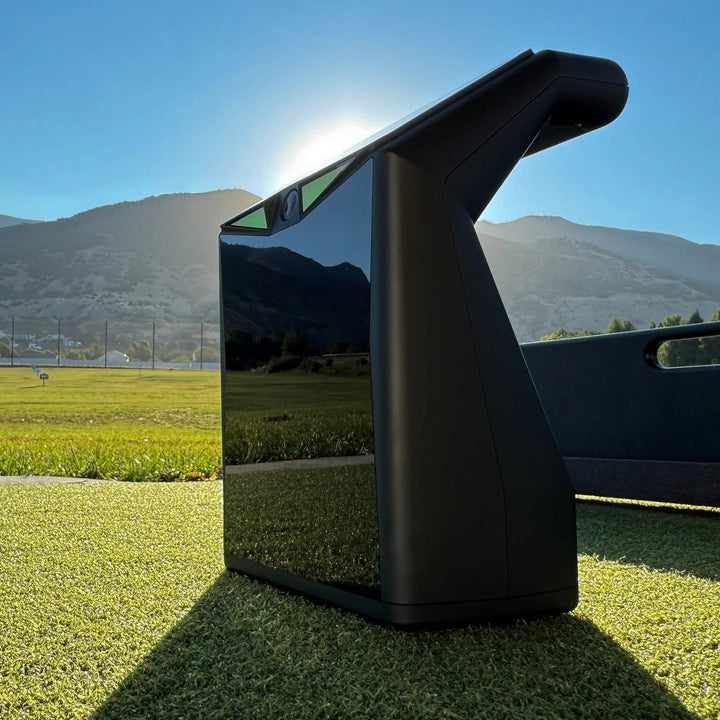
The Foresight GC3 uses three high-speed cameras. Foresight's GC3 page lists four club numbers: club head speed, efficiency (smash factor), club path and angle of attack, read from a single club marker. It doesn't offer face angle or impact location. The hitting zone is 17.8 by 25.4 cm, so the ball goes in a defined spot in front of the unit.
Foresight's manual puts the GC3 about 0.6 m from the hitting area, level with the top of the mat. Because it sits beside the ball, there's nothing behind you and it fits our minimum room of 3.0 m wide, 2.7 m high and 4.2 m long. It has an internal battery rated at 5 to 7 hours, so it also goes to the range.
Two things to know. The GC3 needs to go online at least once every 45 days to validate. And Foresight discontinued the GC3S, the subscription version, in October 2026, so the GC3 is now the three-camera unit to buy. Our GC3 setup page walks through the first session.
If you want the whole room in one order, the Foresight GC3 home simulator package includes the enclosure, launch monitor, Tee Turf mat (with its own built-in base) and a BenQ short-throw projector in a floor case. It needs a Windows PC for Premier.
Foresight GCQuad: four cameras and the full club picture
The GCQuad adds a fourth camera and, with it, what Foresight calls 4-dot club data: a small sticker with four dots on the club face that the cameras track through impact. Foresight's GCQuad page lists face angle, loft and lie at impact, impact location and closure rate on top of the GC3's four club numbers.
Face angle and impact location are the two numbers that explain most bad shots: where the face pointed and where on the face you struck it. If you're working on a fault, or you coach, that's the reason to step up. The GCQuad also has Foresight's putting analysis (launch direction, club speed, impact face angle, skid rate and time to full roll) and a much bigger 45.7 by 35.5 cm hitting zone.
It still sits on the floor beside the ball, so the room is the same as for a GC3. We supply it as the Foresight GCQuad home simulator package.
Foresight QuadMAX: the GCQuad with a screen
Foresight is clear that the QuadMAX and GCQuad share the same four-camera platform and the same 4-dot club data, so the measurement is equally trusted. On its QuadMAX page, Foresight lists what the QuadMAX adds: a touchscreen on the device, MyTiles for choosing which numbers sit on screen, a speed training mode, NFC and QR pairing, internal session memory, and three extra ball measurements (ball apex, descent angle and offline). The battery is field-swappable and rated at 7 to 9 hours, and the unit weighs 2.86 kg.
Those additions matter most away from the simulator. If the unit spends half its life at the range or with a coach, the screen and battery are a real step on. In a home room driven by Premier on a PC, the GCQuad gives you the same club data. We supply the QuadMAX too; message me if you'd like it in a room.
Foresight Falcon: four cameras on the ceiling
The Falcon uses the same four Quadrascopic cameras as the GCQuad, mounted on the ceiling. Foresight's Falcon page lists the same 4-dot club data and a hitting zone of 139.7 by 65.6 cm, with one zone for both left- and right-handed players. Nothing sits on the floor, so nothing gets hit and nothing moves when a different player steps up.
The ceiling is the catch. Foresight's Falcon quick start guide says the ceiling should ideally be 9.5 ft to 10.5 ft (2.9 m to 3.2 m), with the centre of the mat 10 ft to 12 ft (3.0 m to 3.7 m) from the screen and 4 ft (1.2 m) from the Falcon. That's above our 2.7 m minimum ceiling and longer than our standard 2.5 m from ball to screen, so it suits a purpose-built room. Our article on ceiling-mounted Foresight launch monitors covers it in more depth, and overhead vs floor launch monitors helps with the choice.
Software: the same for all four
Every unit here runs Foresight Premier on a Windows PC, with a Foresight+ membership deciding what you can do. Core shot data is on the free tier. Course play needs a paid tier plus a Course Pass, and GSPro needs Foresight's top tier plus a GSPro subscription. Our Sim Buyer Docs page on Foresight+ and Premier explained has every tier and what it costs.
New Foresight units come with a Foresight+ trial; our GC3 comes with a 30-day trial. Foresight's EU pages currently mention a longer Silver membership with some models, including the Falcon, so check what comes with the unit you're quoted.
Which Foresight I'd choose
- A home room for practice and courses: the GC3. It reads the club numbers most golfers act on and fits a standard room.
- You want to fix the face or you coach: the GCQuad, for face angle, impact location and putting data.
- You also use it at the range or for lessons: the QuadMAX, for the on-unit screen, the longer battery and the extra ball numbers.
- A dedicated room with a 2.9 m+ ceiling and mixed hands: the Falcon.
I recommend most people start with the GC3. In our experience, the step from no club data to the GC3's four numbers changes practice far more than the step from four numbers to eight.
Frequently asked questions
What is the best Foresight launch monitor for home use?
For most UK home simulators, the GC3. It sits beside the ball, fits a 4.2 m room, and gives core ball and club data on Foresight's free tier. Choose the GCQuad if you need face angle and impact location.
What's the difference between the GCQuad and the QuadMAX?
Foresight says they share the same four-camera platform and 4-dot club data. The QuadMAX adds a touchscreen, MyTiles, speed training, NFC and QR pairing, internal session memory, a 7 to 9 hour battery and three extra ball numbers.
Does the Foresight GC3 measure face angle?
No. Foresight lists club head speed, efficiency, club path and angle of attack for the GC3. Face angle and impact location come with the four-camera GCQuad, QuadMAX and Falcon.
How high does my ceiling need to be for a Foresight Falcon?
Foresight's quick start guide gives an ideal ceiling of 2.9 m to 3.2 m (9.5 ft to 10.5 ft), with the mat centre 3.0 m to 3.7 m from the screen.
In summary: the GC3 for most rooms, the GCQuad or QuadMAX when the club face is the question, and the Falcon when the room is built around it. If you'd like to see which fits your space, send me your measurements and I'll draw it.
Not sure which option fits your space or budget? Message our sim experts on WhatsApp for a free consultation — no obligation.
Ready to plan your room?
Your free Sim Design Masterplan
Tell us your room. Our sim experts take it from there, in four steps:
- Unlimited WhatsApp help from our sim experts
- A discovery call about your room
- Your room designed and walked through in 3D
- A final quote, line by line, walked through with you
Not sure it’ll fit?
Get your free Sim Design Masterplan
Our sim experts design your room to its real dimensions, then price every item. Free, and no obligation.
- Unlimited WhatsApp help from our sim experts
- A discovery call about your room
- Your room designed and walked through in 3D
- A final quote, line by line, walked through with you




Leave a comment