

A launch monitor makes a cracking present, but it rarely works straight out of the wrapping. On the day they'll need somewhere to hit into, the right app and account, the right balls, and a screen to watch. Sort those four before the 25th and the first shot happens on Christmas morning, not in January.

This is the checklist for the person doing the buying, who is often not the golfer. Everything here comes from the makers' manuals and our own returns policy; where a maker doesn't say, we tell you.
First, where will they hit it?
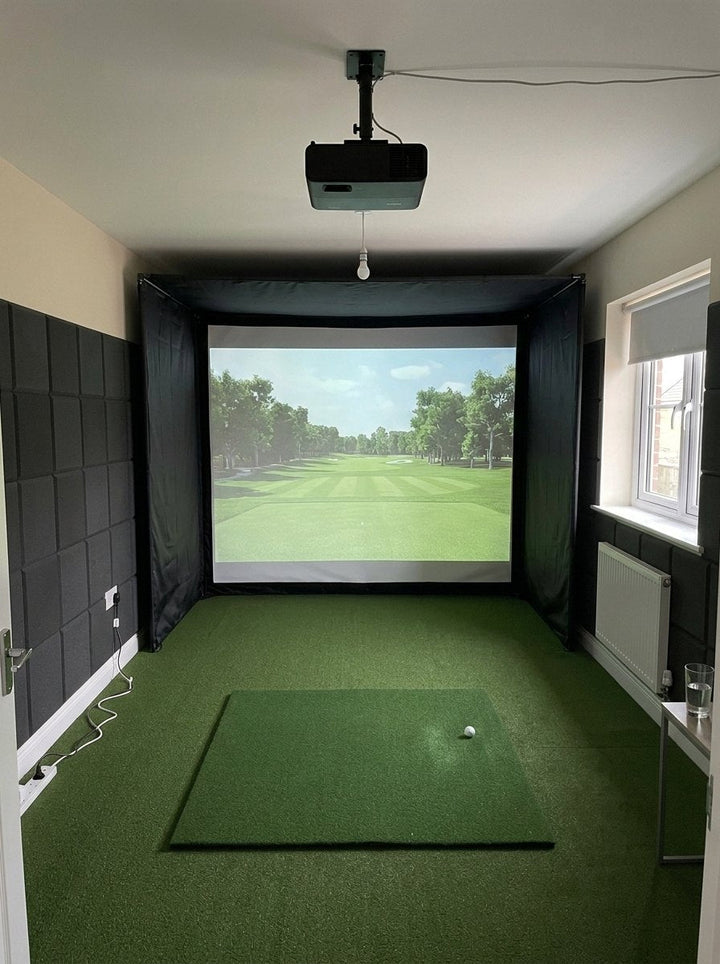
This is the question that catches most gift-givers out. A launch monitor measures the shot; it doesn't stop the ball. Indoors, a real golf ball needs a net or an impact screen in front of it and a hitting mat underneath. Outdoors at a driving range, the range does both jobs.
So think about where the golfer will actually use it. If the answer is "the garage on winter evenings", they need a practice net and a mat as well, or a proper enclosure if a room is the long-term plan. Our practice nets and hitting mats are the cheapest way to make the present usable on the day. If the answer is "the range at weekends", a portable unit and its app are enough to start.
Space matters too, and it depends on how the unit sees the ball. Camera units sit beside the ball, so they fit a room 4.2 m long. Radar units sit behind the golfer and track the flight, so they need their manual distance behind the ball on top. Garmin's R10 manual puts it 1.8 to 2.4 m behind the tee. FlightScope asks for 2.4 m behind the ball for the Mevo Gen2, which makes a 5.2 m room. Our guide to radar and camera launch monitors covers the difference in plain English.
The app, the account and the membership
Every launch monitor we sell runs through an app or a program, and almost all of them want an account before they show a single number. That's ten minutes on Christmas morning if the golfer has their phone and the Wi-Fi password, and an hour of frustration if they don't.
The bigger question is what's free and what's paid. The ball data and the driving range are free on every unit below. Playing courses is where the differences show:
- Garmin Approach® R50 and R10: range practice and your numbers are free. Garmin's Home Tee Hero course play needs a Garmin Golf membership. On the R50 it runs on the unit's own screen; on the R10 it runs in a phone app.
- FlightScope Mevo Gen2: no subscription. The FS Golf app comes with 8 E6 courses the golfer owns for life. Club path and face angle need FlightScope's paid Pro Package.
- Square Golf: no subscription. Course play uses credits, and 1,000 come free.
- Rapsodo MLM2PRO: measured spin needs Rapsodo's RPT balls and a Core membership.
We don't quote membership prices here because they change; what simulator software costs each year keeps the current figures in one place. One thing worth knowing as the buyer: software licences and memberships are sold under the maker's own terms, and they are usually non-refundable once redeemed or paid. So I recommend leaving the membership for the golfer to start, rather than paying for a year in advance as part of the present.
The right balls, and the stickers
Foam and plastic practice balls are the one thing to avoid. Garmin lists foam balls among the causes of missed shots, and Rapsodo says the MLM2PRO can't measure them at all. Every unit we sell is built to read a real golf ball. Beyond that, each maker has its own request indoors:
- Mevo Gen2: FlightScope's manual says aluminium stickers or Titleist RCT balls are required for accurate spin when hitting into a screen. Stickers come in the box.
- Approach R10: Garmin recommends Titleist RCT balls for a much better spin reading indoors.
- Approach® R50: any standard ball, set with the logo facing the unit. Club stickers come in the box for club data.
- Square Golf: three patterned balls come in the box. With them, back spin and side spin are measured; with a normal ball, Square Golf says they are estimated.
- MLM2PRO: a sleeve of Callaway RPT balls comes in the box.
A dozen of the right balls is a small, sensible stocking filler that saves a lot of "why is my spin wrong" on Boxing Day. Our Sim Buyer Docs page on which balls and stickers each launch monitor needs has the full list.
Something to watch it on
The numbers need a screen. For a phone or tablet unit, that's simply the golfer's own device, which they'll want charged and with the app installed. For the Approach® R50, the 10-inch touchscreen is built in, and the picture can go to a projector or TV by HDMI. Garmin's R50 manual says that cable is not included and asks for one that carries at least 1080p, so add a long HDMI lead if there's a TV or projector in the plan.
If they want to play courses with a proper picture on a big screen, that's a projector, an impact screen and, for some software, a Windows PC. That's a room, not a present, and it's where planning pays. Do I need a PC for a golf simulator? sets out which setups need one and which don't.
What each one needs on the day
| Launch monitor | How it sees the ball | Room length indoors | Course play | Indoor ball needs | Runs on |
|---|---|---|---|---|---|
| Garmin Approach R10 | Radar, behind the golfer | 4.6 to 5.4 m | Garmin Golf membership | Titleist RCT recommended | Phone app |
| FlightScope Mevo Gen2 | Radar, behind the golfer | 5.2 m | 8 E6 courses included | Aluminium sticker (in the box) or RCT | iPad or phone |
| Garmin Approach® R50 | Cameras, beside the ball | 4.2 m | Garmin Golf membership | Any real ball, logo facing | Its own screen |
| Square Golf | Camera, beside the ball | 4.2 m | Credits, 1,000 free | Patterned balls (in the box) | Phone or tablet |
| Rapsodo MLM2PRO | Radar, behind the golfer | 4.6 to 5.4 m | Rapsodo membership | RPT balls (a sleeve in the box) | Phone or tablet |
All five are in our launch monitors collection with the live price and the dispatch estimate on each page.
Timing: dispatch, returns and the wrapping paper
We won't promise a delivery date in an article, because stock and couriers move around in December. Each product page shows its live dispatch estimate, and that's the figure to plan around. Order with a margin and you avoid the 23 December worry.
The returns timing is the part people miss. Our 14-day window for an unwanted item runs from delivery, not from Christmas Day, and the item needs to be unused in its original packaging. Order in the first week of December and the window can close before the paper comes off. A faulty unit is a different matter: it's repaired or replaced, and your rights under the Consumer Rights Act 2015 still apply. Can I return a launch monitor? covers the detail, including why software can't come back once it's redeemed.
In our experience the safest gift is the one where you already know the room. If you're not sure the garage is long enough for a radar unit, measure it quietly while they're out, or choose a camera unit that sits beside the ball.
Which one I'd give
For a golfer who mostly practises at the range and wants numbers, the Mevo Gen2 is the easy pick: no subscription, courses included, and it works outdoors with no sticker. For someone who wants to play courses at home this winter in a normal garage, I'd give the Approach® R50, because it runs a full simulator on its own screen with no PC. For a tighter budget and a short room, Square Golf is the way in, because it sits beside the ball and needs no plan.
If the present is really the start of a home simulator, give the golfer the plan as well. We'll draw their room for nothing: start a free Sim Design Masterplan and our sim experts handle the rest on WhatsApp, with a discovery call, a 3D design walkthrough and a final quote walkthrough. It's free and there's no obligation, which makes it a decent card to slip in with the box.
Frequently asked questions
Can a launch monitor be used straight out of the box?
Mostly, yes, once it's charged, the app is installed and an account is set up. What it can't do is stop the ball, so indoors it needs a net or impact screen and a mat on day one.
Do I need to buy a subscription as part of the gift?
No. Range practice and basic shot data are free on each of the units above. Course play on Garmin units needs a Garmin Golf membership, and some makers charge for extra data. Memberships are usually non-refundable, so let the golfer start their own.
Which launch monitor works in a single garage?
A camera unit that sits beside the ball, such as the Approach® R50 or Square Golf, works in a room 4.2 m long. Radar units need their distance behind the ball on top, so check the length first.
Can I return it if they already have one?
An unused item in its original packaging can come back within 14 days of delivery under our policy. That window runs from delivery, so check the dates if you're buying early in December.
In summary: buy the unit for where they'll really use it, add the right balls and something to hit into, and leave the membership to them. Get those right and the first swing happens on Christmas Day.
Not sure which option fits your space or budget? Message our sim experts on WhatsApp for a free consultation — no obligation.
Ready to plan your room?
Your free Sim Design Masterplan
Tell us your room. Our sim experts take it from there, in four steps:
- Unlimited WhatsApp help from our sim experts
- A discovery call about your room
- Your room designed and walked through in 3D
- A final quote, line by line, walked through with you
Not sure it’ll fit?
Get your free Sim Design Masterplan
Our sim experts design your room to its real dimensions, then price every item. Free, and no obligation.
- Unlimited WhatsApp help from our sim experts
- A discovery call about your room
- Your room designed and walked through in 3D
- A final quote, line by line, walked through with you




Leave a comment